SEO strategy

Why Did My Google Traffic Drop? How to Find the Cause

How to find the cause of a Google traffic drop: rule out reporting glitches, technical faults, penalties, ranking updates and seasonality before you change anything.

FindSEO7 min read

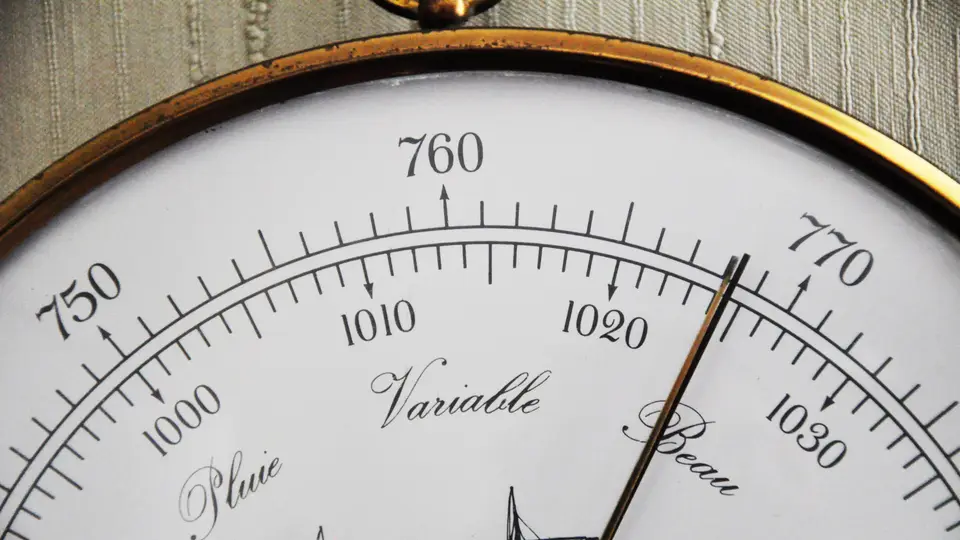
Close-up of an antique barometer dial with a brass rim and a white face marked in millimetres and millibars, its needle pointing towards Beau (fair), with Variable and Pluie (rain) marked to the left.

Photo: Philippe Alès / Wikimedia Commons (CC BY-SA 4.0)

In this article
  1. What are the main causes of a Google traffic drop?
  2. Is the drop real, or is it the data?
  3. How do you read the Search Console Performance report?
  4. Is something broken on your site?
  5. Has Google flagged a penalty or security problem?
  6. Was it a Google update?
  7. Did demand change?
  8. What should you do next?
  9. A traffic drop checklist
  10. The bottom line

Most Google traffic drops come from one of six causes: a reporting glitch, a technical fault, a security or spam problem, a ranking update, a change in what people search for, or a site move. Work through them in that rough order using Google Search Console, because the first few are quick to check and certain to matter. Google's own guide to debugging drops in Search traffic says a drop after a ranking update doesn't necessarily mean anything is wrong with your content, and it recommends avoiding radical changes when a page is already performing well. So diagnose first, and only then decide what to fix.

This guide walks through each check, what the shape of the drop can tell you, and when it's time to bring in help.

What are the main causes of a Google traffic drop?

Google's debugging guide lists the main causes to investigate:

  1. Algorithmic updates. Core updates and smaller updates can change how pages perform.
  2. Technical issues. Errors that stop Google crawling, indexing or serving pages, such as server problems, robots.txt fetching failures or "page not found" errors.
  3. Security issues. If Google detects malware or phishing, it may warn people before they reach your site.
  4. Spam issues. Breaking Google's spam policies can mean lower rankings or no rankings, including through a manual action.
  5. Seasonality and changing interests. Demand for some searches rises and falls through the year, or fades as habits change.
  6. Site moves and migrations. Changing URLs can cause ranking fluctuations while Google recrawls and reindexes the site.

The same guide also says to rule out a problem with the data itself, such as a logging error or a change in how Google processes the numbers.

Is the drop real, or is it the data?

Check this first, because it takes two minutes. Search Console's Data anomalies page records known issues, such as logging errors or changes to how data is aggregated, that can cause a dip or bump in your charts. Recent entries show why it matters:

  • Google says FAQ rich results stopped appearing in Search on 7 May 2026, so sites that had them will see fewer reported FAQ impressions.
  • A logging error meant impressions weren't accurately reported from 13 May 2025 until 27 April 2026. Google says clicks weren't affected, but impressions, click-through rate and average position were, so year-on-year impression comparisons across that window need care.

Then compare sources. If your analytics tool shows a fall but Google Search Console clicks are steady, suspect tracking, such as a broken tag or a consent banner change, before you suspect Google.
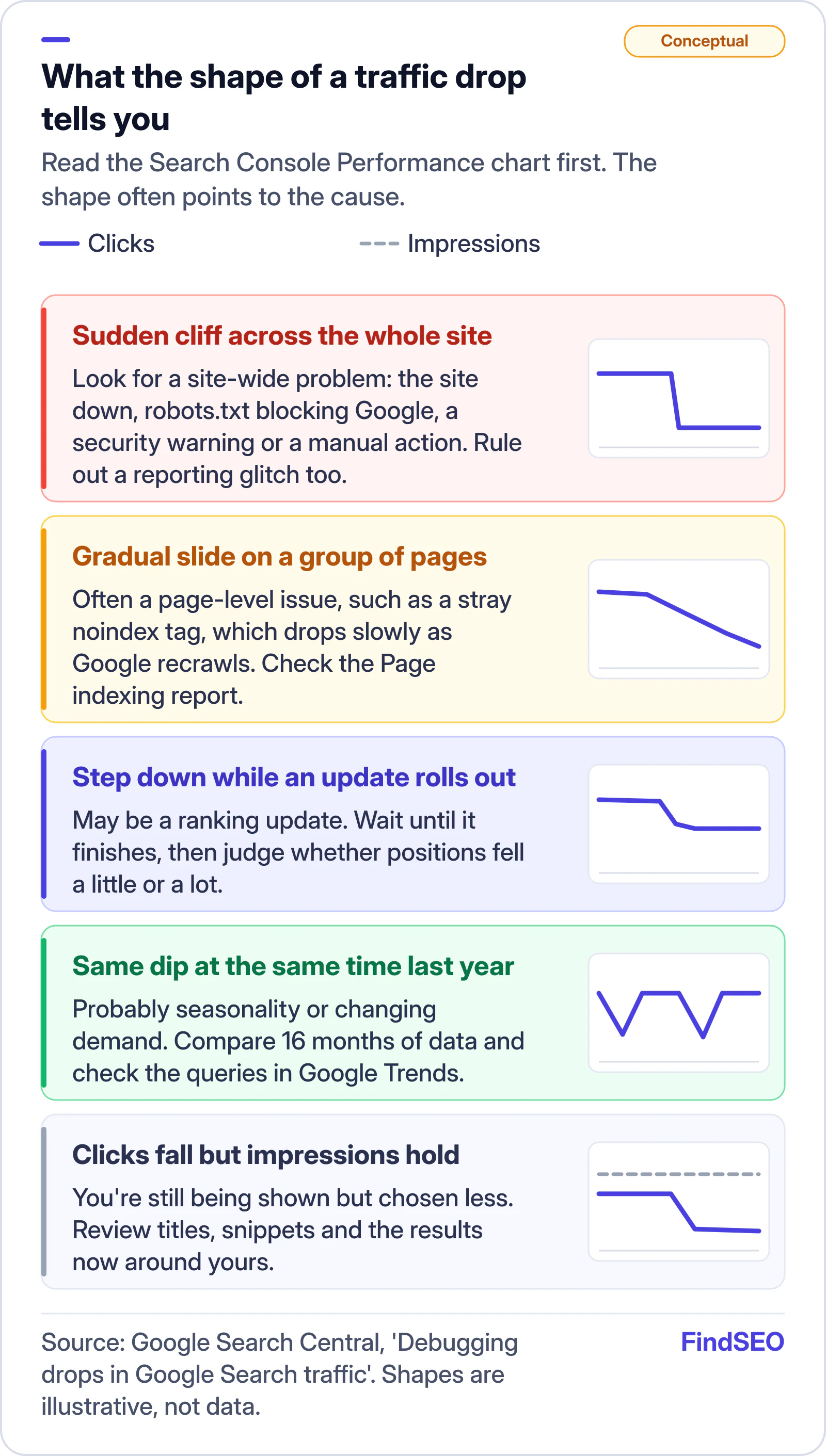
Conceptual guide to what the shape of a traffic drop in Search Console suggests. A sudden cliff across the whole site points to a site-wide problem such as downtime, robots.txt blocking, a security warning or a manual action, or a reporting glitch. A gradual slide on a group of pages often means a page-level issue such as a stray noindex tag. A step down while an update rolls out may be a ranking update. The same dip at the same time last year is probably seasonality. Clicks falling while impressions hold means you are shown but chosen less. Shapes are illustrative, not data. Source: Google Search Central.
The shape of the line is your first clue. Illustrative shapes, not real data.

How do you read the Search Console Performance report?

Open the Performance report and work through the filters Google suggests:

  1. Set the date range to 16 months. Google says this shows whether the drop happens every year. If you need more history, the Search Analytics API and bulk data exports can store it.
  2. Compare periods. Use "Compare last 3 months to previous period" or "year over year", then click through the queries, pages, countries, devices and search appearance tabs to see where the change sits.
  3. Check each search type separately. A drop might be limited to Google Images, Video or News.
  4. Look at clicks and impressions together. Google says if both fell, look at the common causes. If impressions held but clicks fell, your title and snippet may not be doing their job, or another result may be more appealing.
  5. Sort pages by clicks difference. This shows whether you lost traffic across the whole site, a group of pages or one important page.

Two more cuts are worth making. Separate branded from non-branded searches with the branded queries filter, which Google says isn't available on sub-properties or low-impression sites. A fall in branded searches usually means less demand for your name, which is not a problem SEO alone can solve. Our guide to finding keyword ideas in Search Console shows how the filter works. And check average position, but don't obsess over it. Google says impressions and clicks are ultimately the measure of success.

Is something broken on your site?

Technical faults are the most fixable cause, so check them before anything else. Google notes they can be site-wide, like the site going down, or page-level, like a misplaced noindex tag. A page-level fault depends on Google recrawling each page, so the traffic falls more slowly.

Report What it shows
Page indexing Pages Google couldn't or chose not to index, and why
Crawl stats Spikes in robots.txt fetch failures, DNS problems and server connectivity errors
URL Inspection Whether one specific page is indexed and how Google renders it

Look for a spike in issues that lines up with the drop. Our free Google index checker reads robots rules, redirects and noindex tags for a single URL, and the redirect checker shows where old URLs now land. For page-level detail, our guide to why a page isn't indexed covers each status.

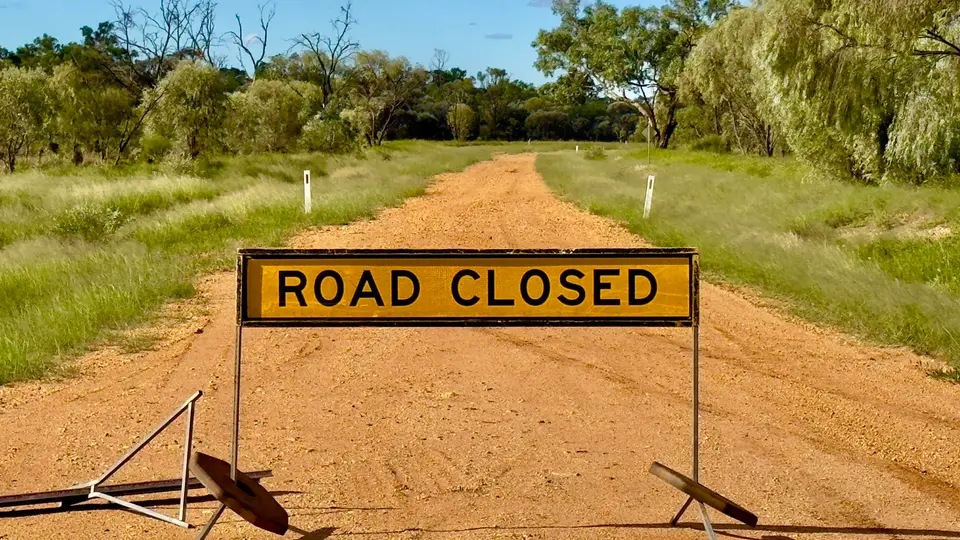
A yellow Road Closed sign standing across a red dirt country road in Queensland, with green grass and gum trees on either side and the empty road continuing behind it.
A stray noindex tag or a robots.txt rule works like a closed road: Google can't reach what's behind it. Photo: Kgbo, CC BY-SA 4.0, via Wikimedia Commons.

If the drop followed a redesign or a domain change, treat it as a migration problem. Google says a medium-sized site can take a few weeks for Google to notice URL changes, and larger sites can take longer. If traffic isn't recovering, its site move guide lists common mistakes, and our checklist for migrating a website without losing SEO covers redirects and testing.

Has Google flagged a penalty or security problem?

Open two reports: Manual actions and Security issues. Google issues a manual action when a person at Google has found that pages break its spam policies, and the report tells you which pages are affected and how to request a review once you've fixed it. A security issue, such as hacked content or malware, can trigger browser warnings that turn visitors away.

Both are rare for well-run sites, but they're quick to rule out. If either report shows a problem, fix it before anything else. The Academy lesson on Search Essentials and spam policies explains what Google counts as spam.

Was it a Google update?

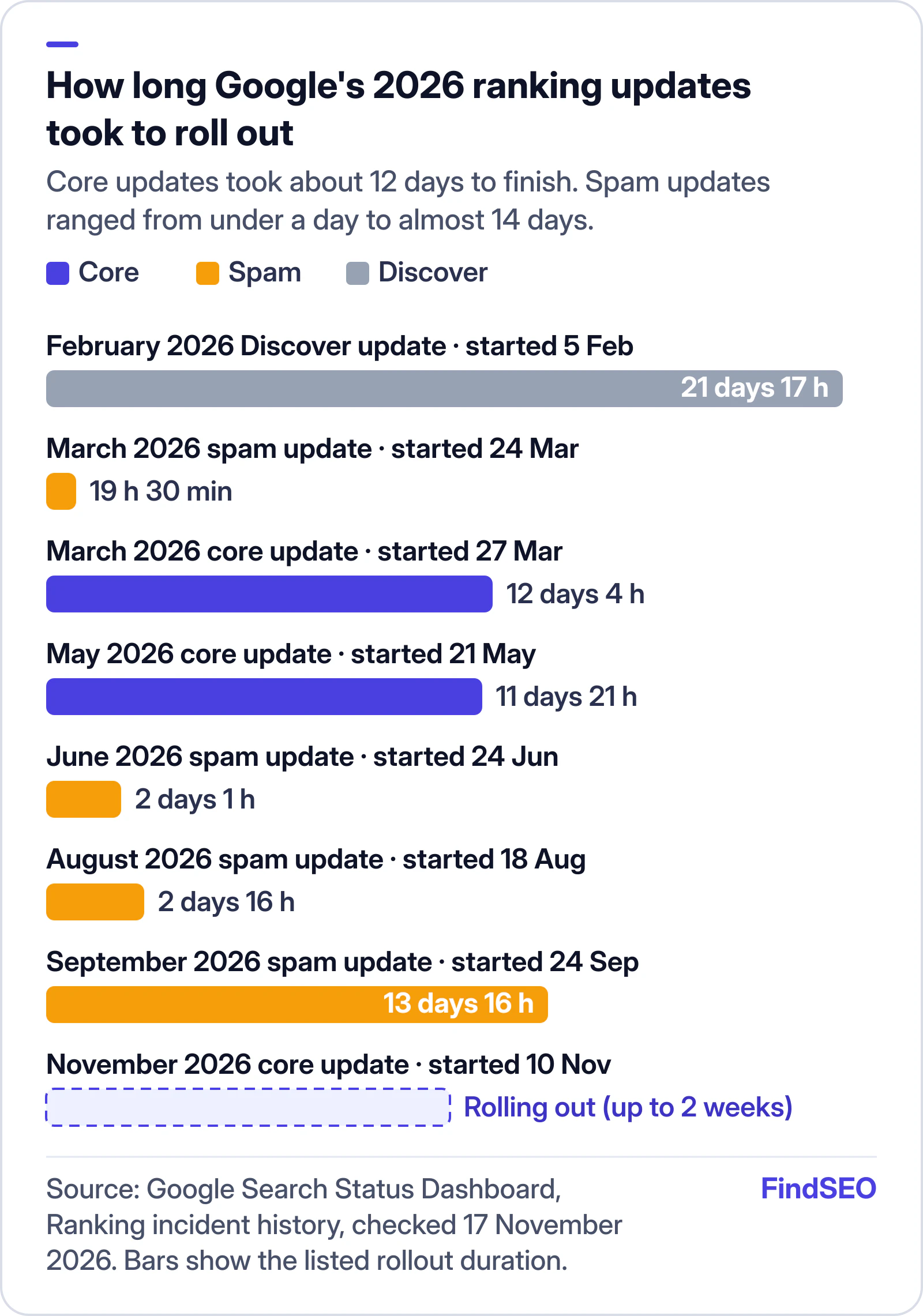
Check the Google Search Status Dashboard, which lists ranking updates with their start dates and how long they took. The November 2026 core update began on 10 November 2026, and Google said the rollout may take up to two weeks.

Bar chart of how long Google's 2026 ranking updates took to roll out, from the Search Status Dashboard. The March 2026 core update took 12 days 4 hours and the May 2026 core update 11 days 21 hours. Spam updates ranged from 19 hours 30 minutes in March to 2 days 1 hour in June, 2 days 16 hours in August and 13 days 16 hours in September. The February 2026 Discover update took 21 days 17 hours. The November 2026 core update started on 10 November and was still rolling out, with Google saying it may take up to two weeks.
Core updates in 2026 took about 12 days to finish, so wait for the end date before you judge the effect.

Google's core updates guidance gives a clear method:

  1. Confirm the update has finished. Note the start and end dates on the dashboard.
  2. Wait at least a full week after it completes. Then compare the week after with a week before the update started.
  3. Judge the size of the drop. Google's example of a small drop is position 2 to 4, which needs no drastic action. A large drop, like position 4 to 29 across many searches, calls for a deeper look at the whole site.

For a large drop, Google points to its helpful content self-assessment and warns against quick fixes. It also says some improvements take months to show, and that there's no guarantee changes will bring rankings back.

Did demand change?

Sometimes the site is fine and fewer people are searching. Google's debugging guide suggests filtering the Performance report to one high-traffic query at a time, then checking it in Google Trends to see whether the fall is yours alone or happening across the web.

Keep in mind what Trends is. Google's Trends data FAQ says it uses a sample of searches, normalises results on a 0 to 100 scale, filters out low-volume terms and isn't a perfect mirror of search activity. Use it to spot direction and seasonality, not exact volumes.

Two empty striped canvas deckchairs standing side by side on wet sand at the water's edge on a quiet winter beach, in black and white.
Seasonal businesses see the same dip every year. Compare like with like before you worry. Photo: Kim Nave, CC BY 4.0, via Wikimedia Commons.

Retailers can plan around the known peaks with our Australian sale calendar.

What should you do next?

Match the response to the cause:

  • Data glitch or tracking fault: fix the tag or wait for Google's data correction. Don't change the site.
  • Technical fault, manual action or security issue: fix it, then request indexing or a review in Search Console.
  • Small drop after an update: wait and keep publishing useful work. Google recommends against radical changes to pages that already perform well.
  • Large, site-wide drop after an update: run an honest review of the whole site against Google's self-assessment questions, then give changes time.
  • Seasonal or demand change: compare year on year and adjust targets rather than the site.
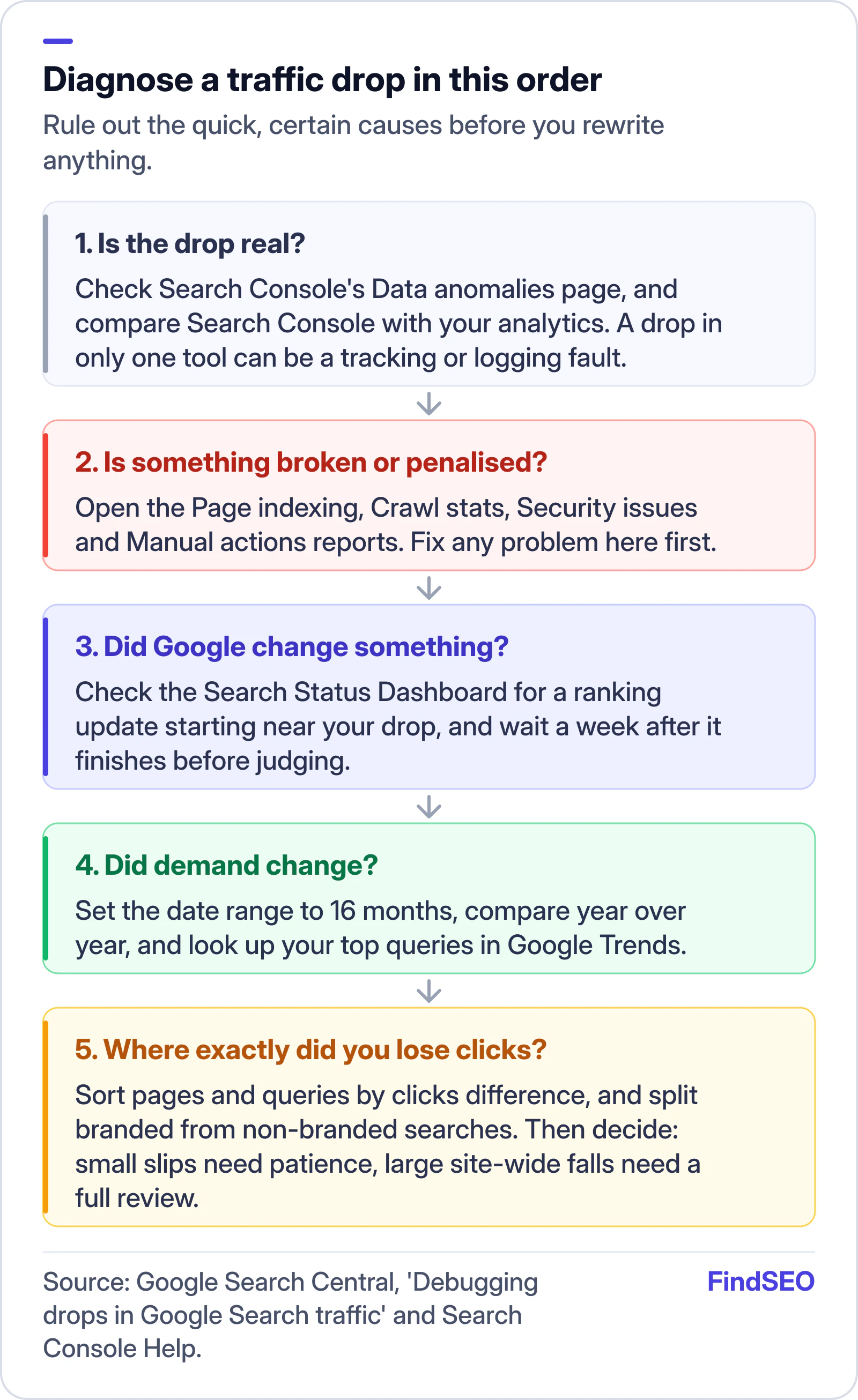
Five-step order for diagnosing a Google traffic drop. First, check whether the drop is real using Search Console's Data anomalies page and by comparing Search Console with your analytics. Second, check whether something is broken or penalised in the Page indexing, Crawl stats, Security issues and Manual actions reports, and fix that first. Third, check the Search Status Dashboard for a ranking update and wait a week after it finishes. Fourth, check for a change in demand with 16 months of data, a year-over-year comparison and Google Trends. Fifth, find where clicks were lost by sorting pages and queries by clicks difference and splitting branded from non-branded searches.
Rule out the quick, certain causes before you rewrite anything.

If an agency manages your SEO, ask it to walk you through these same checks with screenshots. A good SEO report should already explain big movements, and the SEO ROI calculator helps put lost clicks into dollars.

A traffic drop checklist

  • Checked Search Console's Data anomalies page for known reporting issues.
  • Compared Search Console clicks with analytics to rule out tracking faults.
  • Viewed 16 months of data and compared year over year.
  • Checked web, image, video and news search types separately.
  • Compared clicks with impressions to see whether you're shown less or chosen less.
  • Sorted pages and queries by clicks difference.
  • Split branded from non-branded searches.
  • Checked the Page indexing and Crawl stats reports for a spike in errors.
  • Checked the Manual actions and Security issues reports.
  • Checked the Search Status Dashboard for ranking updates and waited a week after any rollout ended.
  • Looked up the top lost queries in Google Trends.
  • Ruled out recent redesigns, URL changes or redirects.

The bottom line

A traffic drop feels urgent, but the fix depends entirely on the cause, and the wrong fix can make things worse. Check the data, then the technical and penalty reports, then the update calendar and finally demand. Most of the time the answer is in Search Console. If the cause is technical or you need a second opinion, a technical SEO audit is the next step. Compare SEO audit services and technical SEO agencies, check how strong competing pages are with the page authority checker, browse SEO agencies in Melbourne or across Australia, or get matched with an agency that can diagnose the drop for you.

FAQs

How long does it take to recover from a Google traffic drop?

It depends on the cause. Fixing a technical fault or a stray noindex tag can bring traffic back once Google recrawls the pages. After a core update, Google says some changes take effect in days while others can take months, and there's no guarantee rankings will return.

Should I change my content straight after a core update?

No. Google recommends waiting until the update has finished, then at least a full week more, before analysing the effect. Small drops often recover on their own, and Google advises against radical changes to pages that already perform well.

Why did my clicks drop but not my impressions?

Google says this usually means people are seeing your result but choosing it less. Your title or snippet may not match what they want, or other results on the page, such as rich results, may be more appealing.

Can a traffic drop just be a reporting error?

Yes. Search Console's Data anomalies page lists known logging errors and data changes. Check it first, and compare Search Console with your analytics, before assuming the drop is real.

Is a traffic drop always my SEO agency's fault?

No. Seasonality, ranking updates and changes in demand can cut traffic on well-run sites. But a good agency should be able to show you which cause applies, using Search Console data, and what it plans to do about it.

Sources

Ready for help with SEO?

Compare SEO-only agencies near you, with client reviews checked by a person, or tell us what you need and get matched.