
You can redesign or migrate a website without losing SEO if you treat it as a planned move rather than a launch. List every old URL, map each one to its closest new page, set up permanent server-side redirects, test the new site before it goes live, then watch Search Console for weeks afterwards. Google says permanent redirects don't cause a loss in PageRank, and that some ranking fluctuation while it recrawls is normal. Most lasting traffic losses come from missed redirects, leftover noindex rules or blocked crawling.
A new website is exciting, and that's exactly when search traffic gets forgotten. Google calls any change to the URLs of existing pages a site move, and it publishes a step-by-step guide to moving a site with URL changes. This article turns that guide into a plain-English plan you can follow yourself or hand to an agency. If you're new to the term, start with our glossary entry on site migration.
What counts as a website migration?
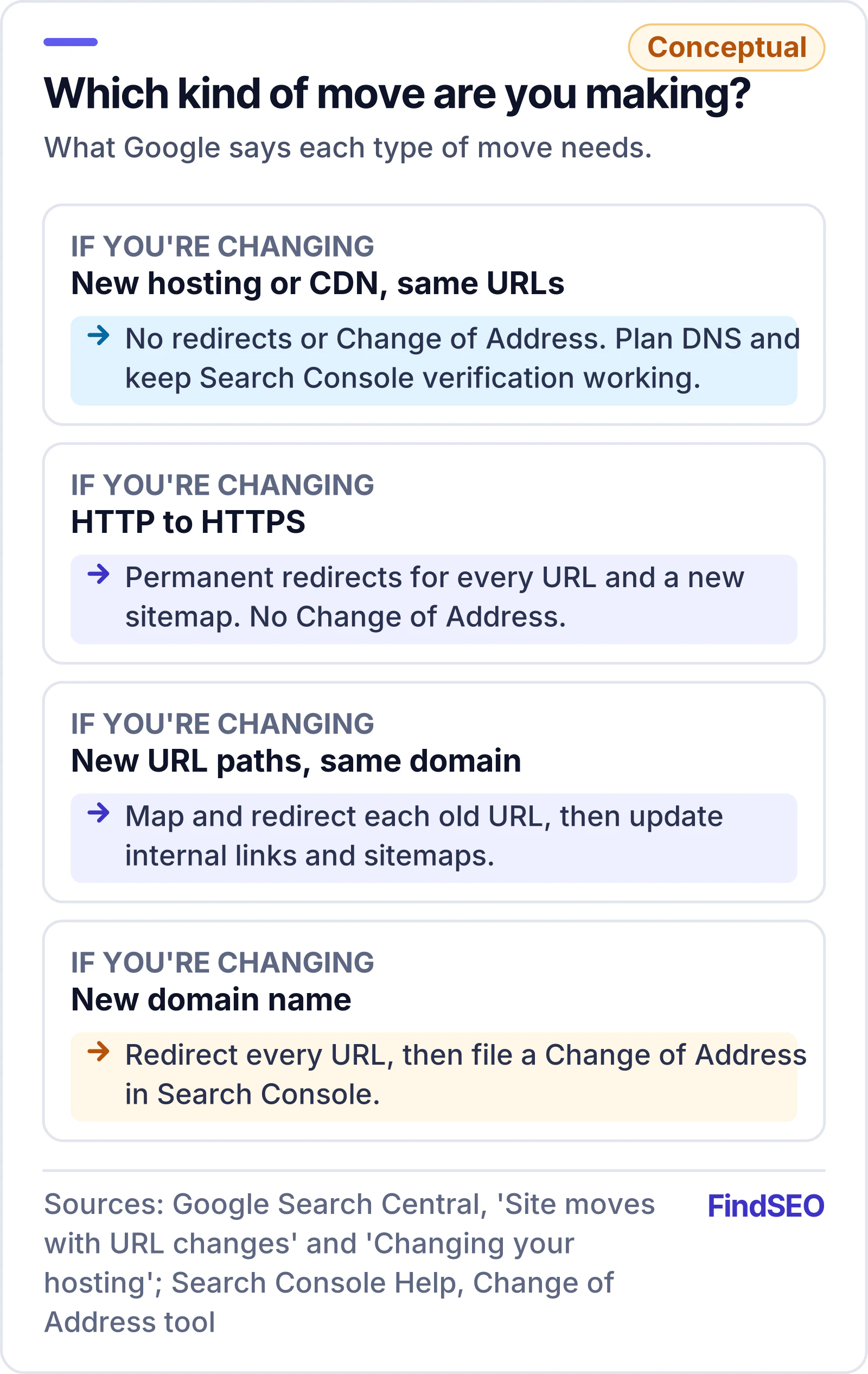
Any change that alters where your pages live, or how they're served, is a migration. Google's documentation splits them into two groups:
- Moves with URL changes. Switching from HTTP to HTTPS, changing domain name (example.com to example.net), merging sites, or changing URL paths, which often happens when you move to a new content management system (CMS) or restructure a redesign.
- Moves without URL changes. Changing hosting provider or adding a content delivery network (CDN), where visitors still see the same addresses. Google covers these in its guide to changing your hosting.
A redesign that keeps every URL exactly as it is isn't a migration in this sense, but it can still change titles, headings, internal links and content, so treat it with the same care.
Will a migration hurt your rankings?
It may, briefly. Google says to expect ranking fluctuation while it recrawls and reindexes your site, and that a medium-sized site can take a few weeks or more for the new URLs to replace the old ones. Larger sites take longer.
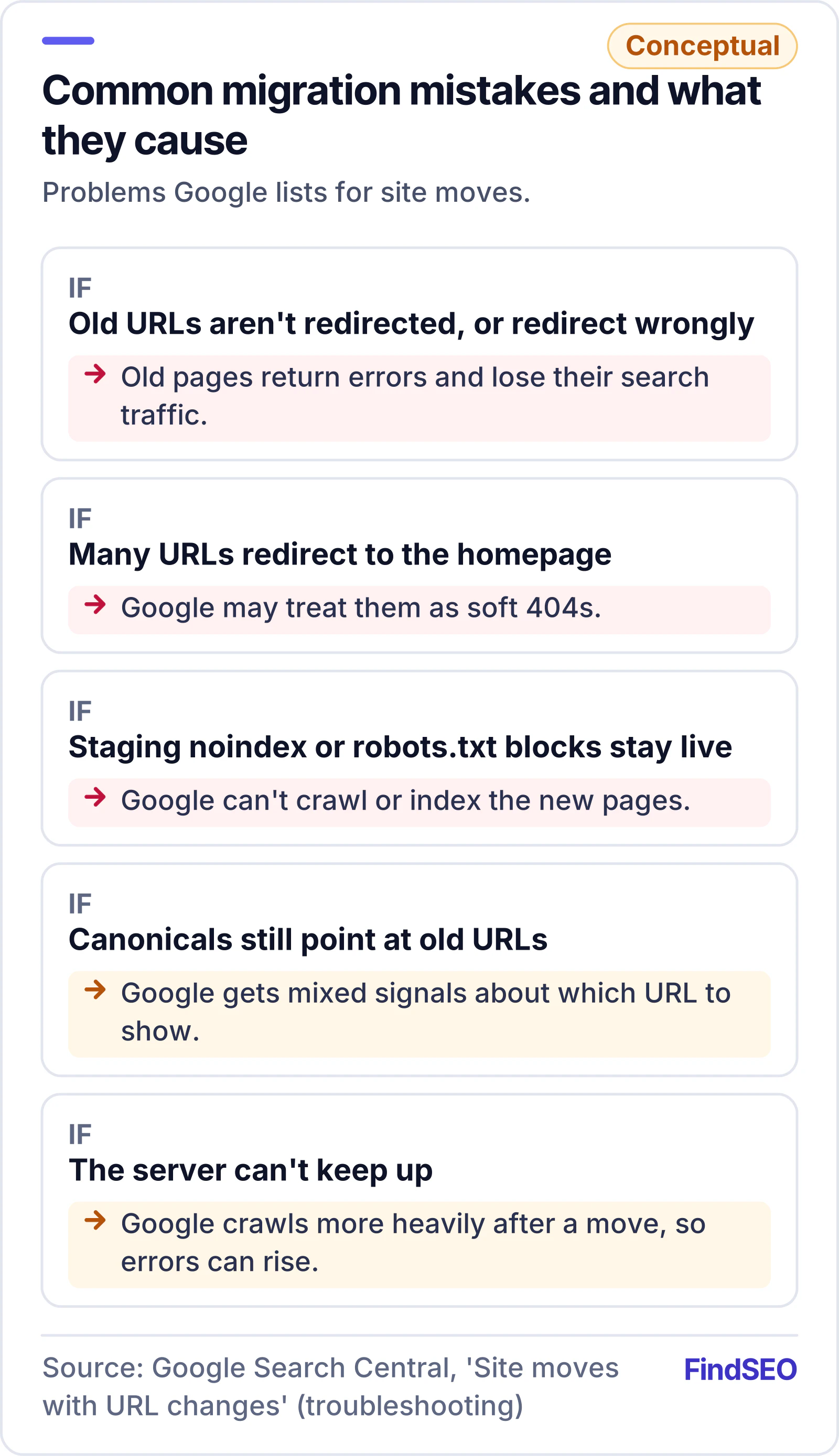
You shouldn't lose link value, though. Google states that 301 and other permanent redirects don't cause a loss in PageRank. The real risks are mistakes: wrong or missing redirects, and blocks left over from development.
Google also advises changing one thing at a time. Its Change of Address tool help page warns that combining a site move with a redesign of content and URL structure will probably cause some traffic loss, because Google may need to relearn and reassess pages. If traffic falls after a launch, our guide to Google core updates explains how to tell a migration problem from an algorithm change.
How do you plan a migration before launch?
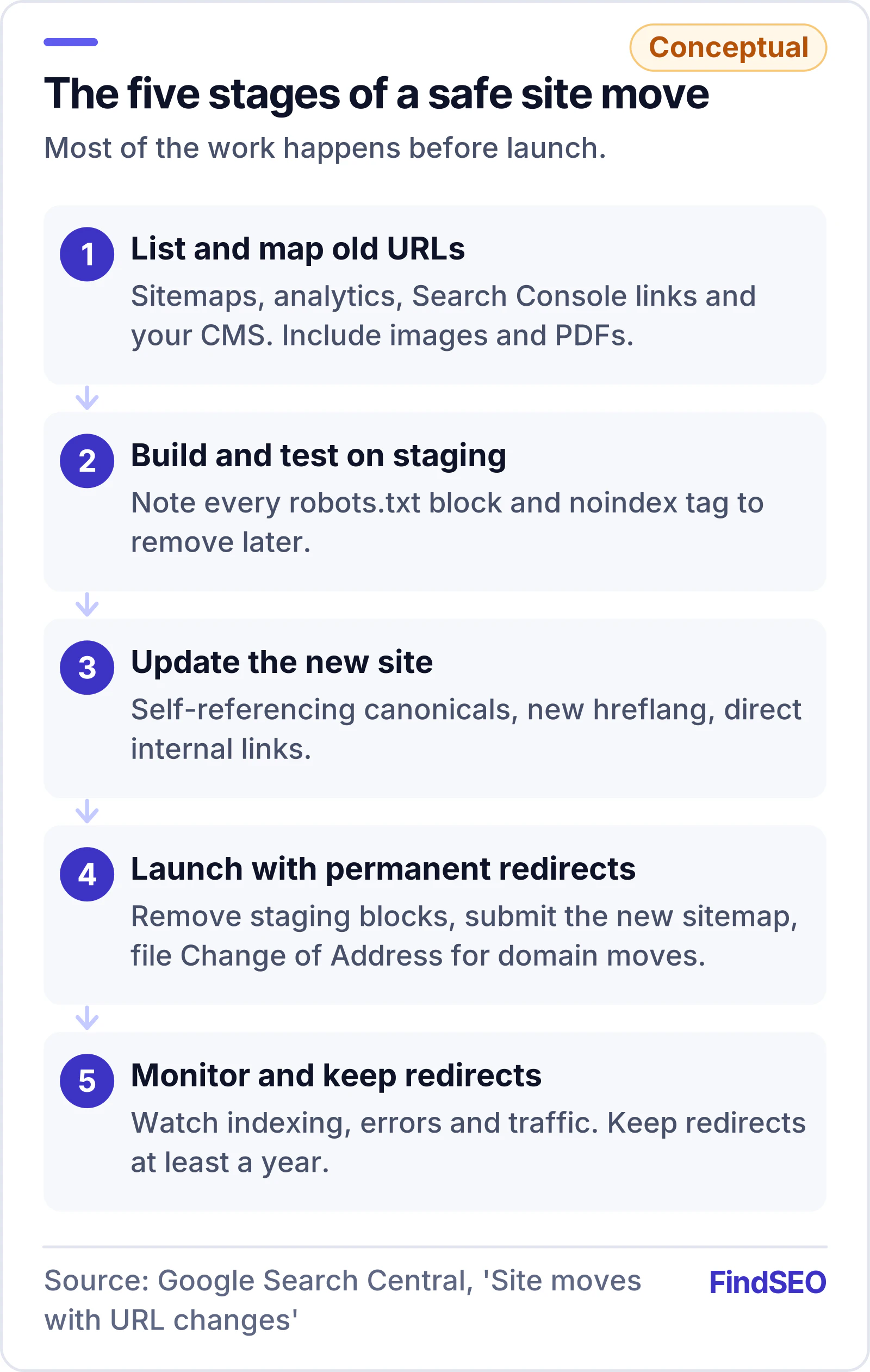
Most of the work happens before anything goes live. Google's site move guide recommends these steps:
- List your old URLs. Google suggests your sitemaps, the most-visited URLs in your analytics or server logs, the Links report in Google Search Console and an export from your CMS. Include images, videos and PDFs, which can earn traffic and links too.
- Map every old URL to a new one. Pick the closest equivalent page, not just the homepage. Keep the mapping in a spreadsheet you can test against.
- Build and test the new site on a staging copy. If you block crawling with robots.txt or use noindex during development, write down exactly what has to be removed on launch day.
- Update the new site's details. Every new URL needs a self-referencing canonical tag, hreflang annotations must use the new URLs, and internal links should point straight to new pages.
- Prepare Search Console. Verify every variant of the old and new sites, and make sure verification files or tags carry over to the new templates.
- Check your capacity and timing. Google crawls a moved site more heavily than usual, so warn your host if the site is large, and launch during a regular traffic dip if you have one.
Run a technical SEO audit on the old site first, to set a baseline and catch problems you don't want to carry across.
How should you set up redirects?
Redirects are the heart of a migration. Google's guide to redirects and Google Search says permanent redirects tell Google to show the new URL in search results, while temporary ones keep the old URL showing. For a migration, follow these rules:
- Use permanent, server-side redirects. A 301 redirect or 308 is the clearest signal. Google says to use JavaScript redirects only if you can't do server-side or meta refresh redirects, because rendering can fail and Google might never see them.
- Redirect to the final destination. Googlebot can follow up to 10 hops, but Google advises keeping chains low, ideally no more than 3 and fewer than 5, because each hop adds latency.
- Don't send everything to the homepage. Google warns that redirecting many old URLs to one irrelevant page can confuse users and may be treated as a soft 404. Redirecting several old pages to one page that genuinely consolidates their content is fine.
- Let removed pages go. If old content has no replacement, Google says it should return a 404 or 410. Its page on HTTP status codes explains how its crawlers treat each one.
Test a sample of old URLs with our free redirect checker to see every hop and the final status code. If you're merging overlapping pages along the way, our guide to duplicate content covers when to redirect and when to use a canonical.

What should you do on launch day?
Once the redirects are switched on, work through this list straight away:
- Remove development blocks. Take out any robots.txt disallow rules and noindex tags that were only there for staging. Google lists these as one of the most common migration mistakes.
- Check canonicals. Make sure canonical tags on the new site use the new URLs.
- Test the redirects. Use the URL Inspection tool for individual pages and a crawler or script for the full mapping.
- Submit the new sitemap. Google says this helps it learn about the new URLs. Our guide to XML sitemaps explains what to include.
- File a Change of Address for domain moves only. You need it when moving from one domain or subdomain to another. Google says you don't need it for HTTP to HTTPS, www to non-www, or moving paths within the same domain.
- Update the links you control. Change internal links, social profiles and ad campaigns, and ask sites that send you the most visits to update their links too.
How long should you keep redirects in place?
Longer than most people expect. Google's site move guide says to keep redirects for as long as possible, and generally at least a year, so it can transfer all signals to the new URLs. For domain moves, the Change of Address tool keeps forwarding signals for 180 days, and Google recommends keeping the old domain registered for at least a year so nobody else can buy it and misuse it.
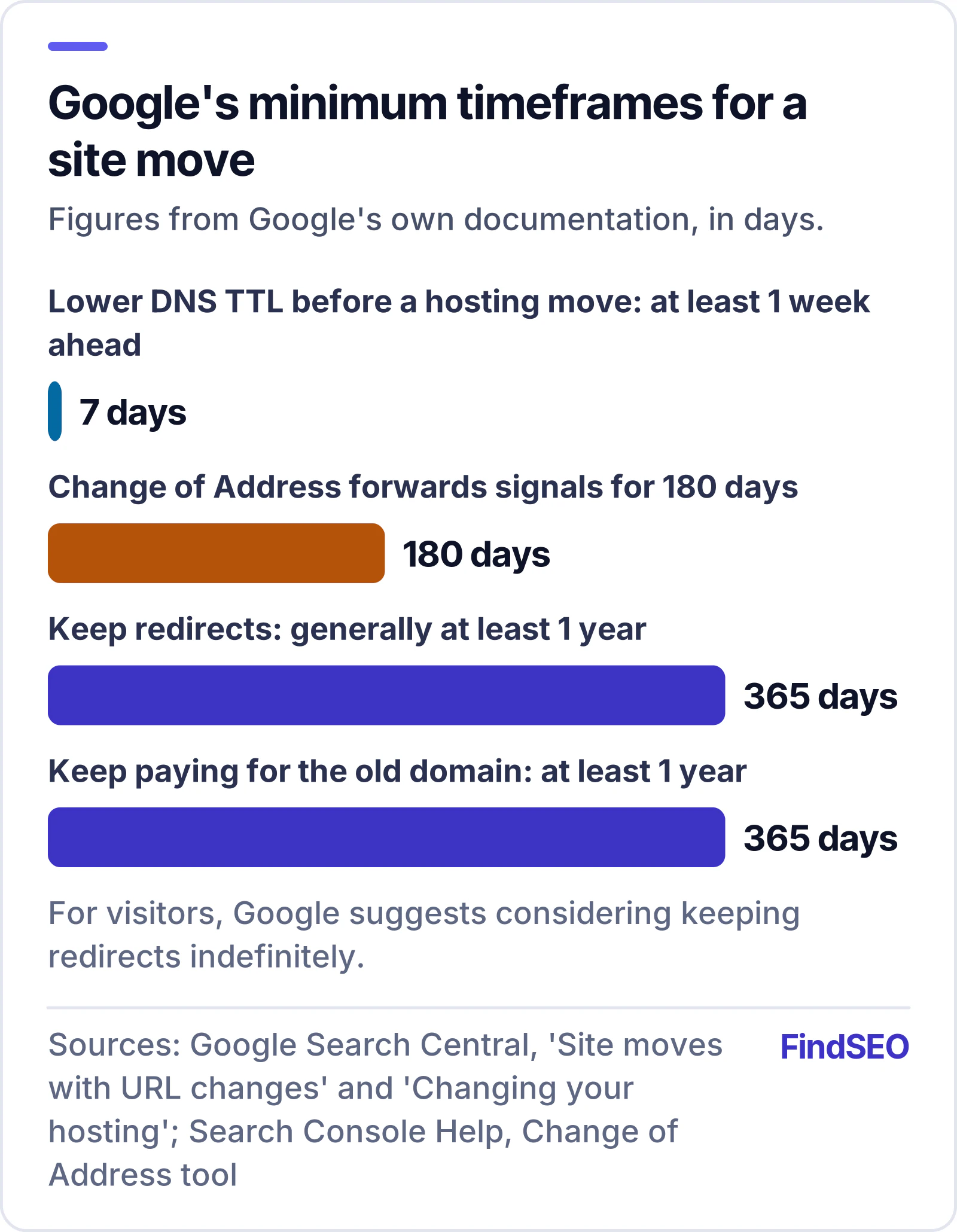
If you're only changing hosting, Google suggests lowering your DNS records' TTL to a few hours at least a week before the move, so the new settings spread faster. It's normal to see Googlebot crawl less for a few days after a hosting change, then climb back up.
How do you check the migration worked?
Watch both the old and new sites closely for the first few weeks. Google suggests:
- Sitemaps. Submit the old and new sitemaps. Indexed old URLs should fall towards zero while new ones rise. Warnings that old URLs redirect are expected.
- Indexing. Check the Page indexing report for spikes in "Not found" or other errors. Our guide to why pages aren't indexed explains each reason. For a quick spot check, try the Google index checker.
- Search performance. In the Performance report, new URLs should start earning impressions and clicks as old ones fade.
- Server logs and analytics. Look for Googlebot crawling, unexpected error codes and normal visitor traffic moving to the new site.
Website migration checklist
- Every old URL, image and PDF is listed, starting with the pages that get traffic and links.
- Each old URL maps to its closest new page, not the homepage.
- Redirects are permanent, server-side and go straight to the final page.
- Removed pages with no replacement return 404 or 410.
- New pages have self-referencing canonicals, updated hreflang and updated internal links.
- All Search Console variants are verified and verification survives the new templates.
- Staging robots.txt blocks and noindex tags are removed on launch day.
- The new sitemap is submitted, and Change of Address is filed for domain moves.
- Indexing, errors and traffic are checked weekly for the first few months.
- Redirects stay in place for at least a year, and the old domain stays registered.
What should you ask an agency before a migration?
Google's page Do you need an SEO? says a redesign or new site is a great time to bring in an SEO, so the site is search-friendly from the start. Before you hire, ask these questions:
| Ask | A good answer |
|---|---|
| How will you build the URL list and mapping? | Sitemaps, analytics, Search Console links and a crawl, not a guess. |
| What redirects will you use, and who sets them up? | Permanent server-side redirects, tested before and after launch. |
| What happens on launch day and the week after? | A written runbook with named owners. |
| How will you report on the move? | Indexing, errors and traffic for old and new URLs against a pre-launch baseline. |
Our questions to ask an SEO agency go further, and it's worth putting migration support in writing, as our guide to what an SEO contract should include explains. The How search engines work lesson in the FindSEO Academy covers why crawling and indexing matter so much during a move.
Bottom line
A migration doesn't have to cost you search traffic. Permanent redirects don't lose PageRank and short-term fluctuation is normal, so the job is to avoid lasting mistakes: missing or wrong redirects, leftover noindex and robots.txt blocks, and changing too much at once. Map every URL, redirect each one to its true replacement, keep the redirects for at least a year and watch Search Console until things settle. Check the strength of your most important pages first with the Page Authority Checker, and use the SEO ROI calculator to see what your organic traffic is worth protecting. If you'd rather hand it over, browse technical SEO agencies in Australia, start with technical SEO agencies in Melbourne, or use Get matched to find a specialist.