
Technical SEO

301 vs 302 Redirects: Which Should You Use for SEO?

A 301 tells Google a page has moved for good; a 302 says the move is temporary. When to use each, plus 307, 308, meta refresh and mistakes to avoid.

FindSEO7 min read

A railway track splitting into two lines at a set of points, with a black and white switch lamp and lever mounted beside the rails on a gravel bed next to a platform edge.

Photo: Olek Remesz / Wikimedia Commons (CC BY-SA 3.0)

In this article
  1. What's the difference between a 301 and a 302 redirect?
  2. Which redirect should you use?
  3. Does a 302 redirect hurt SEO?
  4. When is a temporary redirect the right choice?
  5. What about meta refresh and JavaScript redirects?
  6. What redirect mistakes hurt SEO?
  7. How do you check which redirect a page uses?
  8. A redirect checklist
  9. The bottom line

Use a 301 when a page has moved for good, and a 302 when the move is temporary and the old URL will come back. Google treats a 301 (or 308) as a strong signal that the new URL should be canonical, so it shows the new address in search results. It treats a 302 (or 307) as a weak signal and keeps showing the original URL. Neither type is a penalty, and Google says 301 and other permanent redirects don't cause a loss in PageRank. The SEO risk comes from picking the wrong type, chaining redirects or sending old pages somewhere irrelevant.

This guide explains what each status code means, how Google reads them, when a temporary redirect is the right call, and how to check what your site is actually sending.

What's the difference between a 301 and a 302 redirect?

The difference is how long the move is meant to last. The HTTP standard, RFC 9110, says a 301 means a resource "has been assigned a new permanent URI", while a 302 means it "resides temporarily under a different URI", so clients should keep using the original address for future requests.

Google follows the same logic. Its guide to redirects and Google Search says visitors generally can't tell redirects apart, but Google Search can:

  • Permanent redirects show the new redirect target in search results.
  • Temporary redirects show the source page in search results.

Here's how the four common status codes compare:

Status code What it means How Google treats it Request method
301 Moved Permanently Moved for good Strong signal the target should be canonical Browsers may switch POST to GET
308 Permanent Redirect Moved for good The same as a 301 Must not change
302 Found Temporary move Weak signal, so the old URL usually stays Browsers may switch POST to GET
307 Temporary Redirect Temporary move The same as a 302 Must not change

Google's page on how HTTP status codes affect its crawlers confirms it treats 307 like 302 and 308 like 301. It still recommends using the code that fits, because other clients, such as other search engines, may benefit from the difference. A 301 redirect is the usual choice for permanent moves, while a 308 suits forms and apps that must resend the same request.

Which redirect should you use?

Start with one question: will the old URL ever come back? If not, it's permanent. If yes, it's temporary. Two situations don't need a redirect at all.
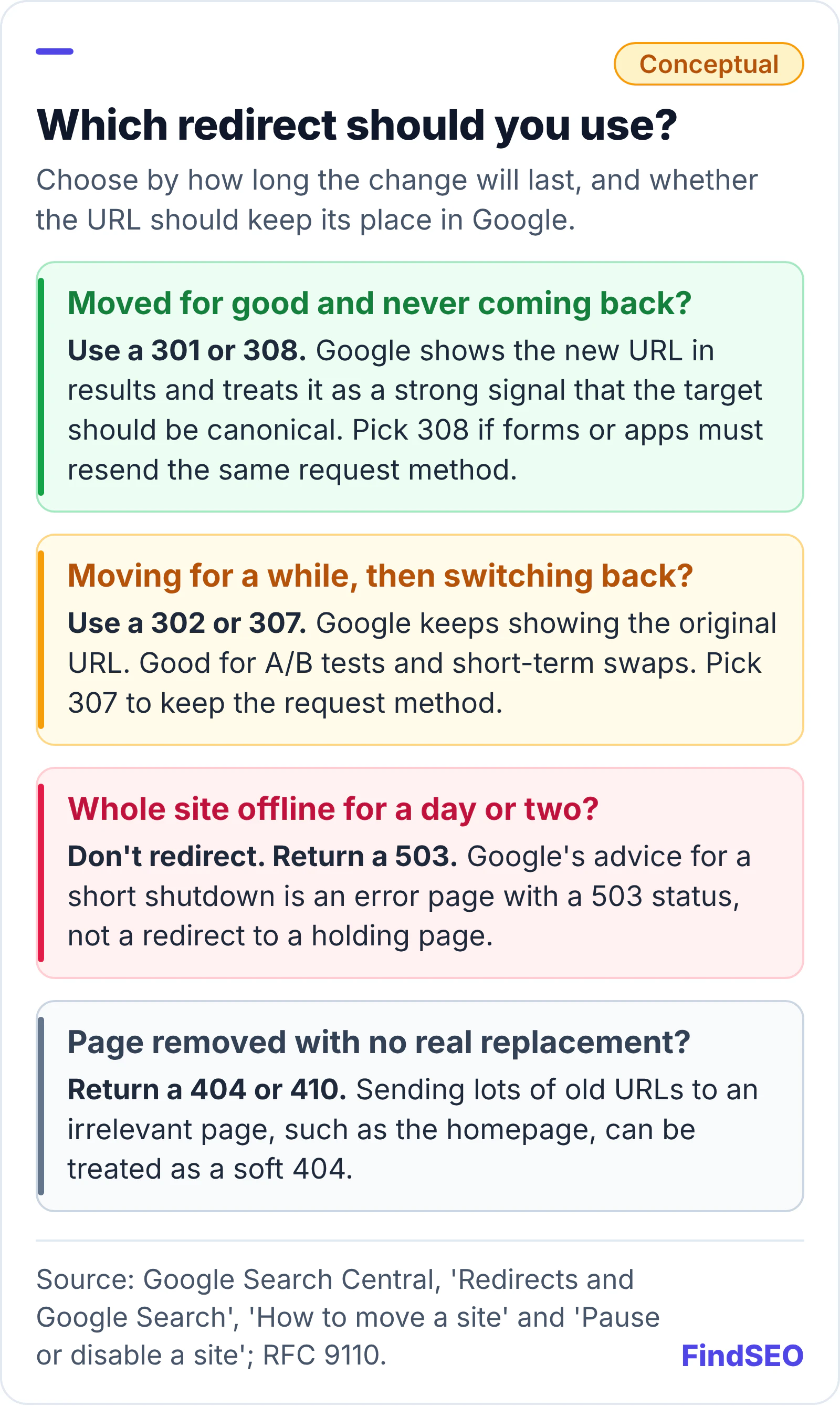
Decision guide for choosing a redirect. If a page has moved for good, use a 301 or 308, because Google shows the new URL and treats it as a strong canonical signal; pick 308 if forms or apps must resend the same request method. If it is moving for a while and switching back, use a 302 or 307, because Google keeps showing the original URL; this suits A/B tests and short-term swaps. If the whole site is offline for a day or two, don't redirect: return a 503. If a page is removed with no real replacement, return a 404 or 410, because redirecting lots of old URLs to an irrelevant page such as the homepage can be treated as a soft 404. Source: Google Search Central and RFC 9110.
Most redirects on a typical site should be permanent. Temporary ones are for changes you plan to undo.

Most real-world cases are permanent: a new domain, a switch from HTTP to HTTPS, a renamed page, merged articles or a retired product with a close replacement. Google's guide to consolidating duplicate URLs lists redirects as the strongest of its canonicalization signals, and recommends permanent redirects when you want to get rid of duplicate pages. Our guides to canonical tags and duplicate content explain when a redirect beats a canonical tag.
Does a 302 redirect hurt SEO?

Not when the move really is temporary. A 302 tells Google to keep the original URL, which is what you want while a page is briefly somewhere else. The problem is using a 302 for a move that's permanent. Google says that with a temporary redirect, its indexing pipeline doesn't use the redirect as a signal that the target should be canonical, although the target might still be indexed if other signals point to it. That leaves Google to work out which URL you want, when a 301 would have told it directly.

Permanent redirects don't cost you ranking credit either. Google's guide to moving a site says: "Don't worry about link credit. 301 and other permanent redirects don't cause a loss in PageRank." If you're planning a bigger site migration, our guide to moving a website without losing SEO covers URL mapping and timing.

When is a temporary redirect the right choice?

Use a 302 or 307 when you expect the original URL to return. Google's documentation gives examples like these:

  1. A/B and split tests. Google's guide to website testing says to use a 302, not a 301, when you redirect some visitors to a test variation, so search engines keep the original URL in their index.
  2. A service that's briefly unavailable. The redirects guide suggests a temporary redirect to a page explaining what's happening, without compromising the original URL in search results.
  3. Short-term swaps, such as pointing a page at a seasonal landing page that will be taken down afterwards.
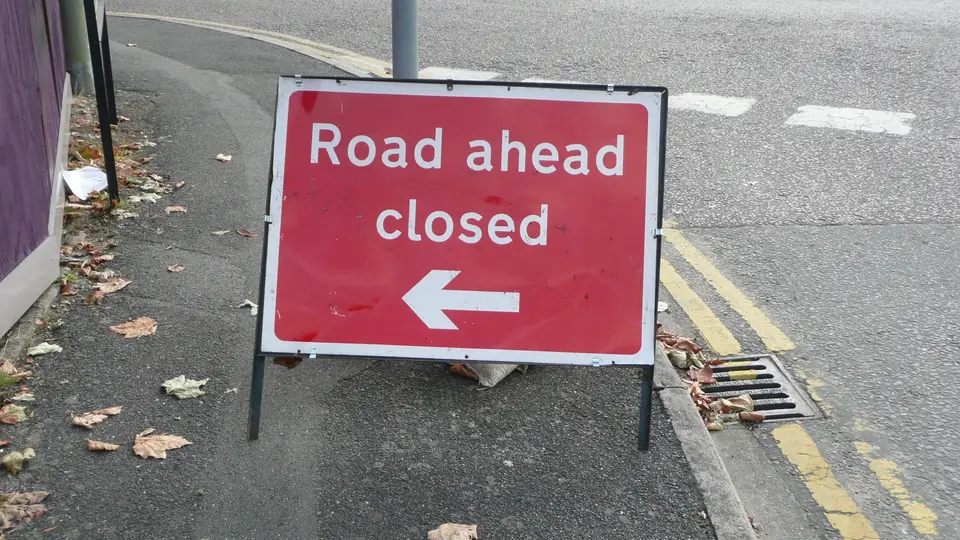
A red folding roadworks sign on a footpath reading Road ahead closed, with a white arrow pointing left to the diversion, beside a kerb with double yellow lines and autumn leaves.
A temporary redirect works like a diversion sign: traffic goes another way for now, but the road is still there. Photo: Arriva436, CC BY 3.0, via Wikimedia Commons.

There are also two cases where a redirect is the wrong tool:

  • Closing the whole site for a day or two. Google's guide to pausing or disabling a site recommends an informational error page with a 503 status code for short shutdowns, rather than redirecting everything.
  • Sending visitors to a country or language version automatically. Google's guidance on multi-regional and multilingual sites says to avoid redirecting people based on what you think their language is, because it can stop users and search engines seeing all versions. Offer a language switcher and use hreflang instead. Our guide to ccTLDs, subdomains and subfolders covers the wider set-up.

What about meta refresh and JavaScript redirects?

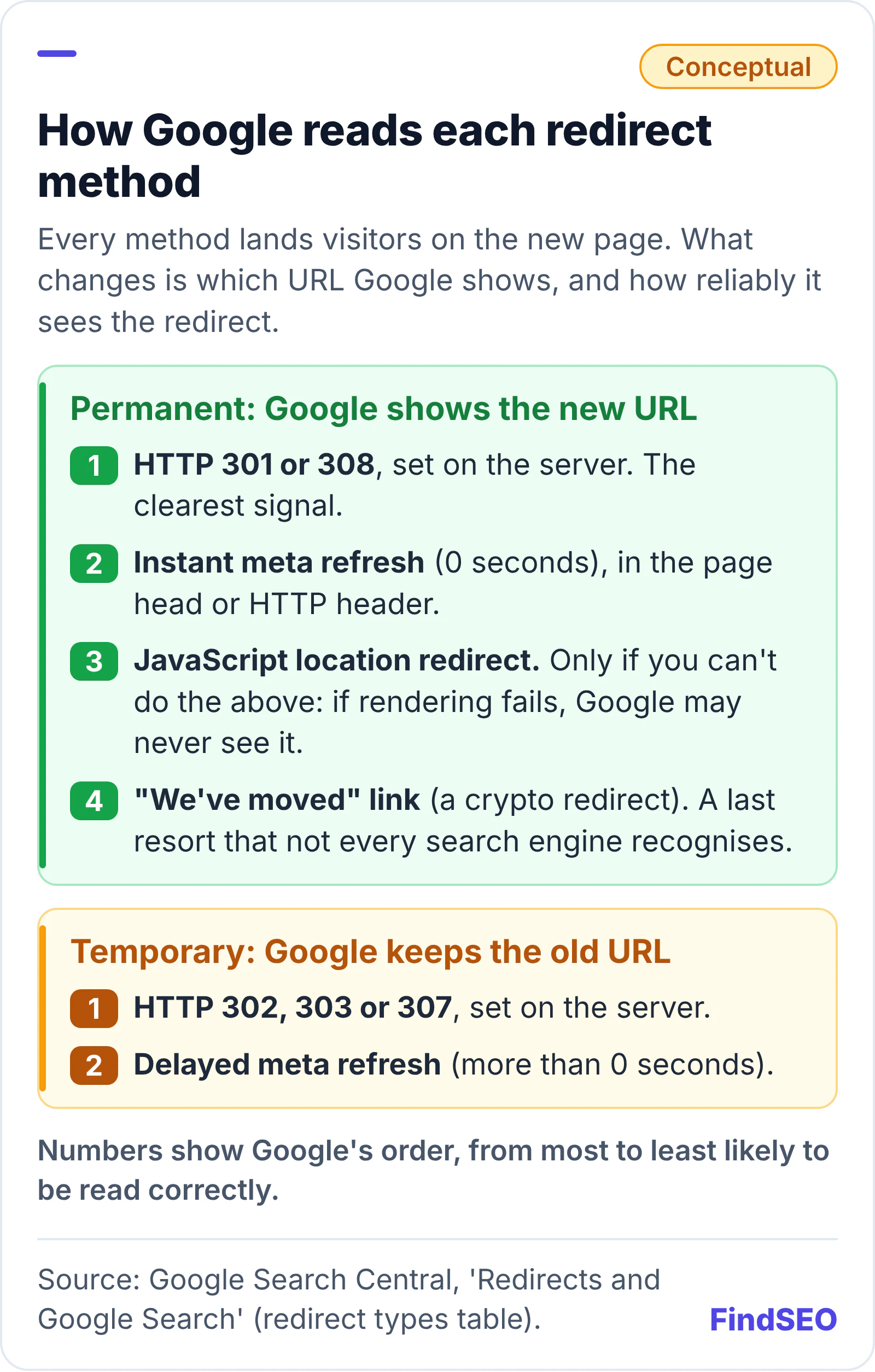
They can work, but server-side redirects are more reliable. Google's redirects guide orders each method by how likely Google is to interpret it correctly, with server-side redirects at the top.

How Google reads each redirect method, in Google's order from most to least likely to be read correctly. Permanent methods, where Google shows the new URL: first, an HTTP 301 or 308 set on the server, the clearest signal; second, an instant meta refresh of 0 seconds; third, a JavaScript location redirect, only if you can't do the others, because Google may never see it if rendering fails; fourth, a 'we've moved' link, known as a crypto redirect, a last resort. Temporary methods, where Google keeps the old URL: first, an HTTP 302, 303 or 307 set on the server; second, a delayed meta refresh of more than 0 seconds. Source: Google Search Central, Redirects and Google Search.
A server-side status code is the method Google is most likely to read correctly.

An instant meta refresh counts as permanent, and a delayed one counts as temporary. Google says to use JavaScript redirects only if you can't use server-side or meta refresh redirects, because rendering can fail and Google might never see the redirect. Platforms such as Shopify and Blogger may already have built-in redirect tools, so check those before anyone hand-codes a workaround. Our Academy lesson on how search engines work explains crawling and rendering in more detail.

What redirect mistakes hurt SEO?

The redirect type matters less than getting the basics right. Watch for these:

  1. Using a 302 for a permanent move. Check the status code your server actually sends, not just that the page lands in the right place.
  2. Redirect chains. Google's crawlers follow up to 10 redirect hops, but its site move guide advises redirecting straight to the final destination, or keeping chains short, ideally no more than 3 hops and fewer than 5.
  3. Redirecting everything to the homepage. Google warns that sending many old URLs to one irrelevant page can confuse users and may be treated as a soft 404. If there's no replacement, let the URL return a 404 or 410.
  4. Redirects back through HTTP. Google's canonicalization guide says HTTPS-to-HTTP redirects make it prefer the HTTP version very strongly.
  5. Removing redirects too soon. Google recommends keeping them for as long as possible, generally at least a year after a move.
  6. Old internal links. Update links so visitors and crawlers go straight to the final URL. Our Academy lesson on internal links, URLs and images shows how.
  7. Setting a 301 before you're sure. RFC 9110 says a 301 is heuristically cacheable, so browsers may keep following it from their cache after you change it. If the destination isn't settled yet, it isn't a permanent move.
A weathered railway switch lever with a red and yellow disc, bolted to a wooden sleeper beside rusty rails on a gravel track bed in low sunlight.
Every redirect is a switch someone set on purpose. Check it still points where you meant it to. Photo: W.carter, public domain, via Wikimedia Commons.

How do you check which redirect a page uses?

Look at the status code and every hop, then confirm what Google has done with the destination:

  1. Run old URLs through our free redirect checker. It shows each hop and the final status code, so 302s and chains stand out.
  2. Read Search Console's Page indexing report. Google's Page indexing report help says "Page with redirect" is a non-canonical URL that redirects elsewhere and won't be indexed, which is normal for old URLs. "Redirect error" flags chains that are too long, loops and bad URLs.
  3. Inspect the destination URL. The URL Inspection tool shows whether the new URL is indexed and which canonical Google chose. Google notes that its inspection tools don't follow redirects, so test the final URL directly.
  4. Check the target's canonical tag, noindex rules and robots.txt with our Google index checker.

Once signals have consolidated, our page authority checker gives a rough read on whether the new URL has picked up the old one's strength. If redirects are part of a bigger technical SEO problem, see what a technical SEO audit includes, and use our guide to why a page isn't indexed to decode the reports.

A redirect checklist

  • Permanent moves use a 301 or 308, set on the server.
  • Temporary moves and A/B tests use a 302 or 307.
  • Short full-site outages return a 503, not a redirect.
  • Each old URL goes straight to its closest replacement in one hop.
  • Removed pages with no replacement return a 404 or 410.
  • No redirect sends HTTPS pages back through HTTP.
  • Nobody is redirected automatically by language or location.
  • Internal links, canonical tags and the XML sitemap use the final URLs.
  • Redirects stay in place for at least a year after a move.
  • A sample of URLs is retested after every change.

The bottom line

A 301 says "this page lives here now"; a 302 says "back soon". Use a permanent redirect for anything that won't be reverted, a temporary one for tests and short-term swaps, and a 503 rather than a redirect when the whole site is briefly down. Google doesn't penalise either code and permanent redirects don't lose PageRank, so the gains come from clean, single-hop redirects to relevant pages. If you'd rather hand it to a specialist, read what technical SEO services cover, compare technical SEO agencies in Australia, browse SEO agencies in Melbourne, size the opportunity with the SEO ROI calculator, or get matched with an agency that can audit your redirects.

FAQs

Is a 301 or 302 redirect better for SEO?

Neither is better in general. Use a 301 for a permanent move, because Google treats it as a strong signal to show the new URL. Use a 302 for a temporary move, because Google keeps showing the original URL. The wrong choice for the situation is what causes problems.

Do 301 redirects pass link value?

Yes. Google's site move guide says 301 and other permanent redirects don't cause a loss in PageRank. Rankings can still fluctuate for a while as Google recrawls the old and new URLs.

What's the difference between a 302 and a 307 redirect?

Both are temporary, and Google treats them the same way. Under the HTTP standard, a browser may change a POST request to a GET when it follows a 302, but must keep the same method for a 307. The same difference applies between a 301 and a 308.

Can I change a 302 redirect to a 301 later?

Yes. If a temporary move becomes permanent, switch the redirect to a 301 or 308. Google will then use it as a strong signal that the new URL should be canonical when it next crawls the old address.

Should I redirect deleted pages to the homepage?

Not as a blanket rule. Google warns that redirecting many old URLs to one irrelevant page can confuse users and may be treated as a soft 404. Redirect each page to its closest replacement, or let it return a 404 or 410 if there isn't one.

Sources

Ready for help with SEO?

Compare SEO-only agencies near you, with client reviews checked by a person, or tell us what you need and get matched.