
Google rewrites a title or description when it thinks your version doesn't describe the page well for the searcher. Titles are usually rewritten because they're missing, too long, stuffed with keywords, full of boilerplate or out of date. Descriptions are swapped out because Google builds snippets mainly from the page's content and only uses your meta description when it describes the page better. You can't force Google to show your text, but clear, accurate, unique tags are used most of the time. Fix the cause, not the symptom.
What's the difference between a title tag, a title link and a snippet?
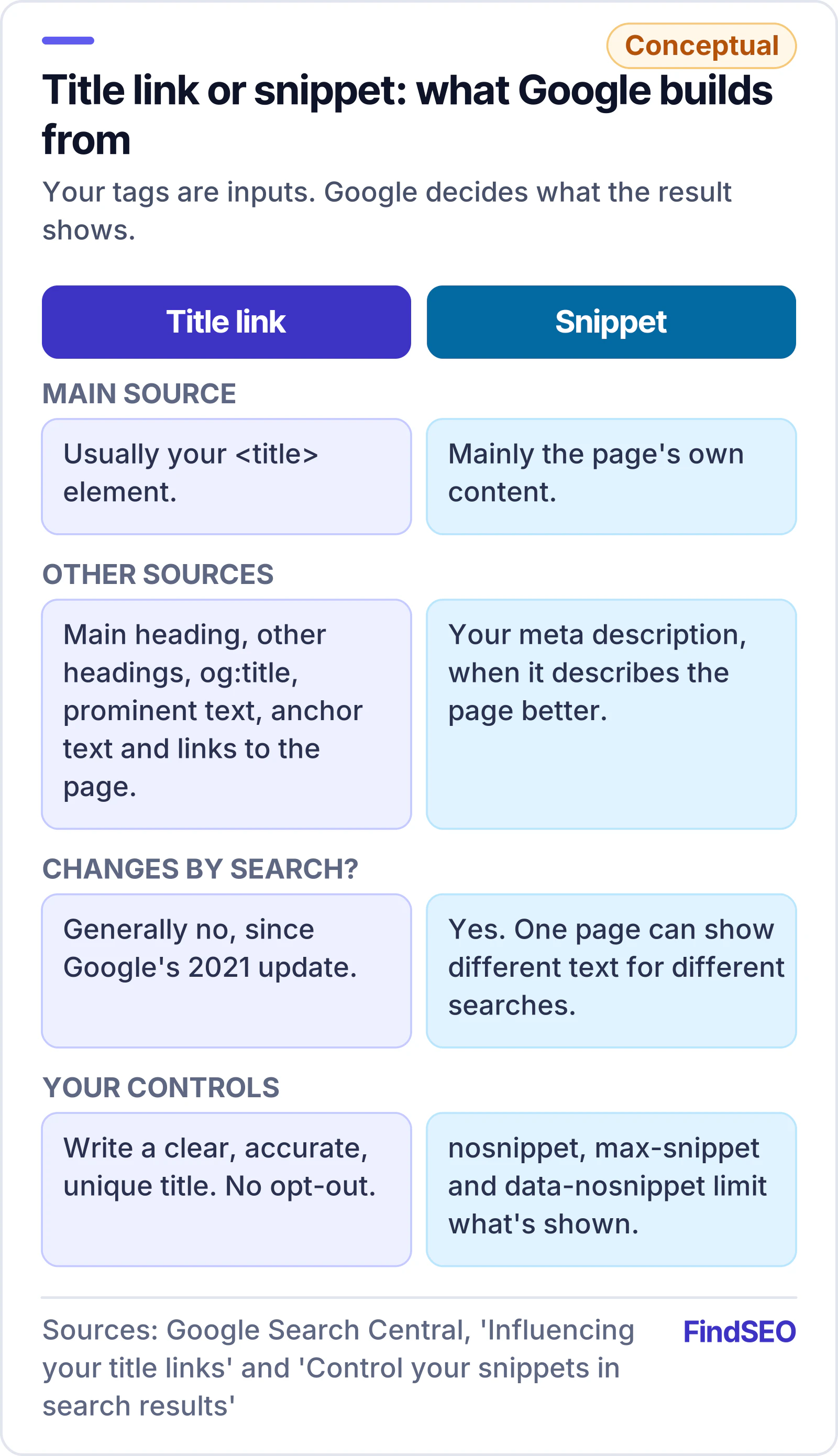
Your title tag is the <title> element in the page's HTML. The clickable headline Google shows on its search results page is what Google calls a title link, and the short text underneath is the snippet. Google's SEO starter guide calls these two the most visually significant parts of a search result.
The key point is that they aren't the same thing. Google's documentation on title links says they're produced automatically, and the title element is only one input. Google also looks at:
- The main visual title shown on the page.
- Heading elements, such as the H1.
- The og:title meta tag.
- Other large, prominent text on the page.
- Other content on the page.
- Anchor text on the page.
- The text of links pointing to the page.
- WebSite structured data.
Snippets work the same way. Google's snippet documentation says they're created primarily from the page content itself, and your meta description is used when it might give a more accurate description than text taken straight from the page.
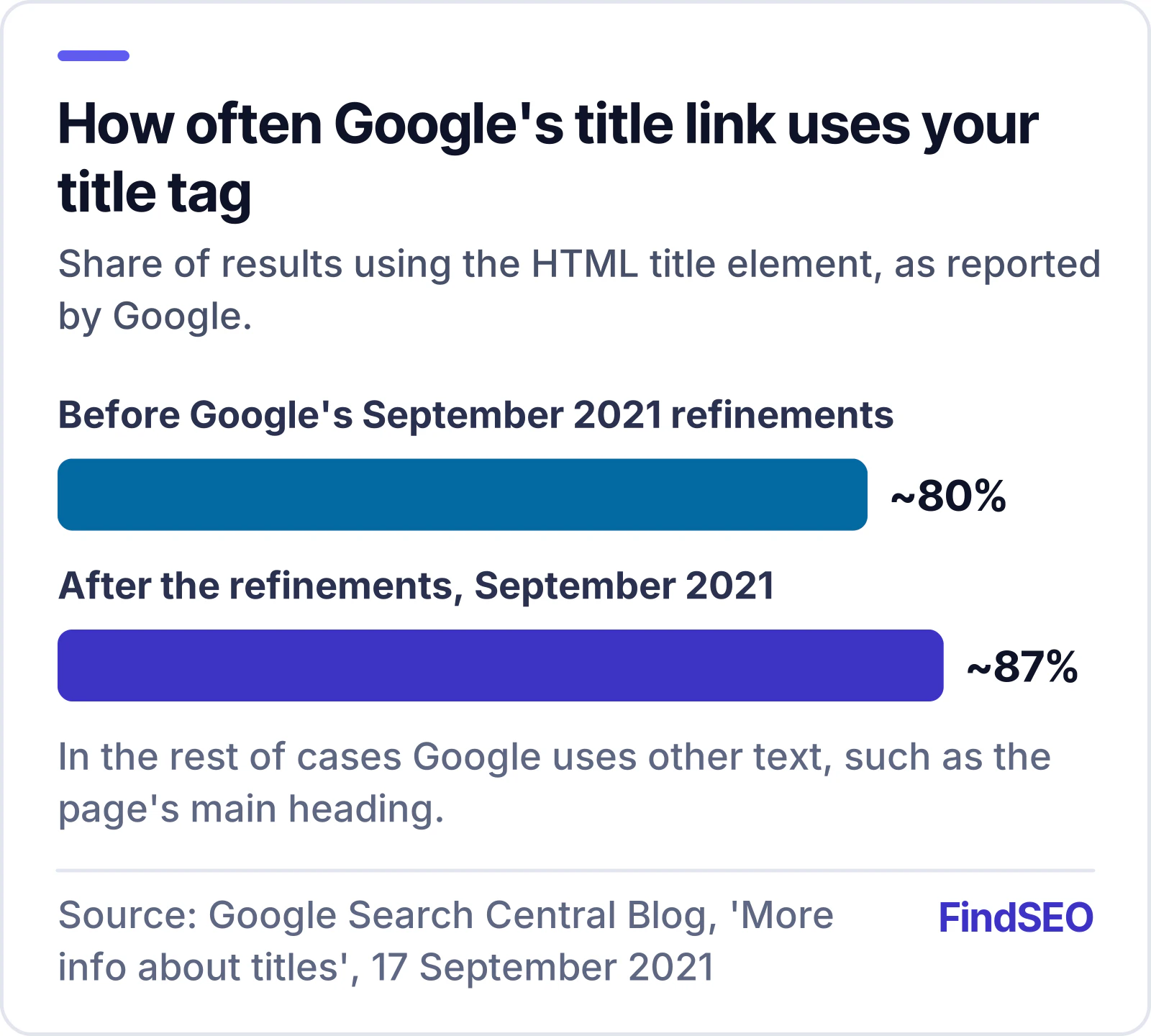
How often does Google use your title tag?
Most of the time. When Google changed how it generates titles in August 2021, its announcement said title tags were used more than 80% of the time. The new system also meant titles generally no longer changed with the query, as they could before. After feedback, Google refined the system and said in September 2021 that title elements were now used around 87% of the time, up from around 80%.
Put simply, if Google is rewriting many of your titles, the problem is more likely to be your titles than Google.
Why does Google rewrite title tags?
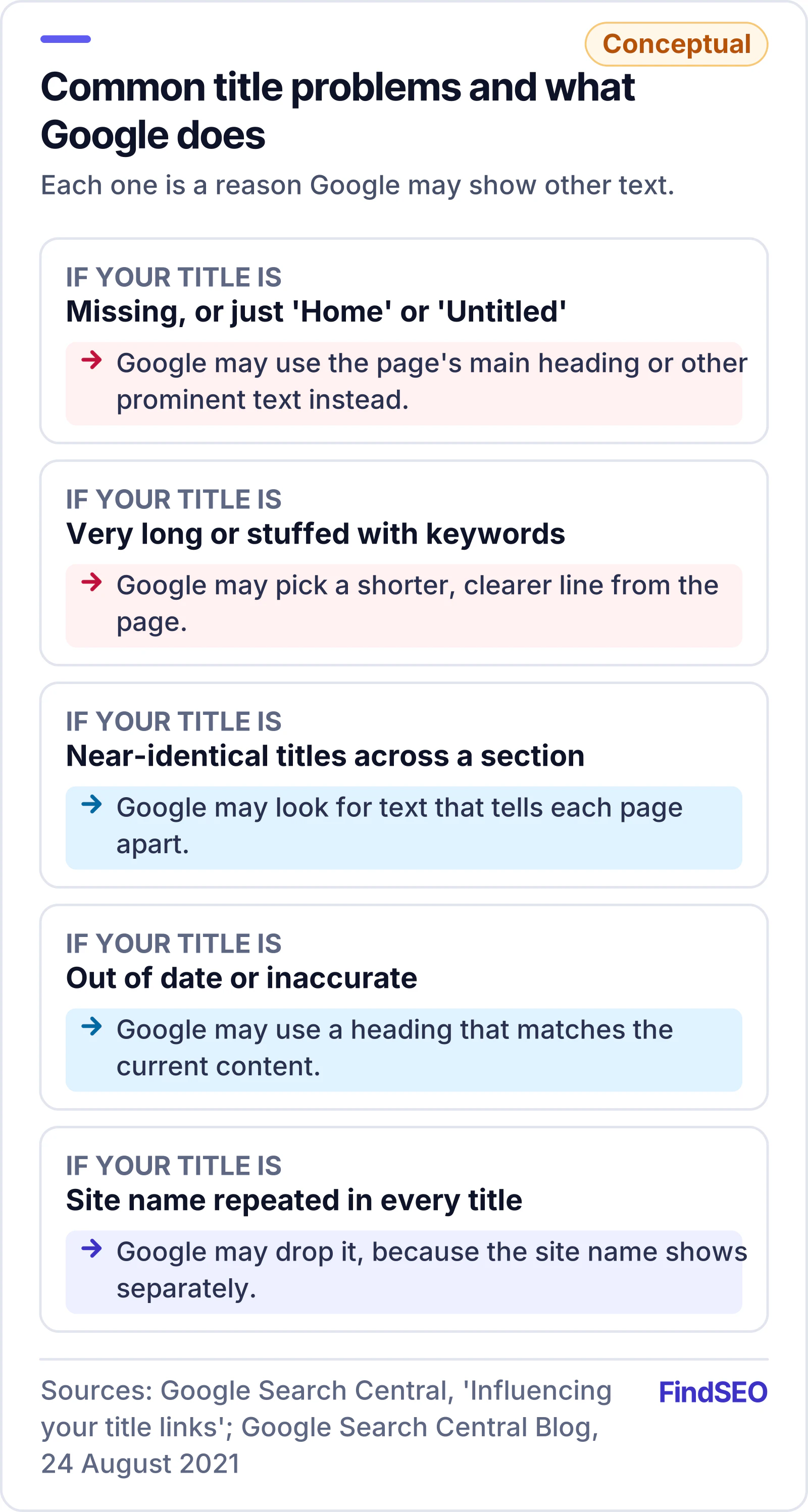
Google's title link documentation lists the common problems it corrects:
- Half-empty titles, such as a title that's just the site name, with nothing about the page.
- Obsolete titles, such as a page that still says last year in the title after the content was updated.
- Inaccurate titles that don't reflect what's on the page.
- Micro-boilerplate, where pages in the same section share nearly identical titles that don't tell them apart. A forum with the same title on every sub-page is Google's example.
- No clear main title, where the page has several headings of similar size and none stands out.
- Language or script mismatch, where the title is in a different language or writing system from the page's main content.
- Repeated site names, where Google may drop your site name from the title because it already appears as the site name shown separately in the result.
Google's August 2021 post adds three more: titles that are very long, titles stuffed with keywords, and titles that are missing or say something generic like "Home" or "Untitled". Repeating the same words over and over to rank isn't just ignored, either. Keyword stuffing is one of the practices covered by Google's spam policies.
Two more things are worth knowing. There's no character limit on titles, but long ones are cut off to fit the device. And if a page is blocked by robots.txt, Google can't read it, so it builds the title from text elsewhere, such as the anchor text of links pointing to the page.
Why does Google ignore your meta description?
Because the snippet's job is to match the search, Google decides which text best does that, search by search. The snippet documentation says snippets can differ depending on what someone searched for, so one page can show different text for different queries. Your description competes with your page's own text, and the better match wins.
Google says your meta description is less likely to be shown when it:
- Is a string of keywords rather than a sentence.
- Is the same across many pages, so it doesn't describe this page.
- Doesn't summarise what's on the page.

What helps is a unique description for each page that includes useful details, such as the author and date on an article, or the price, age and manufacturer on a product page. On large sites, Google says generating descriptions programmatically from page data is fine, as long as each one reads naturally. Like titles, there's no length limit, but snippets are truncated to fit the device.
If you're unsure what a good title and description look like, our Academy lesson on titles and meta descriptions covers the basics, and the free meta tag generator gives you a starting point to edit.
Does a rewritten title hurt your rankings?
Google doesn't describe a rewrite as a penalty. Its documentation treats title links and snippets as how a result is displayed, and a rewrite as Google correcting a title it thinks would describe the page poorly. The cost you can see is in clicks: a weaker title or snippet can get fewer of them.
That makes click-through rate the number to watch. The Performance report in Google Search Console shows clicks, impressions and CTR by page and query. A page with healthy impressions but a low CTR for its main searches is worth checking first. Our guide to what an SEO report should include explains how to read those numbers together.
How do you find and fix rewritten titles?
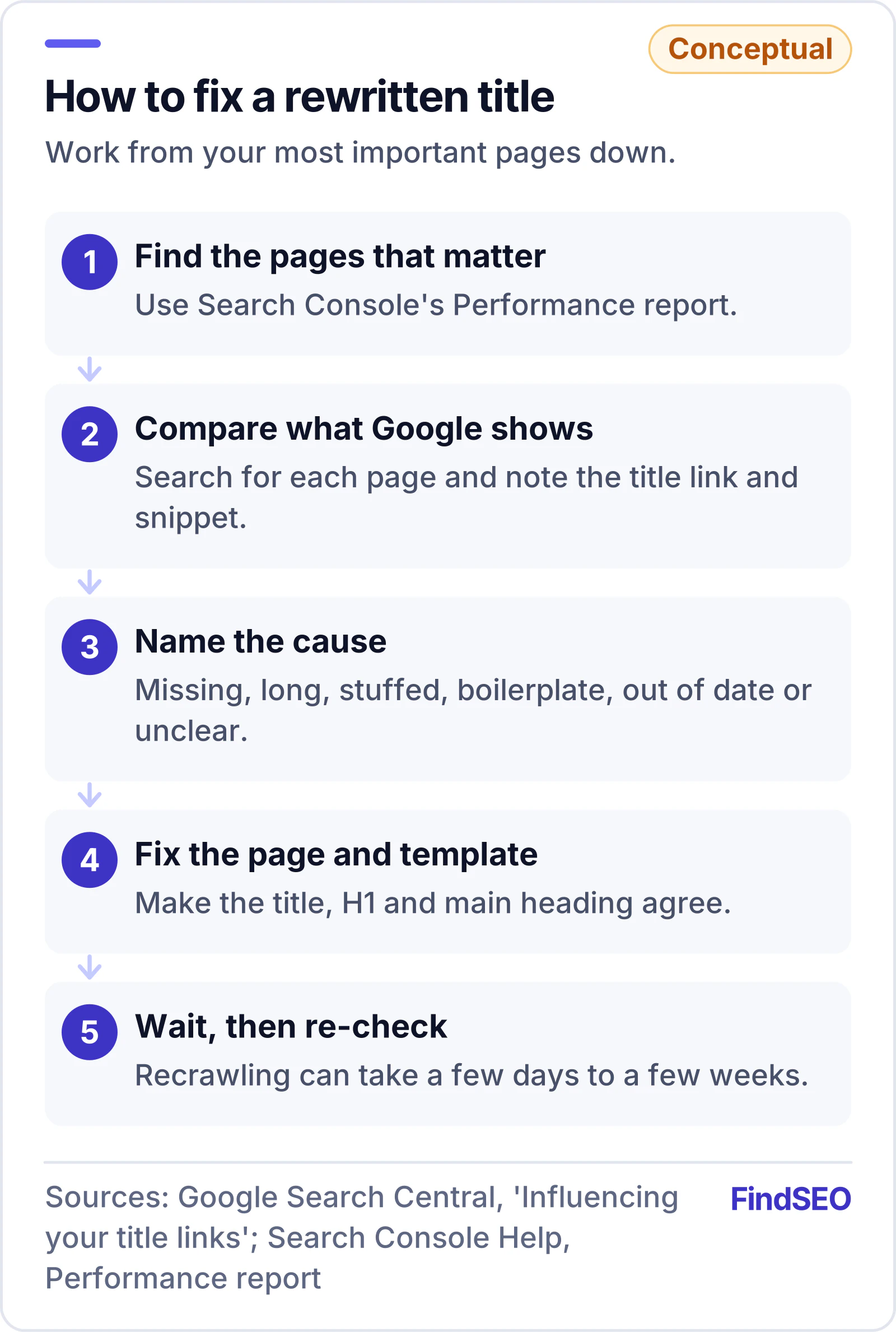
Search Console has no report that lists rewritten titles, so you need to check what Google shows:
- Start with your important pages. Use the Performance report to list the pages and searches that matter most.
- Search for them. Look at the title link and snippet Google shows and compare them with your tags.
- Find the cause. Match each rewrite to a problem from Google's list: missing, too long, stuffed, boilerplate, obsolete, inaccurate or unclear.
- Fix the page, not just the tag. Make the title element, the H1 and the main visible heading agree. If a template gives many pages the same title, fix the template so each one is unique.
- Wait for a recrawl. Google says changes may take a few days to a few weeks to appear, after the page is recrawled and reprocessed.
- Re-check the result. If Google still uses other text, look again at whether your title truly describes the page.
Google says it can't manually change title links for individual sites, so a request won't help. Rewrites spread across many pages are often a site-wide issue, such as duplicate content or a template problem, which is why titles are a standard part of a technical SEO audit.
Can you stop Google showing a snippet?
You can limit it, but not write it. Google's robots meta tag documentation lists the controls:
| Control | Where it goes | What it does |
|---|---|---|
| nosnippet | robots meta tag | Shows no text snippet for the page |
| max-snippet:[number] | robots meta tag | Limits the snippet to that many characters |
| data-nosnippet | HTML attribute on a section | Keeps that part of the page out of snippets |
If rules conflict, Google applies the more restrictive one, so nosnippet wins over max-snippet. Use these sparingly: a result with no snippet tells searchers very little about your page. There's no equivalent control for titles.
Title and description checklist
- Every indexable page has its own title element, and none say just "Home" or "Untitled"
- Titles describe the page in plain words, without repeated keywords
- The title, H1 and main visible heading agree
- Section templates give each page a distinct title
- Dates and years in titles are updated when the content is
- The title is in the same language as the page
- The brand is added once, briefly, with a delimiter such as a dash or pipe
- Each meta description is unique and summarises the page in a sentence or two
- Descriptions include useful details, such as price, author or location
- Important pages are checked in search results after changes, and CTR is tracked in Search Console
What should you ask an agency about titles and descriptions?
- How will you find pages where Google rewrites our titles? Expect a check of real search results for important pages, not just a crawl of the tags.
- Will you fix templates or just individual pages? Site-wide problems need template fixes.
- How do you write titles? Listen for accuracy and clarity rather than cramming in keywords.
- How will you measure the result? Ask for clicks and CTR by page from Search Console, compared over a sensible period.
- Will titles be updated when content changes? Our guide to how often to update content explains when a refresh is worth it.
Bottom line
Google rewrites titles and descriptions when yours don't describe the page well, and it uses your title element around 87% of the time when there's nothing to correct. Write one clear, accurate, unique title and description per page, make the title and main heading agree, fix templates that repeat themselves, and check what Google actually shows. To see what more clicks could be worth, try the SEO ROI calculator, and check a page's strength with the Page Authority Checker. If you'd rather hand it over, browse content SEO agencies in Australia, start with content SEO agencies in Melbourne, or use Get matched to find a specialist.