Content

How to Get a Featured Snippet on Google: What Actually Works

What Google says about featured snippets: how pages are chosen, how to write answer-first sections that qualify, how to track them and how to opt out.

FindSEO8 min read

Hands typing on a slim silver laptop on a white desk against a plain white wall, with a small green succulent in a white pot to the right.

Photo: NordWood Themes / Wikimedia Commons (CC0)

In this article
  1. What is a featured snippet?
  2. Can you choose which page becomes a featured snippet?
  3. Which searches show featured snippets?
  4. How do you write content that can be featured?
  5. What formats do featured snippets use?
  6. Does a featured snippet bring more clicks?
  7. How do you check if you have a featured snippet?
  8. How do you stop a page from being featured?
  9. Featured snippet checklist
  10. The bottom line

You can't apply for a featured snippet or mark a page up to get one. Google's systems choose the page they think best answers the search, then lift a short passage from it to the top of the results. What you can do is make that choice easy: rank on page one for the question, answer it plainly in the first sentences under a matching heading, give the answer a clear shape (a short paragraph, a list or a table), and keep the text visible and easy to link to. Then track the query in Search Console and keep the page accurate, because Google removes snippets that break its policies.

This guide covers what Google has published about featured snippets, the writing pattern that gives a page its best chance, and the controls to use if you'd rather not be featured.

A featured snippet is a result where Google reverses the usual layout and shows the descriptive text first, with the page link underneath. Google's documentation, Featured snippets and your website, says they can also appear inside the related questions group known as "People also ask". Google's visual elements gallery adds that when someone expands one of those questions, the answer they see is a featured snippet.

Google's help page How Google's featured snippets work lists three places you'll find them: at the top of the results, in "People also ask", and next to the Knowledge Graph panel. Usually there's one, but sometimes there are more.

If you're new to how results pages are put together, our Academy lesson on search results and SERP features walks through each element of the search engine results page.
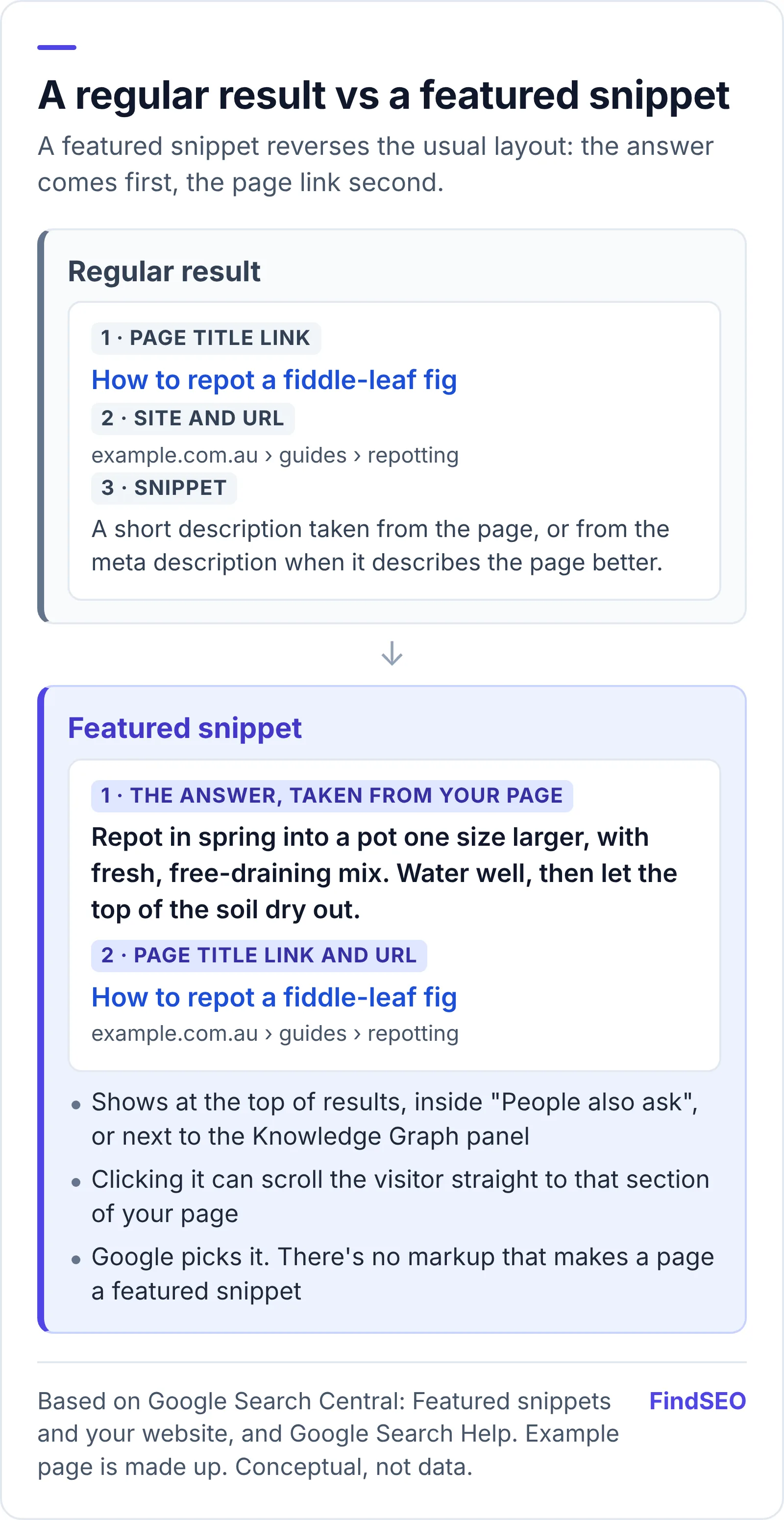
Comparison diagram of a regular Google result and a featured snippet. The regular result shows the page title link first, then the site and URL, then a short snippet taken from the page or its meta description. The featured snippet reverses this: the answer taken from the page comes first in bold, followed by the page title link and URL. Notes underneath say featured snippets show at the top of results, inside People also ask, or next to the Knowledge Graph panel; clicking one can scroll the visitor to that section of the page; and Google picks them, with no markup that makes a page a featured snippet.
A featured snippet puts your answer above your page link. The example page is made up. Based on Google Search Central: Featured snippets and your website, and Google Search Help.

No. Google's documentation answers the question "How can I mark my page as a featured snippet?" with two words: "You can't." It goes on: "Google systems determine whether a page would make a good featured snippet for a user's search request, and if so, elevates it."

That rules out a few common shortcuts:

  1. There's no featured snippet markup. Schema markup helps Google understand a page and can make it eligible for other rich results (our lesson on structured data basics explains which), but no type turns a page into a featured snippet.
  2. The page still has to be found and indexed. If Google can't render the text, it can't feature it. Content that only appears after a click or a script is a risk, as our guide to whether JavaScript is bad for SEO covers.

When Google launched the feature in January 2014, publishers worried it would cost them clicks. Danny Sullivan, Google's Public Liaison for Search, wrote in A reintroduction to Google's featured snippets that featured snippets "aren't meant as a sole source of information" and sit alongside regular listings.

Google doesn't publish a list. Its help page says they appear when people want an answer that fits in a short piece of a page, and the 2018 post says Google shows them "when we believe this format will help people more easily discover what they're seeking". It adds that they're "especially helpful for those on mobile or searching by voice".

In practice that means question-style and task-style searches: what something is, how to do something, how long or how much, which option to choose. These are often long-tail keywords, and the best way to find the ones you already rank for is the Performance report. Our guide to finding keyword ideas in Search Console shows how to filter queries that start with "how", "what" or "why".

Match the search intent as well as the words. If the results for a question are all product pages, a long explainer is unlikely to be lifted into a snippet. Our guide to fixing a search intent mismatch explains how to read the results page before you write.

A hand holds a smartphone upright in a dim room, the screen glowing behind soft circles of pink, orange and teal light, against a purple background.
Google says featured snippets are especially useful on phones and in voice search, where a short answer matters most. Photo: Rodion Kutsaev, CC0, via Wikimedia Commons.

"Write the answer you'd give a client on the phone, then put the detail underneath," says Tristan Brunsdon of Design Box Digital in Melbourne. These steps follow what Google documents about snippets:

  1. Ask the question in a heading. Use the words people search, not a clever label. Our Academy lesson on headings and content structure covers how to order sections.
  2. Answer it in the first sentence or two. Google says snippets are "primarily created from the page content itself" in its guide to controlling your snippets. An answer that makes sense out of context is easier to lift than one that depends on the paragraph before it.
  3. Give the answer a clear shape. Steps belong in a numbered list, options in a bulleted list and comparisons in a real HTML table, not an image of one.
  4. Back it up underneath. Add examples, exceptions and sources. Google's helpful content self-assessment questions apply here: original detail is what makes a page worth choosing and worth clicking.
  5. Keep the text visible. Google's "Read more" deep link guidance asks for content that's "immediately visible on the page to a human", not hidden in tabs or expandable sections.
  6. Don't break the jump. Clicking a featured snippet can take the visitor straight to that section. Google says to avoid scripts that force the scroll position on load and not to strip the #fragment from the URL.
  7. Keep it accurate. Google's help page says searchers can report a featured snippet with wrong information, and Google removes snippets that break its featured snippet policies. If a site has many that break the rules, Google stops showing featured snippets from it at all. Our guide on how often to update content helps you plan reviews of key pages.
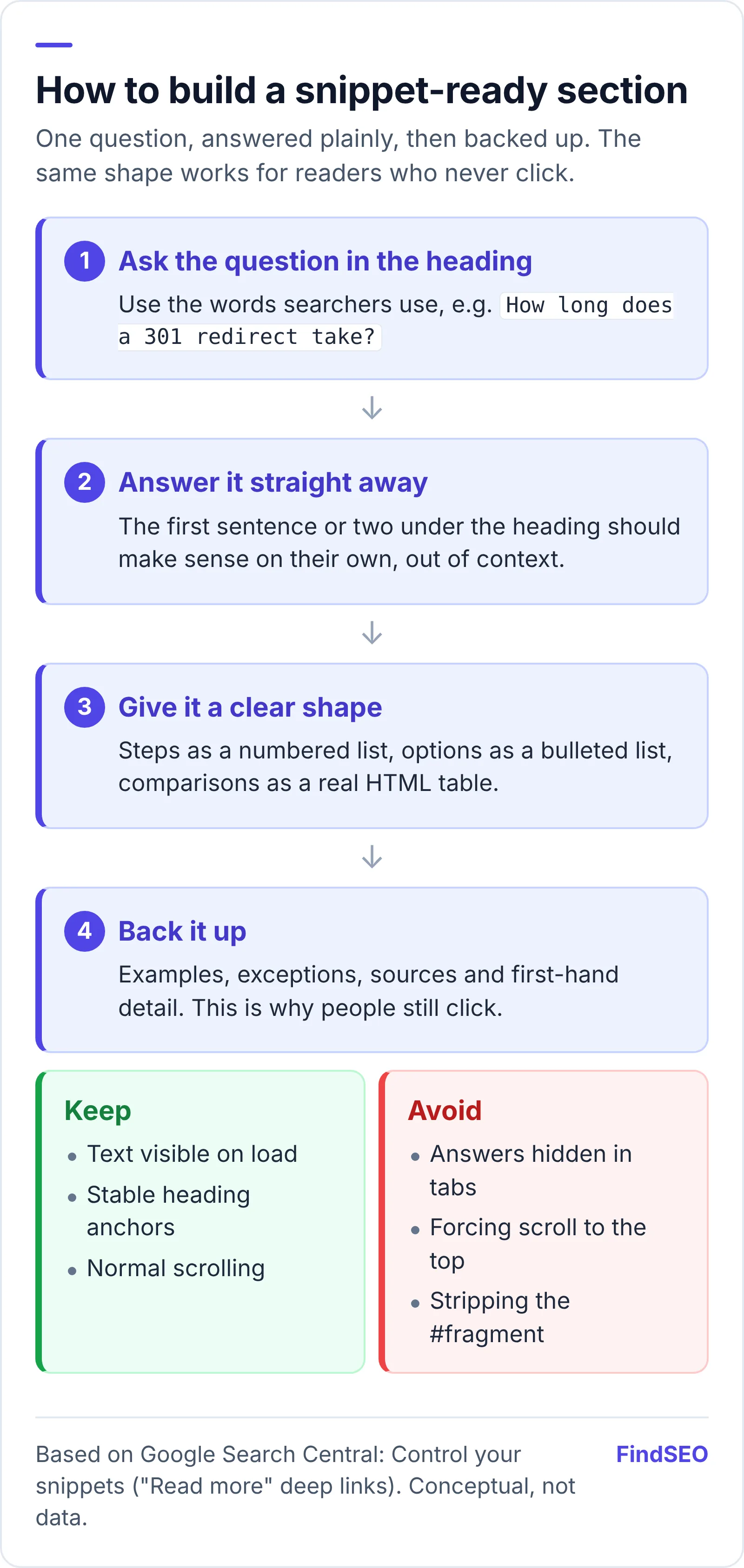
Process diagram titled How to build a snippet-ready section, with four steps. One: ask the question in the heading, using the words searchers use. Two: answer it straight away, so the first sentence or two make sense on their own. Three: give it a clear shape, with steps as a numbered list, options as a bulleted list and comparisons as a real HTML table. Four: back it up with examples, exceptions, sources and first-hand detail. A Keep panel lists text visible on load, stable heading anchors and normal scrolling. An Avoid panel lists answers hidden in tabs, forcing the scroll to the top, and stripping the URL fragment.
The answer-first pattern used throughout FindSEO articles. Based on Google Search Central: Control your snippets.

Google decides the format from the page and the search. These are the shapes you'll usually see, and the page structure that supports each one:

Format you see Typical search What helps on your page
Short paragraph What is, why, is it A direct one- or two-sentence answer under a question heading
Numbered list How to, steps An ordered HTML list with one action per step
Bulleted list Types, examples, options A short unordered list under a clear heading
Table Compare, cost, specs A real HTML table with header cells
Video How to do a physical task A video with clear sections; Google's 2018 post describes video snippets that jump to the right moment

Don't force every page into a list. Use the shape the content needs, with the same headings your internal linking relies on.

Often it brings visibility, and sometimes clicks, but it isn't guaranteed. A featured snippet can answer the question on the results page, which is part of why zero-click searches happen. Google's 2018 post said that after launch "it quickly became clear that featured snippets do indeed drive traffic", but your own data is the only reliable guide.

Two documented details matter here:

  1. It usually counts as position 1. Search Console's guide to impressions, position and clicks says a featured snippet "(typically) occupies position 1", and a click on its link counts as a click.
  2. Your page isn't repeated. Google's guide to ranking systems says that if a listing "is elevated to become a featured snippet, we don't repeat the listing later on the first page of results." Our explainer on Google's ranking systems covers deduplication in more detail.

So a page that moves into the snippet can show a better average position with a different click-through rate. Judge it on leads and sales, not position alone. The free SEO ROI calculator helps you put a value on that traffic.

Close-up of two hands typing on a silver laptop keyboard at a desk, lit by a bright window, with a dark mug blurred in the background.
Answer-first writing helps readers and gives Google a clean passage to show. Photo: Thomas Lefebvre, CC0, via Wikimedia Commons.

Search Console shows your queries and average position, but not the layout each searcher saw, so combine it with a manual check:

  1. In the Performance report, filter to the page and sort its queries by impressions.
  2. Look for question queries where the average position is close to 1.
  3. Search those queries yourself in a private window, on mobile and desktop, from the country you target.
  4. Note which section Google lifted. That tells you which part of the page is doing the work.
  5. Compare with competing pages. The free page authority checker gives a quick read on how strong the pages around you are.

If you'd rather not have a passage shown without context, such as pricing that changes often, Google's robots meta tag specifications give you these controls:

Control What it does Watch out for
nosnippet Blocks all text snippets for the page, featured or regular Your regular result loses its description too
data-nosnippet Keeps marked text out of any snippet Only works on span, div and section elements
max-snippet:[number] Limits snippet length; lower values make featured snippets less likely Google says it doesn't guarantee they'll stop

Google says that when rules conflict, the more restrictive one applies. Use these sparingly: a page that can't show a useful snippet may also look less appealing as a regular result. If your concern is the description on your regular result rather than a featured snippet, our guide to why Google rewrites title tags and the meta description entry explain what's going on.

  • The page already ranks on page one for the question.
  • The heading uses the words people search.
  • The first sentence or two answer the question on their own.
  • Steps, options and comparisons use real lists and HTML tables.
  • The answer is visible on load, not in a tab or accordion.
  • Nothing on the page forces the scroll position or strips the #fragment.
  • The answer is accurate, sourced and dated where it matters.
  • You've checked the query in Search Console and in a live search.
  • Any nosnippet, data-nosnippet or max-snippet rules are deliberate.

The bottom line

Featured snippets are chosen, not claimed. The work is the same work that ranks a page: understand the question, answer it clearly and early, and back the answer with detail people can trust.

If you'd like help restructuring key pages, browse agencies offering content SEO, compare SEO agencies in Australia, or use Get Matched to hear from agencies that fit your brief.

FAQs

Can you pay or apply for a featured snippet?

No. Google says you can't mark a page as a featured snippet. Its systems decide whether a page would make a good one for a search and elevate it if so. There's no form, fee or structured data type for it.

Does structured data help you get a featured snippet?

Not directly. There is no featured snippet markup. Structured data can make a page eligible for other rich results, but the featured snippet text comes from the visible content of the page.

Do featured snippets count as position 1 in Search Console?

Usually. Search Console Help says a featured snippet links to the source page and so typically occupies position 1. A click on its link counts as a click, and impressions follow the standard rules.

Why did my featured snippet disappear?

Results change as Google's systems re-evaluate pages and as competing pages improve. Google also removes featured snippets that break its featured snippet policies, and can stop showing any from a site with many violations. Check the page is still accurate, visible and ranking.

How do I stop Google showing my page as a featured snippet?

Add the nosnippet robots rule to block all snippets for the page, use data-nosnippet on specific sections, or lower max-snippet. Google says a low max-snippet makes featured snippets less likely but doesn't guarantee it, so use nosnippet if you need certainty.

Sources

Ready for help with SEO?

Compare SEO-only agencies near you, with client reviews checked by a person, or tell us what you need and get matched.