
Content

What Is a Search Intent Mismatch and How Do You Fix It?

When a page doesn't give searchers what they came for, it struggles to rank. How to spot a search intent mismatch and fix it, using Google's own guidance.

FindSEO6 min read

A hand holds an open brass pocket compass in front of a blurred woodland background, checking which way to go.

Photo: Ethan Sykes / Wikimedia Commons (CC0)

In this article
  1. What is search intent?
  2. How does Google work out intent?
  3. What does a search intent mismatch look like?
  4. How do you diagnose a search intent mismatch?
  5. How do you fix a search intent mismatch?
  6. When is intent not the problem?
  7. Search intent checklist
  8. The bottom line

A search intent mismatch is when the page you want to rank doesn't give searchers what they're actually looking for. Google's own explanation of how it ranks results says its first step is to establish "the intent behind your query." So if people searching "how much does a website cost" want an explainer and your page is a contact form, good writing and links won't close the gap. The fix is to read intent from the results page and Search Console, then change the page type, the content, or which page you target.

This guide explains what search intent is, how to tell when a page doesn't match it, and the fixes that work.

What is search intent?

Search intent is the reason behind a search. Google's Search Quality Rater Guidelines describe four common intents for the people who test its results: Know (find information), Do (accomplish a goal, such as buying or downloading), Website (reach a specific site or page) and Visit-in-person (find a place nearby). Marketers often use different labels for the same ideas: informational, commercial, transactional and navigational. Our Academy lesson on what the searcher wants covers those labels.
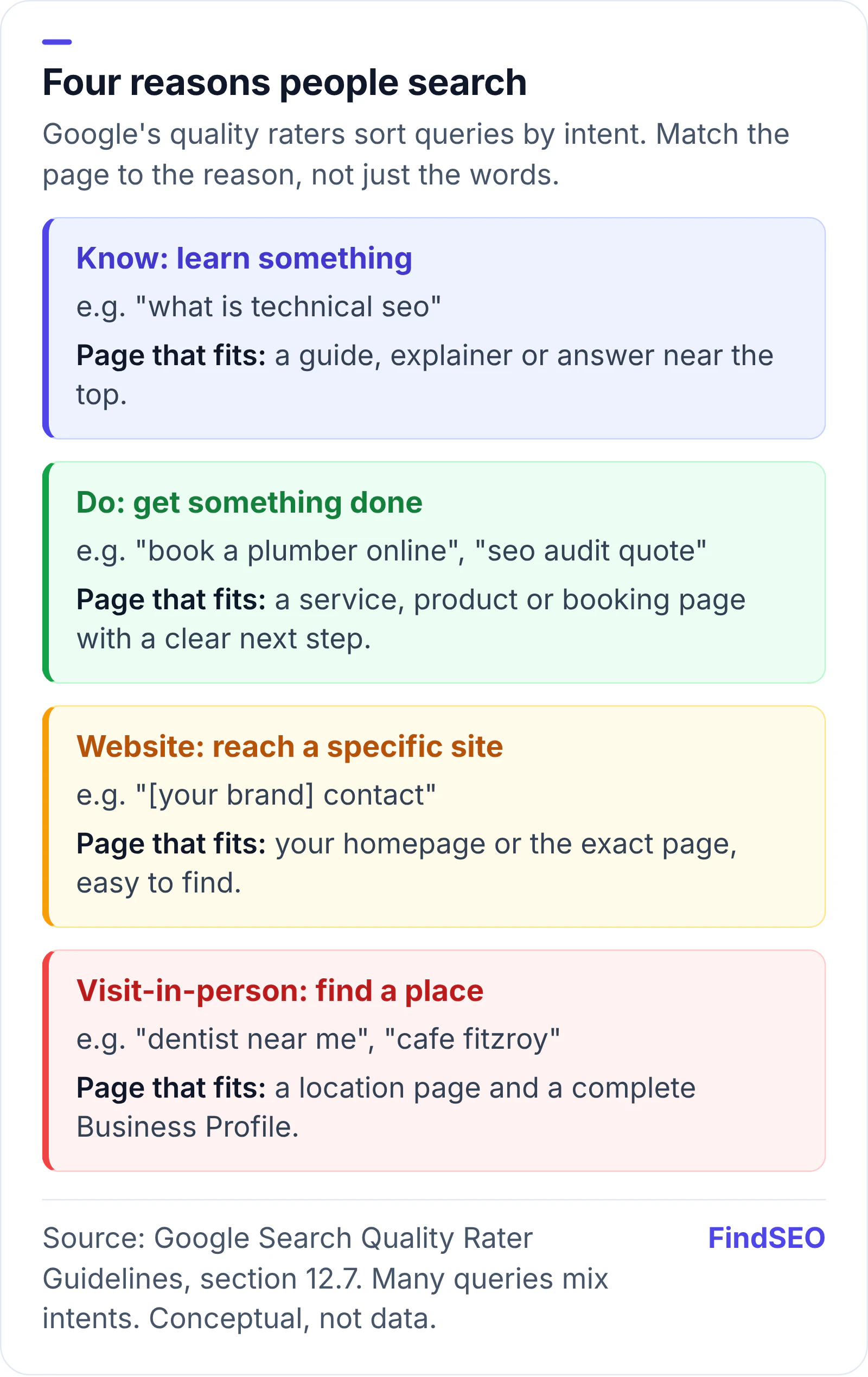
Diagram of four search intents from Google's Search Quality Rater Guidelines, each matched to the page that fits. Know, to learn something, such as what is technical seo: a guide or explainer with the answer near the top. Do, to get something done, such as book a plumber online: a service, product or booking page with a clear next step. Website, to reach a specific site: your homepage or the exact page. Visit-in-person, to find a place, such as dentist near me: a location page and a complete Business Profile.
Each intent calls for a different kind of page. Based on Google's Search Quality Rater Guidelines, section 12.7. Conceptual, not data.

Two points from the guidelines are worth knowing. The line between Know and Do queries "is sometimes blurry," and many queries have more than one likely intent. And rater scores don't change rankings directly: Google says no single rating can directly affect how a page appears in Search. The guidelines show what Google is aiming for, which is why our guide to Google's quality rater guidelines is useful background.

How does Google work out intent?

From the words, the context and how people respond to results. Google says it builds language models to work out what a few typed words mean, including a synonym system that knows "change laptop brightness" and "adjust laptop brightness" mean the same thing. Words like "cooking" or "pictures" suggest recipes or images, many queries have local intent, and freshness matters more for news than for dictionary definitions.

When Google added BERT to Search in 2019, it said the model would help it better understand one in 10 searches in US English, especially longer, conversational ones. In practice, you can't win a query by repeating its words. Google's SEO Starter Guide suggests thinking about the words readers use, noting that some people search "charcuterie" while others search "cheese board," but says not to worry about every variation.

A woman in a red and black striped top looks through a clothing shop window at mannequins, deciding whether to go in.
Like a shop window, your page has seconds to show searchers they've found what they came for. Photo: Gyorgy Bakos, CC0, via Wikimedia Commons.

What does a search intent mismatch look like?

The page is fine on paper but the wrong shape for the query. Common signs:

  1. It stalls below page one for its main term, while page one is full of a different kind of page, such as guides when you have a sales page.
  2. It gets impressions but few clicks. A low click-through rate can mean your title and snippet promise something searchers don't want.
  3. The wrong page ranks. A blog post shows for a service query, or several of your pages take turns ranking for the same term, a pattern often called keyword cannibalisation.
  4. Visitors arrive and leave. Traffic grows but your conversion rate doesn't, because the people arriving were researching, not ready to buy.
  5. Local searches show a map, but you have no local page. For "near me" queries, a national page has little chance against businesses with location pages. Our guide to location pages for local SEO shows how to build them without doorway spam.

Here's how the same business can get it wrong:

Example query Likely intent Page that usually fits Common mismatch
how much does seo cost Know Pricing explainer with ranges and what affects them A contact form with no prices
seo agency melbourne Do and Visit-in-person Service or directory page with proof, plus a Business Profile A blog post about choosing an agency
what is a canonical tag Know A short, clear explainer A service page selling audits
book seo audit Do Service page with scope, price guide and a booking form A general guide to audits

How do you diagnose a search intent mismatch?

Start with the results page, because it shows what Google currently thinks satisfies the query. Then check your own data.

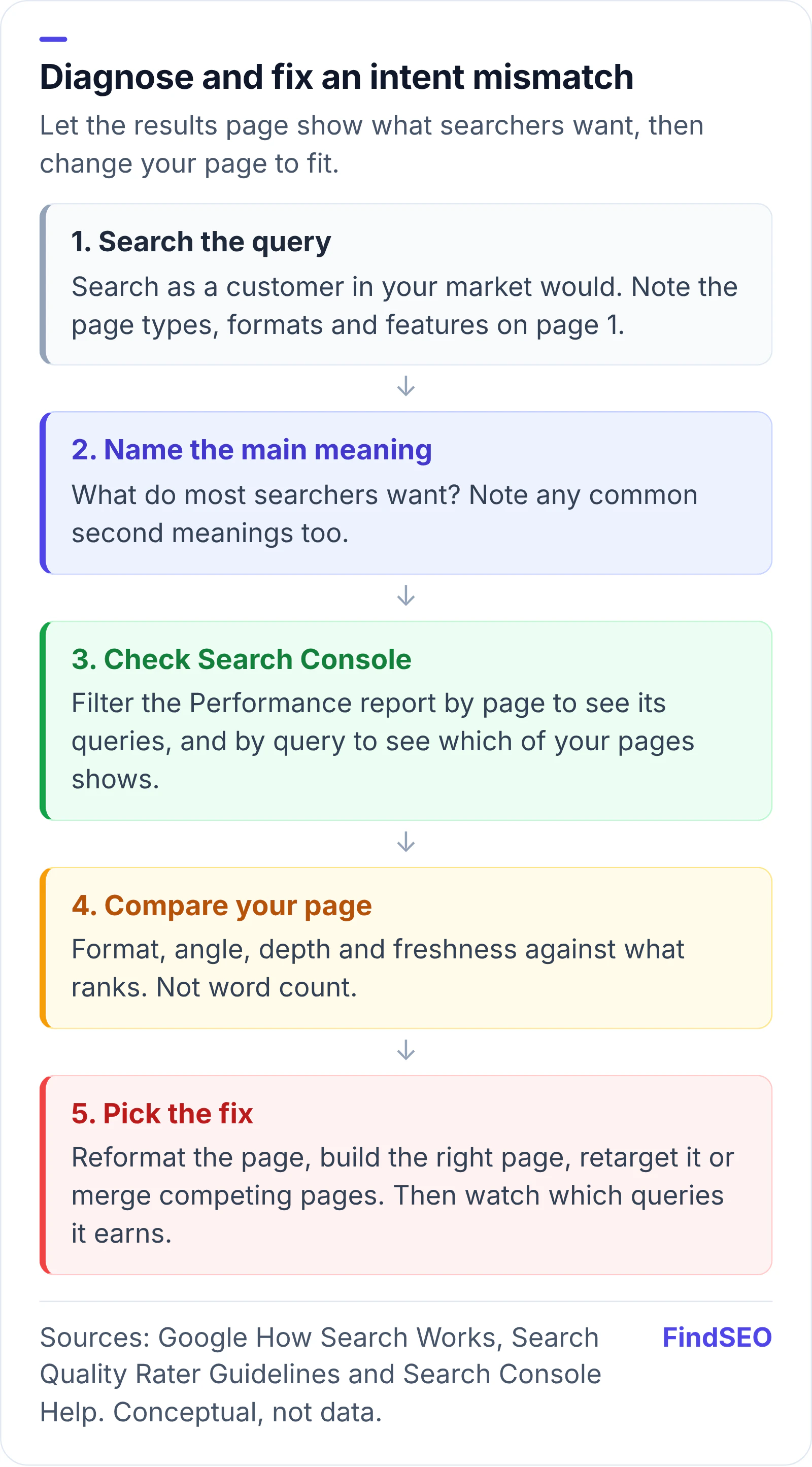
  1. Search the query yourself. Note the types of page on page one (guides, product pages, service pages, directories), their format and any features such as a map, videos or a featured snippet. Google's gallery of visual elements names the features you'll see. Results vary by person: Search Console Help says they're specific to "the time, place, device, and recent history" of the searcher, so search as a customer in your market would.
  2. Name the main meaning. The rater guidelines separate a query's dominant interpretation (what most people mean) from common and minor ones, and note that meanings change over time. Their example is [iphone], where most searchers now want the latest model rather than the first one.
  3. Check Search Console. In the Performance report, filter by page to see the queries it actually gets, then filter by query to see which of your pages appears. Our guide to finding keyword ideas in Search Console walks through the filters.
  4. Compare your page with what ranks. Look at format, angle, depth and freshness. Don't chase length: Google's guide to creating helpful content says plainly that it doesn't have a preferred word count.
Five-step process to diagnose and fix a search intent mismatch: 1, search the query as a customer in your market would and note page types, formats and features on page one; 2, name the main meaning most searchers want; 3, filter Search Console's Performance report by page and by query; 4, compare your page's format, angle, depth and freshness with what ranks, not its word count; 5, pick the fix: reformat, build the right page, retarget or merge competing pages, then watch which queries it earns.
Diagnose before you rewrite: the results page and your Search Console data usually point to the fix. Conceptual process based on Google's documentation.

How do you fix a search intent mismatch?

Pick the smallest change that gives searchers what they want.

  1. Reformat the page. If searchers want a quick answer, put it in the first paragraph. If they want to compare, add a table. If they want to act, make the next step obvious.
  2. Build the right page and link to it. Sometimes the existing page is fine for its own query, and the business needs a second page, such as a service page alongside a guide. Point to it with descriptive anchors from related pages, as explained in our guide to internal linking, and map each keyword group to one page using our lesson on clustering and mapping keywords.
  3. Retarget the page. If a page keeps attracting queries it wasn't written for, and they're useful to you, rewrite it for those queries instead.
  4. Merge competing pages. When two pages split the same intent, combine them and point the weaker URL at the stronger one. Google's guide to consolidating duplicate URLs covers redirects and canonical tags, and our explainer on 301 vs 302 redirects explains which to use.
  5. Fix the title and introduction. Your title should describe the page honestly. Google's documentation on title links explains when it replaces titles that don't, and our guide to why Google rewrites title tags shows how to avoid it.
  6. Cover local intent properly. For visit-in-person searches, pair a useful location page with a complete Business Profile. Google's guide to improving your local ranking says local results are mainly based on relevance, distance and how well known a business is.
Overhead view of a person typing on a laptop at a cafe table, with an open notebook, a smartphone and a coffee beside them.
Most intent fixes are editing jobs: restructure the page, sharpen the intro, add the missing table or next step. Photo: Juliette Leufke, CC0, via Wikimedia Commons.

When is intent not the problem?

When your page matches the results but still ranks lower, the gap is usually elsewhere: quality, authority or technical issues. Work through our helpful content self-assessment, and compare your page with the ones above it using the free page authority checker. If you're weighing whether the work is worth paying for, the SEO ROI calculator helps you size the opportunity, and you can compare content SEO agencies in Australia or browse the agency directory.

Search intent checklist

  • You've searched each priority keyword and noted what kinds of page rank.
  • Each priority keyword maps to one page of the right type.
  • Informational pages answer the question near the top.
  • Service and product pages make the next step obvious.
  • Local keywords have a location page and a complete Business Profile.
  • Search Console queries for each page match what the page offers.
  • No two pages compete for the same intent.
  • Titles and introductions describe what the page actually delivers.
  • You recheck the results page after major Google updates or market changes.

The bottom line

Search intent decides which kind of page can rank, before quality and links come into it. If a page stalls, look at what Google shows for the query and what Search Console says the page actually ranks for. Then reformat it, build the page searchers want, or merge pages that compete. When you brief an agency, ask how they check intent before they write. If you'd like help, get matched with an SEO agency that does content work.

FAQs

What are the main types of search intent?

Google's Search Quality Rater Guidelines describe four: Know (find information), Do (accomplish a goal such as buying or booking), Website (reach a specific site or page) and Visit-in-person (find a place nearby). Marketers often call them informational, transactional or commercial, navigational and local. Many queries mix more than one.

How do I know if my page has a search intent mismatch?

Search the query yourself and compare the pages on page one with yours. If they're a different type, such as guides when you have a sales page, that's a strong sign. In Search Console, a page that gets impressions but few clicks, or ranks for queries it wasn't written for, is another.

Can one page target more than one search intent?

Sometimes. Google's guidelines say many queries have more than one likely intent, and a service page can include a short explainer. But when the results for two keywords show very different page types, they usually need separate pages.

Does making a page longer fix a search intent mismatch?

No. Google says it doesn't have a preferred word count. If searchers want a quick answer, a price guide or a booking form, adding words won't help. Change the format and focus of the page instead.

How long does it take to see results after fixing search intent?

It depends on how often Google recrawls the page and how competitive the query is. Request indexing for the changed page with Search Console's URL Inspection tool, then watch the Performance report for changes in the queries and clicks it earns.

Sources

Ready for help with SEO?

Compare SEO-only agencies near you, with client reviews checked by a person, or tell us what you need and get matched.