
Location pages help local SEO when each one describes a real place or service area your business actually serves, with details a visitor can't get anywhere else on your site. Swapping the suburb name into the same template and publishing it fifty times creates doorway pages, which Google's spam policies name directly. A good location page has its own address or service-area details, local proof, and a clear path to book. A doorway page exists only to catch a search and send the visitor somewhere else.
This guide covers what Google counts as a doorway page, when a business should build location pages, what each page needs, and how to check whether an agency's city-page plan is safe.
What is a location page?
A location page is a page on your own website about one branch, office, store or service area. For a business with a shopfront, it's the page your Google Business Profile links to. For a business that travels to customers, it describes an area you cover and the work you do there.
Location pages matter because local results weigh relevance, distance and prominence. Google's local ranking tips say complete, accurate business information helps your listing match the right searches. Your website is part of that picture. We explain the full ranking model in how Google ranks local results.
What does Google count as a doorway page?
Google's spam policies on doorway abuse describe doorways as sites or pages created to rank for specific, similar search queries. The examples include:
- Multiple domains or pages aimed at specific regions or cities that funnel users to one page.
- Pages generated to send visitors to the usable or relevant part of your site.
- Substantially similar pages that are closer to search results than a clearly defined, browseable hierarchy.
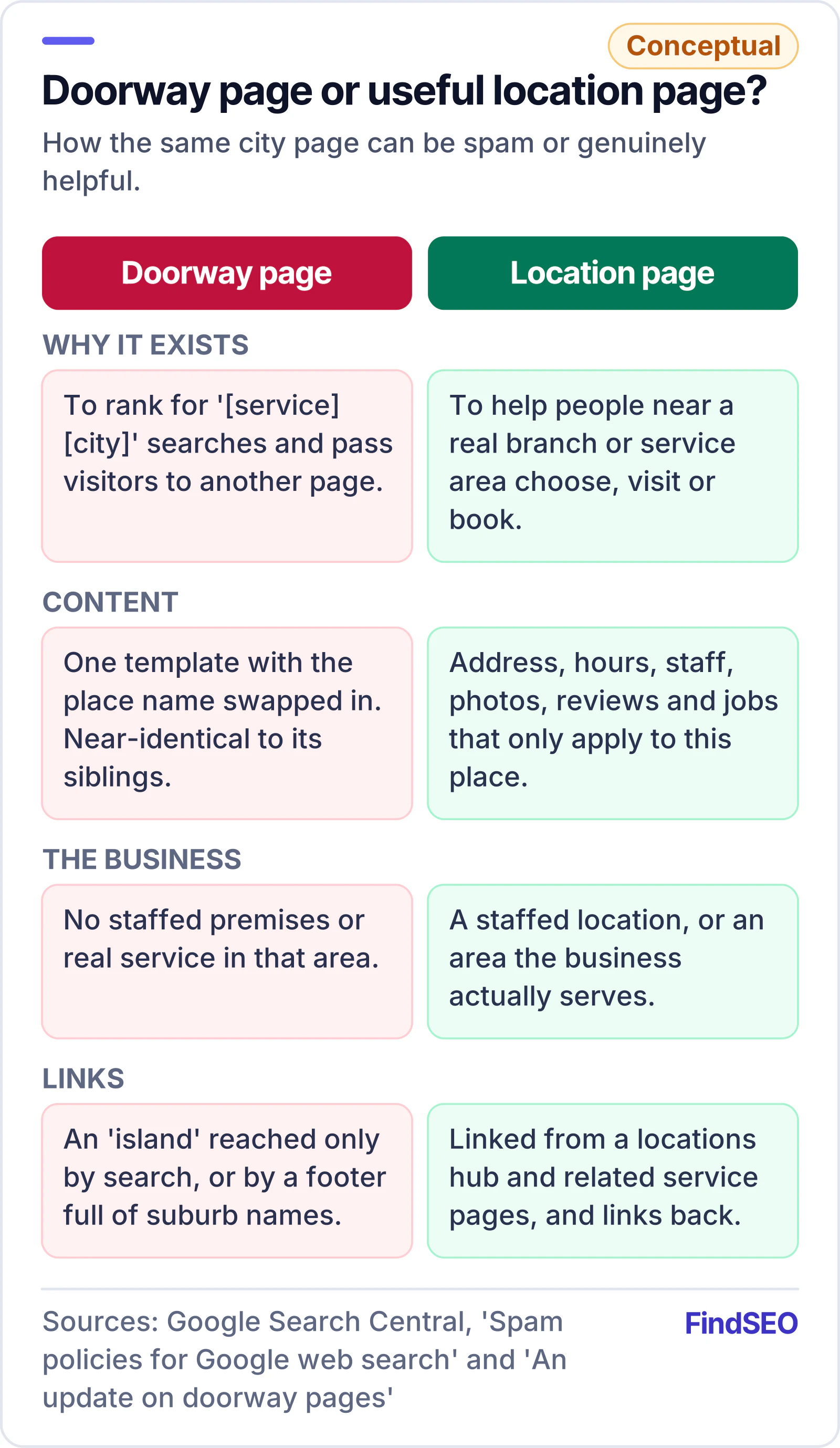
The same policies treat keyword stuffing as spam, including "blocks of text that list cities and regions that a web page is trying to rank for". The long footer of suburb names some sites still carry falls into that category. Scaled content abuse also applies. Publishing many pages mainly to manipulate rankings is a violation however the pages were produced, whether by hand, from templates or with automated tools.
When Google announced its doorway update, its doorway pages blog post gave site owners questions to test their pages against. Are the pages made to rank for generic terms when the content is very specific? Would they duplicate useful aggregations, such as locations, that already exist on the site? Are they an "island", hard to reach from the rest of the site? Those questions still work as a check today. Our guide to Google's spam policies explained covers the other policies in plain English.
When should a business build location pages?
The answer depends on how your business serves customers, not on how many suburbs you'd like to rank in. Google's Business Profile guidelines set the ground rules for listings, and your website pages should follow the same reality:
- Storefront businesses with staffed premises that customers visit should have one profile and one page per location. Google asks for a website that represents that individual location.
- Service-area businesses that visit customers get one profile with a service area, and Google says to hide the address if customers don't come to it. Google's service area guidelines allow up to 20 service areas and say the area shouldn't extend farther than about 2 hours of driving from the base.
- Hybrid businesses that serve customers at their premises and on the road can show both an address and a service area.
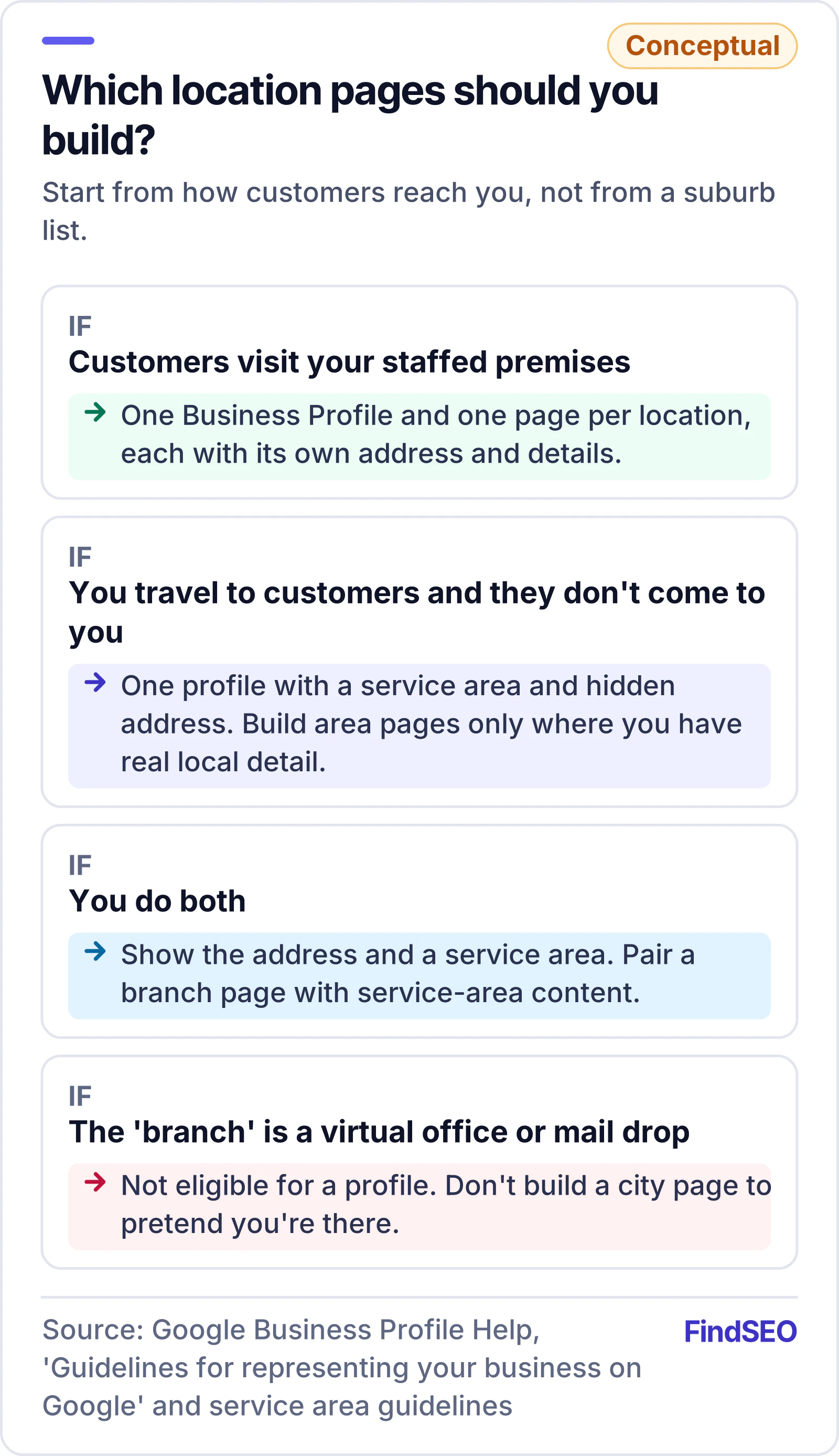
Virtual offices aren't eligible for a profile, and co-working spaces only qualify if you have signage, staff and customers there during business hours. Separate profiles are only allowed for locations with separate service areas and staff. If a "branch" exists only to justify a city page, the page is a doorway and the listing can be suspended. Our guide to a suspended Google Business Profile explains what happens next.
What should a good location page include?
A useful location page answers the questions someone in that area has before they call. Google's helpful content guidance asks whether content was made for people first, or mainly to attract search visits, and whether a lot of it is produced through extensive automation. Apply both questions to every page.
For a storefront location, include:
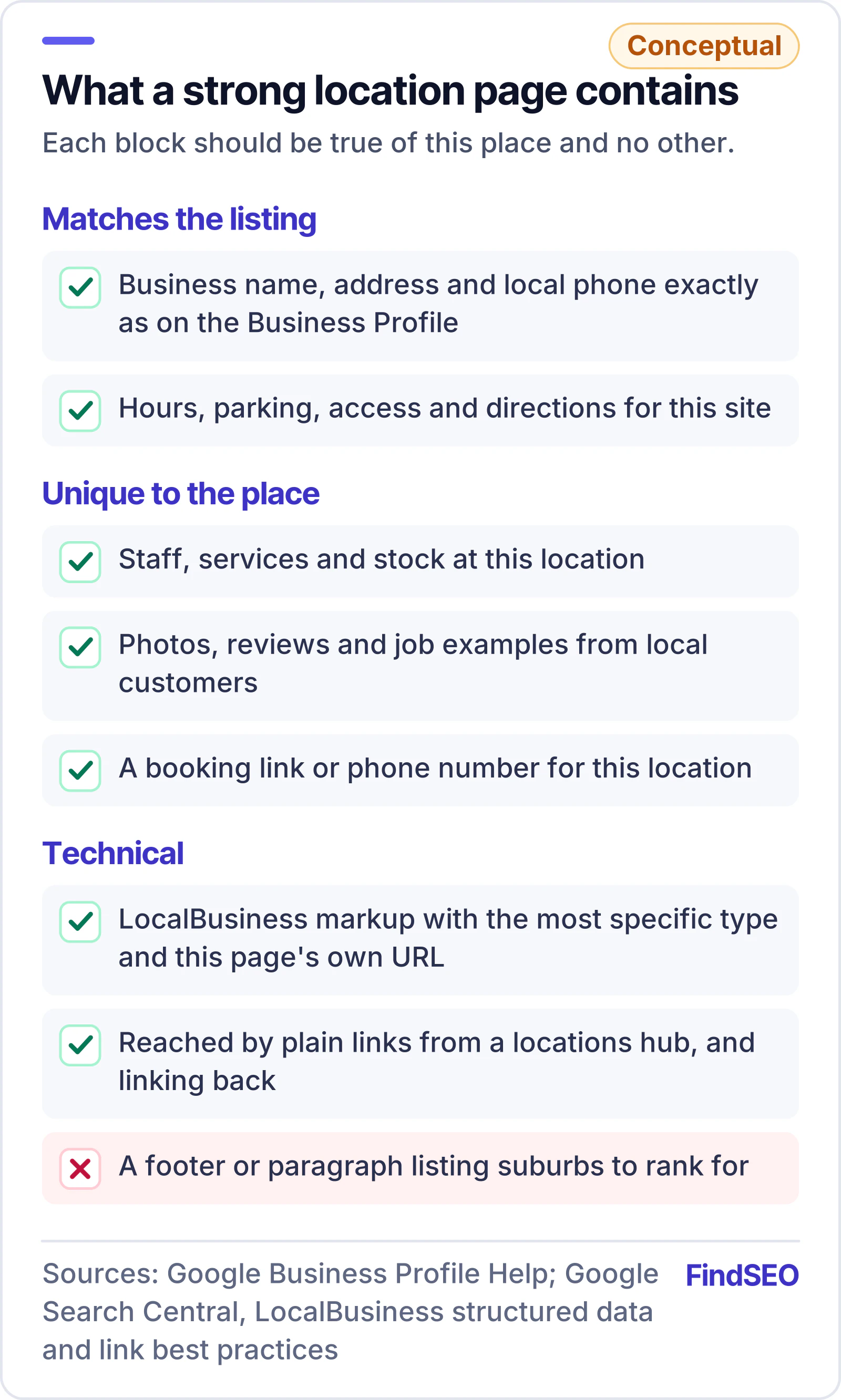
- The exact name, address and local phone number, matching the Business Profile. Google prefers a local number to a central call centre number.
- Opening hours, parking, access and directions that apply to this site only.
- The staff, services and stock at this location, especially where they differ from other branches.
- Local proof, such as photos of the premises, reviews from customers of that branch, and local projects or case studies.
- A clear call to action, with a booking link or phone number for this location rather than a generic contact form.

For a service-area business, focus on the work rather than the map. Explain which suburbs you cover, typical jobs there, response times you can actually meet, local regulations or council rules that affect the work, and examples of completed jobs. If you can't write anything specific about an area, it probably doesn't need its own page yet. A single, well-built service-area page often does better than twenty thin ones, and it avoids keyword cannibalisation between near-identical pages.

How do you mark up and link location pages?
Structured data helps Google read the details on each page. Google's LocalBusiness structured data guide requires a name and address. It says the url should be the fully qualified URL of the specific business location, and that geo coordinates should have at least five decimal places. Use the most specific business type that fits, and test the markup before release. The schema markup glossary entry explains the basics, our structured data basics lesson walks through it step by step, and the free schema generator builds valid LocalBusiness JSON-LD.
Every location page should be reachable through normal links. Google's guide to crawlable links says it can generally only follow <a> elements with an href. A store finder that only shows results after someone types a postcode can hide your location pages from Google. Add a plain locations hub that links to every branch, link each branch back to the hub, and connect related service pages with descriptive anchors. That kind of internal linking is also what separates a browseable hierarchy from an "island" of doorway pages.
How do you check an agency's location page plan?
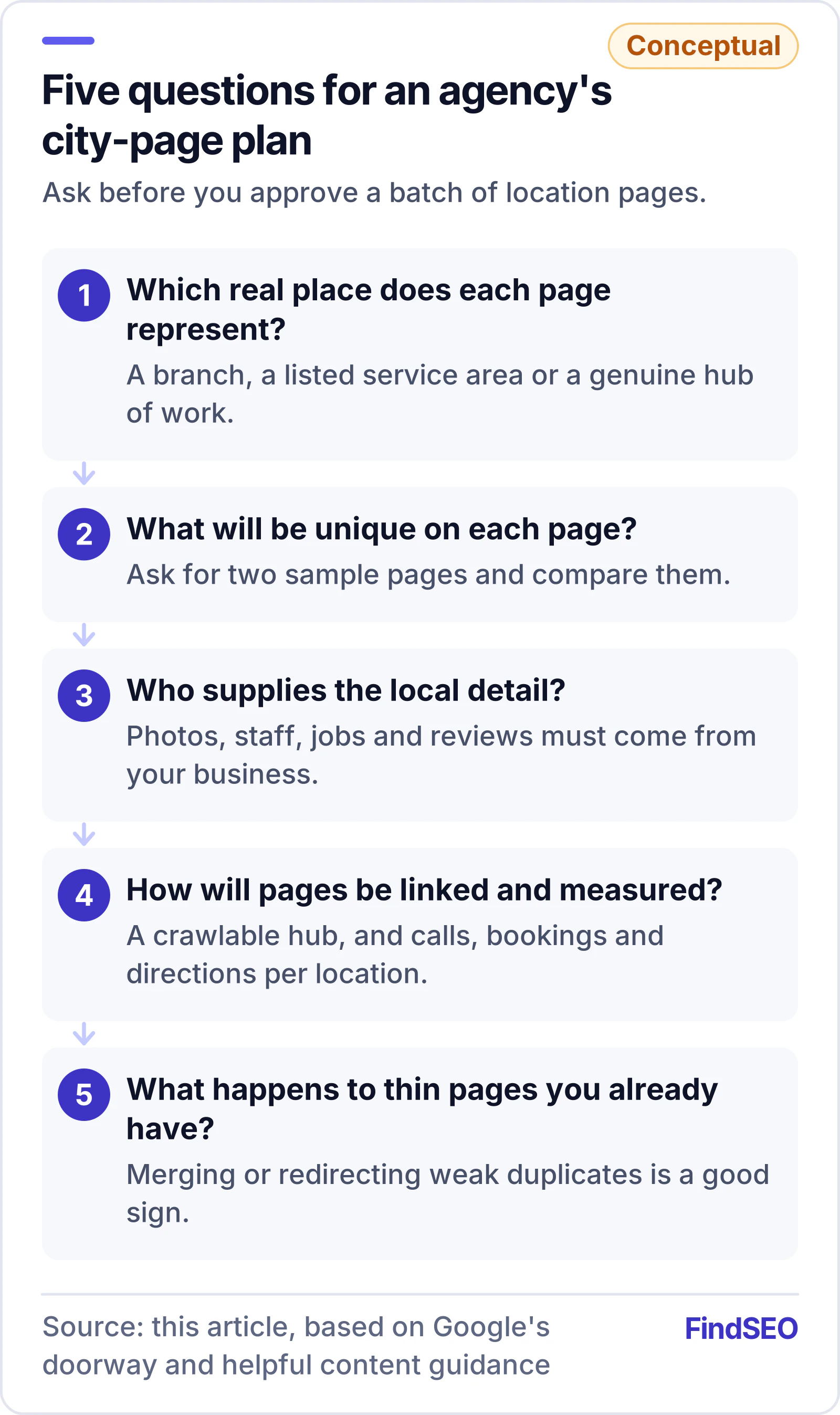
Location pages are one of the most common deliverables in local SEO proposals, and also one of the easiest to pad. Before you approve a plan, ask:
- Which real locations or service areas does each page represent? Every page should map to a branch, a listed service area or a genuine hub of work.
- What will be unique on each page? Ask for a sample page and compare it with a second one. If only the suburb name changes, push back.
- Who supplies the local detail? Good pages need photos, staff names, job examples and reviews from your business. An agency can't invent them.
- How will the pages be linked and measured? Look for a locations hub, crawlable links, and reporting on calls, bookings and direction requests per location, not just rankings.
- What happens to existing thin pages? A plan that merges or redirects weak duplicates is a good sign.
Our article on whether duplicate content hurts SEO explains how Google handles near-identical pages. To put numbers on the outcome, the SEO ROI calculator shows what extra local leads are worth. Specialists in local SEO services can show you location pages they've built for similar businesses, and you can browse Melbourne SEO agencies to compare approaches.
Location page checklist
- Each page represents a real, staffed location or a listed service area.
- Name, address and local phone match the Google Business Profile for that location.
- Hours, directions, parking and access are specific to the location.
- Staff, services, photos, reviews and job examples are unique to the page.
- No footer or paragraph lists suburbs you're trying to rank for.
- LocalBusiness markup uses the most specific type, the location's own URL and precise coordinates, and passes testing.
- A crawlable locations hub links to every page, and each page links back.
- Thin or duplicate city pages are merged, improved or redirected.
- Calls, bookings and direction requests are tracked per location.
The bottom line
Location pages are worth building when they describe real places and real work. They're a risk when they exist only to rank. Start from how your business actually serves customers, give each page details nobody could copy to another suburb, mark it up and link it properly, and judge an agency's plan by the quality of a sample page, not the page count. If you want help planning location pages that hold up, get matched with a local SEO specialist who can show their work.