If your Google Business Profile has been suspended, fix whatever breaks Google's guidelines first, then submit one appeal through Google's appeals tool with documents that prove your business name and address. Google says appeals can be submitted only once, so a rushed appeal on an unchanged profile is the most common way to turn a fixable suspension into a long one. Don't delete the profile and don't create a new one for the same business.
What does a suspended Business Profile mean?
A suspension means Google has found that the profile, or the account managing it, breaks its guidelines for representing your business. Google's page on how to fix suspended or disabled profiles is the official starting point, and the appeals tool shows the decision date, the reason, the policy involved and whether it can be appealed.
For a local business it's serious. Google says that when it removes a profile, the public can't go to it and the owner and managers can't act on it. Your listing is gone from Maps and the local pack until it's reinstated, which is why a suspension can hit enquiries faster than almost any other local SEO problem.
It helps to know which kind of restriction you have:
| What Google restricted | What it means | Where to start |
|---|---|---|
| A single profile | That listing breaks a guideline | Fix the profile, then appeal it in the appeals tool |
| Your Google Account | The account itself is restricted, which can suspend every profile it manages | Appeal the account first on the My accounts page, then the profiles |
| Content only | A rejected edit, photo or review restriction, not the whole profile | Appeal the specific content |
| A disabled profile | Google believes the business doesn't exist or isn't eligible | Usually a deeper problem; read the reason carefully before appealing |
Google's overview of Business Profile policies explains that a pattern of violations can lead to an account restriction. When that happens, every profile you manage is suspended and you can't create or claim others. A restriction on an account you use for another Google product can also lead to a profile suspension.
Why do Google Business Profiles get suspended?
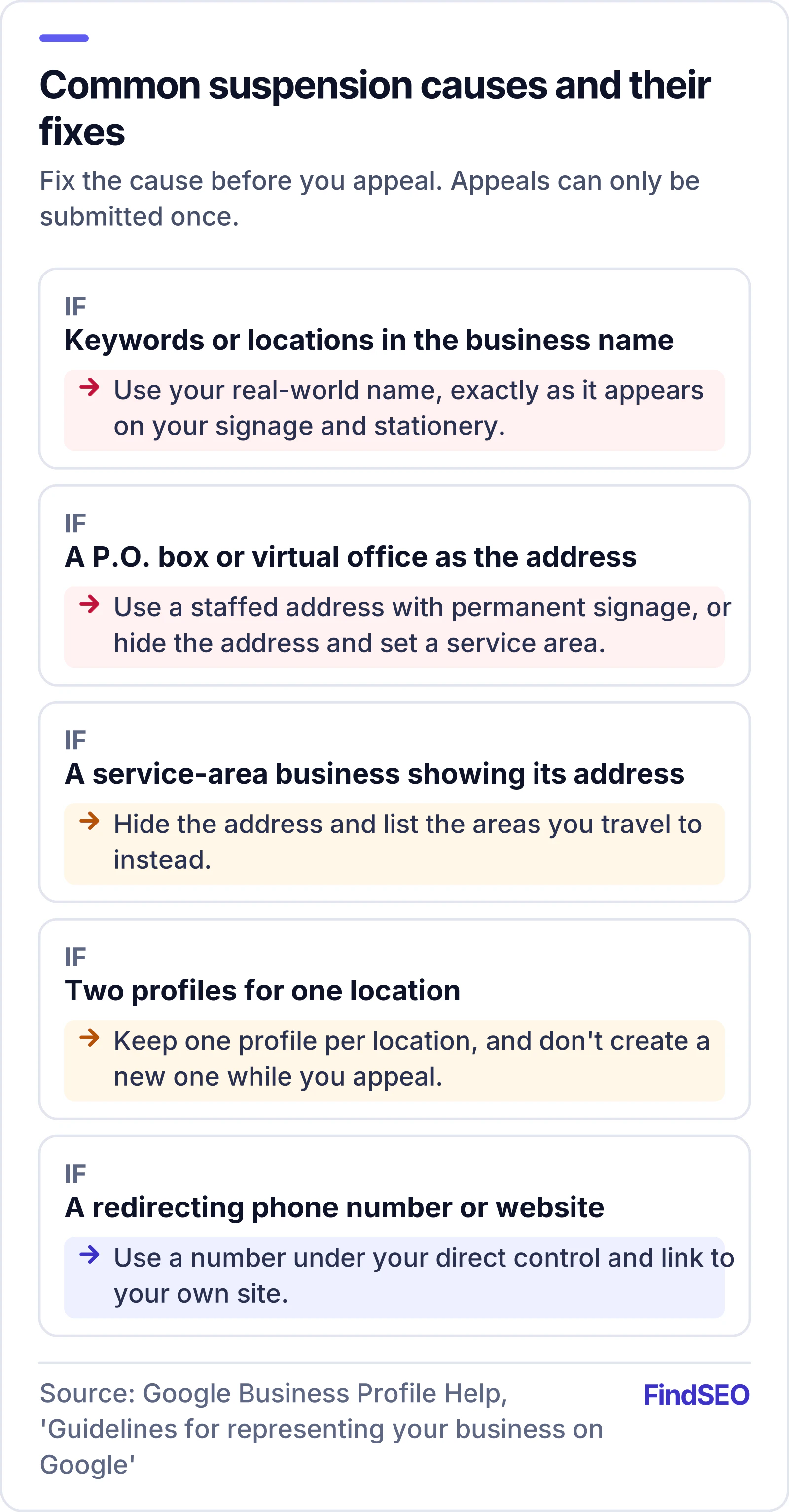
Most suspensions trace back to a handful of guideline breaches. These are the ones Google's guidelines spell out:
- Keywords in the business name. Your name should match your real-world name, as on your signage and stationery. Google says adding unnecessary information, such as service or location keywords, could result in suspension. "Smith Plumbing" is fine; "Smith Plumbing Emergency Plumber Melbourne" is not.
- An address you don't operate from. Google doesn't accept P.O. boxes, and says a virtual office, a rented mailing address you don't operate from, isn't eligible. An office in a co-working space needs clear signage and must be staffed by your business and receive customers during business hours.
- A service-area business showing its address. If you visit customers rather than having them visit you, like a plumber or cleaner, Google says to hide your address and set a service area instead.
- Duplicate profiles. Only one profile is allowed per business location. A second profile for the same place, often created by a staff member or a previous agency, is a common trigger.
- A phone number or website you don't control. Numbers must be under the business's direct control, and redirecting phone numbers or website URLs that don't go to your own business aren't allowed.
- An ineligible business. Google's policy overview says businesses must make in-person contact with customers during their stated hours. Lead generation companies, online-only businesses and rental or for-sale properties aren't eligible.
- Fake engagement. Buying reviews, rewarding customers for them or asking only happy customers breaks Google's rules on fake engagement, and can lead to a profile restriction for fake engagement rather than a full suspension.
Suspensions can also follow sudden changes. Google's policy overview notes that edits which change a business's identity may be rejected, and that some changes, such as a major rebrand or a venue relocating, need the old profile closed and a new one created rather than an edit.
How do you fix the problem before appealing?
Google is direct about this: make sure your profile follows the guidelines before you request reinstatement. Work through it in this order:
- Read the reason in the appeals tool. It names the policy involved. Start there rather than guessing.
- Clean up the business name. Remove keywords, locations, taglines and phone numbers so it matches your signage and registration.
- Check the address. Use a real, staffed address with permanent signage, or hide the address and set a service area if you go to customers.
- Remove duplicates you control. If you created two profiles for one location, don't create a third while you wait.
- Check phone and website. Use a number you control and link to your own website, not a tracking redirect or a third-party page.
- Trim the categories. Use as few as possible to describe your core business, and remove links and promotions from the description.
- Check who has access. Our guide to what an SEO contract should include explains why you should stay primary owner and give agencies manager access.

Google's guide to owners and managers says each person needs their own Google Account and shouldn't share passwords.
What evidence should you include?
Google asks for evidence that the business is real, located where you say and run by you. Its examples include an official business registration, a business licence, tax certificates and utility bills such as electricity, phone, water or internet. The name and address on your documents need to match the profile.
For an Australian business, useful documents include:
- Your Australian Business Number (ABN) record, which anyone can check on the government's ABN Lookup
- Your business name registration, if you trade under a name other than your own (business.gov.au explains how business names are registered)
- A recent utility bill or lease in the business name at the profile's address
- Any trade or business licence your industry needs
- Photos of permanent signage at the premises, showing the street number if you can
Business.gov.au notes that your registered business name must be visible to the public wherever you do business, and Google says permanent, fixed signage is required if you show an address. A clear photo of your shopfront with the signage and street number helps prove both.

How does the appeal process work?
Once the profile is fixed and your documents are ready:
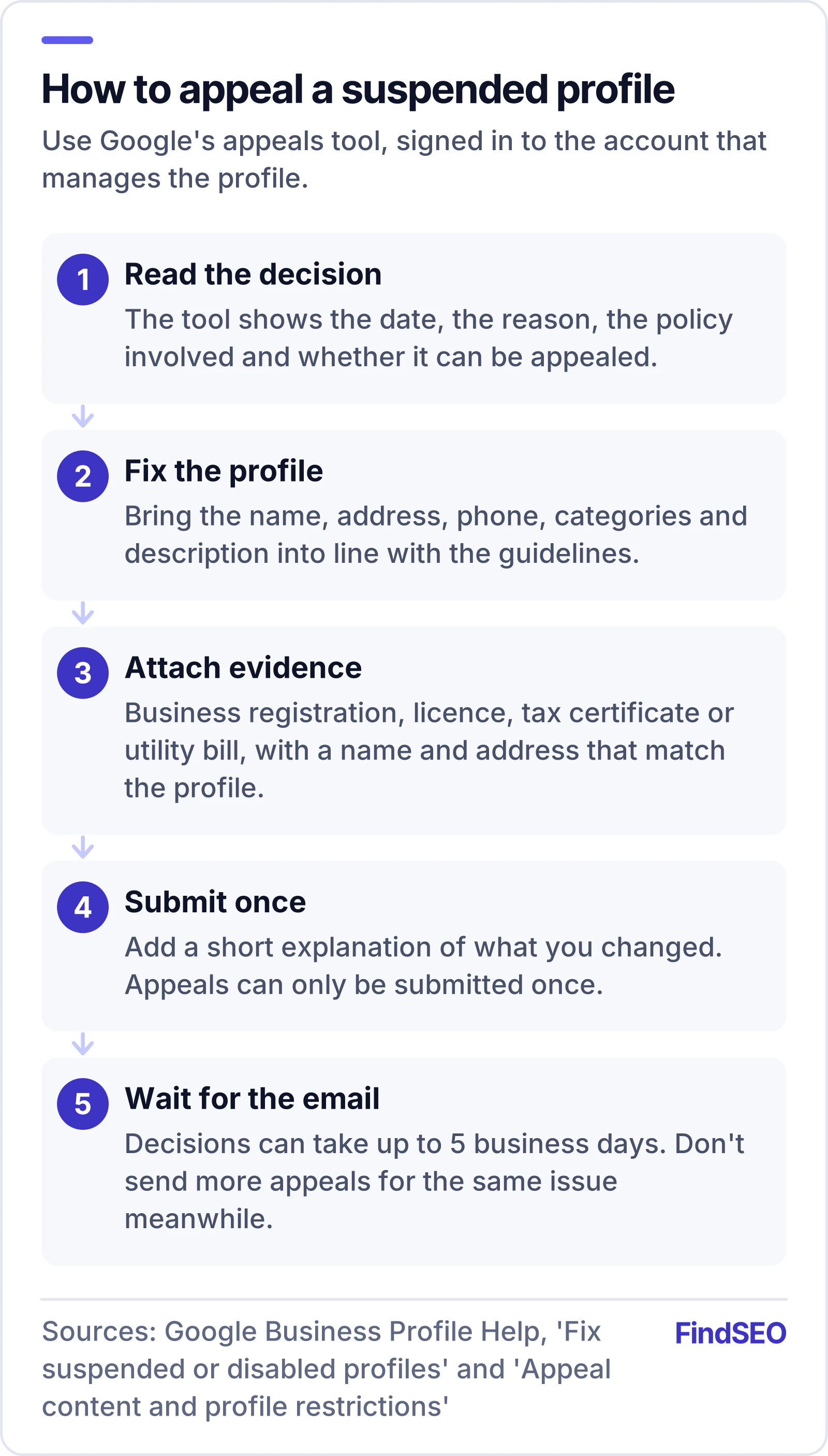
- Open the appeals tool while signed in to the Google Account that manages the profile.
- Check the decision. Confirm the reason and that the profile is eligible for appeal.
- Upload your evidence and add a short, factual explanation of what you changed.
- Submit once. Google says appeals can only be submitted once.
- Wait for the email. Google's page on appealing content and profile restrictions says appeal reviews and decisions can take up to 5 business days, and asks you not to submit multiple appeals for the same issue before you get a decision.
- Check the status in the appeals tool: Submitted, Approved, Not approved, Can't be appealed or Eligible for appeal.
If you manage more than 10 profiles, Google offers bulk reinstatement using a spreadsheet of Business Profile IDs instead of appealing one at a time.
What if your appeal is rejected?
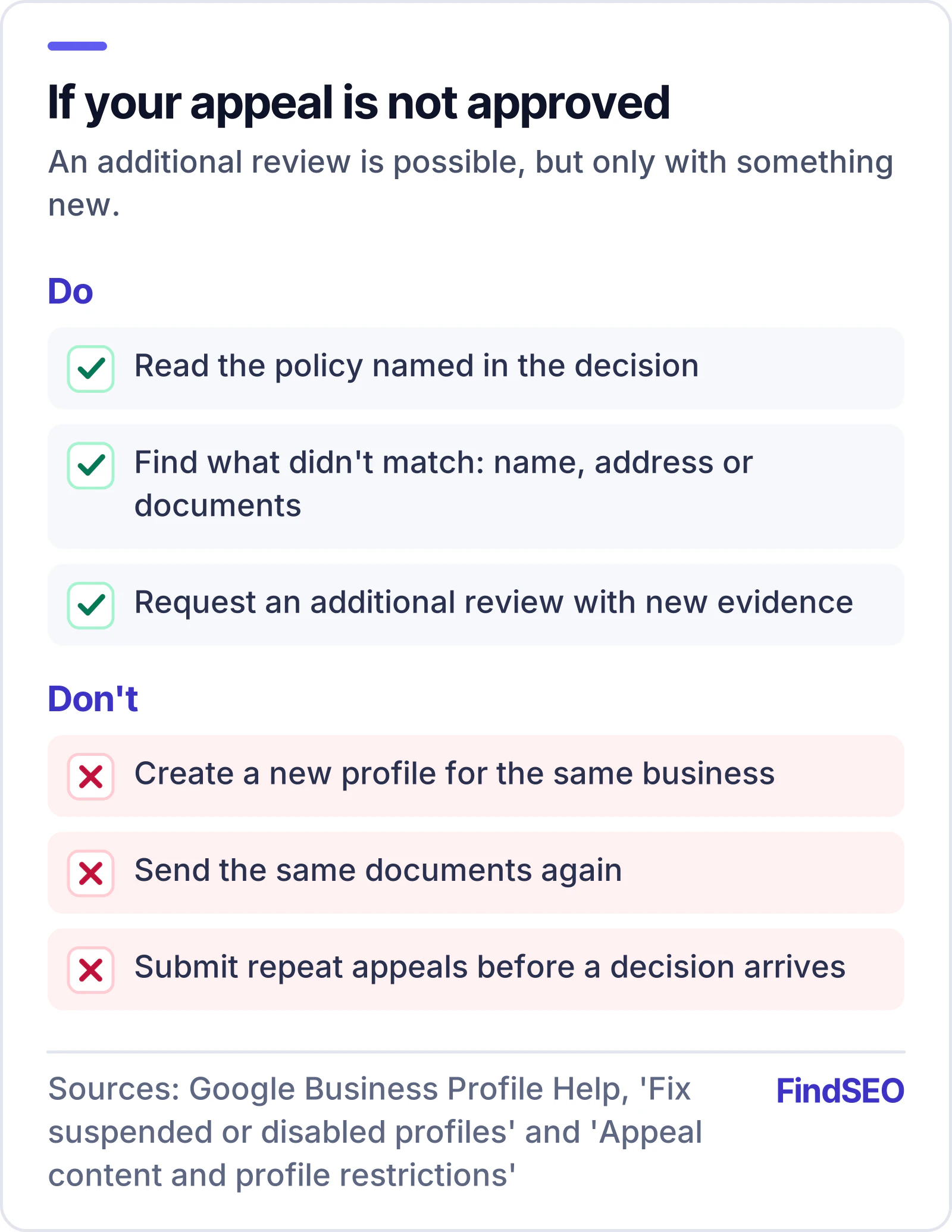
A "Not approved" decision isn't always the end. Google says you can request an additional review after a denial, but only if you have new evidence to submit. Use the time to find what was missing: a document in the wrong name, an address that doesn't match, or a guideline breach you didn't spot. Google adds that businesses in the European Economic Area may have additional redress options.
If the decision says the profile can't be appealed, Google has decided the business isn't eligible as it stands. Read the policy named in the decision before doing anything else. Opening a new profile for the same business breaks the one-profile-per-location rule and can make things worse.
How do you avoid another suspension?
Most repeat suspensions come from the same habits as the first. Treat these as standing rules:
- Keep the profile honest. Real name, real address or service area, real hours. Our guide to how Google ranks local results explains why relevance comes from complete, accurate details, not keywords in the name.
- Earn reviews the allowed way. Ask every customer the same way, with no rewards and no filtering. See how to get more Google reviews without breaking the rules.
- Plan big changes. Get advice before you rebrand, move or merge locations, since those changes can need a new profile.
- Match your website. Use the same name, address and phone on your site, and describe them with LocalBusiness markup from our Schema Generator.
- Avoid shortcuts. Any provider who promises map rankings with keyword-stuffed names or bought reviews is selling the tactics that get profiles suspended. Our Academy lesson on Search Essentials and spam policies explains how Google treats manipulation, and our guide to fake SEO guarantees covers the sales pitch.
A suspension recovery checklist
- Reason and policy noted from the appeals tool
- Account restriction appealed first, if there is one
- Business name matches signage and registration, with no keywords
- Real, staffed address with permanent signage, or address hidden for a service-area business
- No duplicate profiles for the same location
- Phone number and website under your direct control
- Fewest possible categories; no links or promotions in the description
- Every user on their own Google Account, with you as primary owner
- Registration, licence and a utility bill in the business name at the profile address
- Shopfront signage photo ready to upload
- One appeal submitted, then up to 5 business days for a decision
- No new profile created while you wait
The bottom line
A suspension is Google telling you something on the profile, or the account behind it, breaks its guidelines. Find the reason, fix it properly, gather documents that match the profile, and appeal once. Once you're back, protect the profile with honest details and allowed review requests. If local search drives your enquiries, use the SEO ROI calculator to see what a week offline costs, and check your site's strength with the Page Authority Checker. For help, browse local SEO agencies in Australia, start with local SEO agencies in Melbourne, or use Get matched to find a specialist.