How to Do SEO for an Online Store: What Google Recommends
Google's own ecommerce guidance in plain English: site structure, product and category URLs, filters, pagination, structured data and Merchant Center feeds.
SEO for an online store comes down to three jobs. First, make sure Google can reach every product by following ordinary links from your menu to your categories to your product pages. Second, stop filters, sort orders and tracking parameters from turning a few hundred products into a near-endless set of duplicate URLs. Third, describe each product clearly, both in the visible page and in Product structured data, and consider sending the same data through a Google Merchant Center feed. Do those well and the rest (useful category copy, good photos, reviews and links) has a solid base to build on.
This guide works through Google's own ecommerce documentation, so you can brief a developer or check an agency's plan against what Google actually says.
How does Google find the products in an online store?
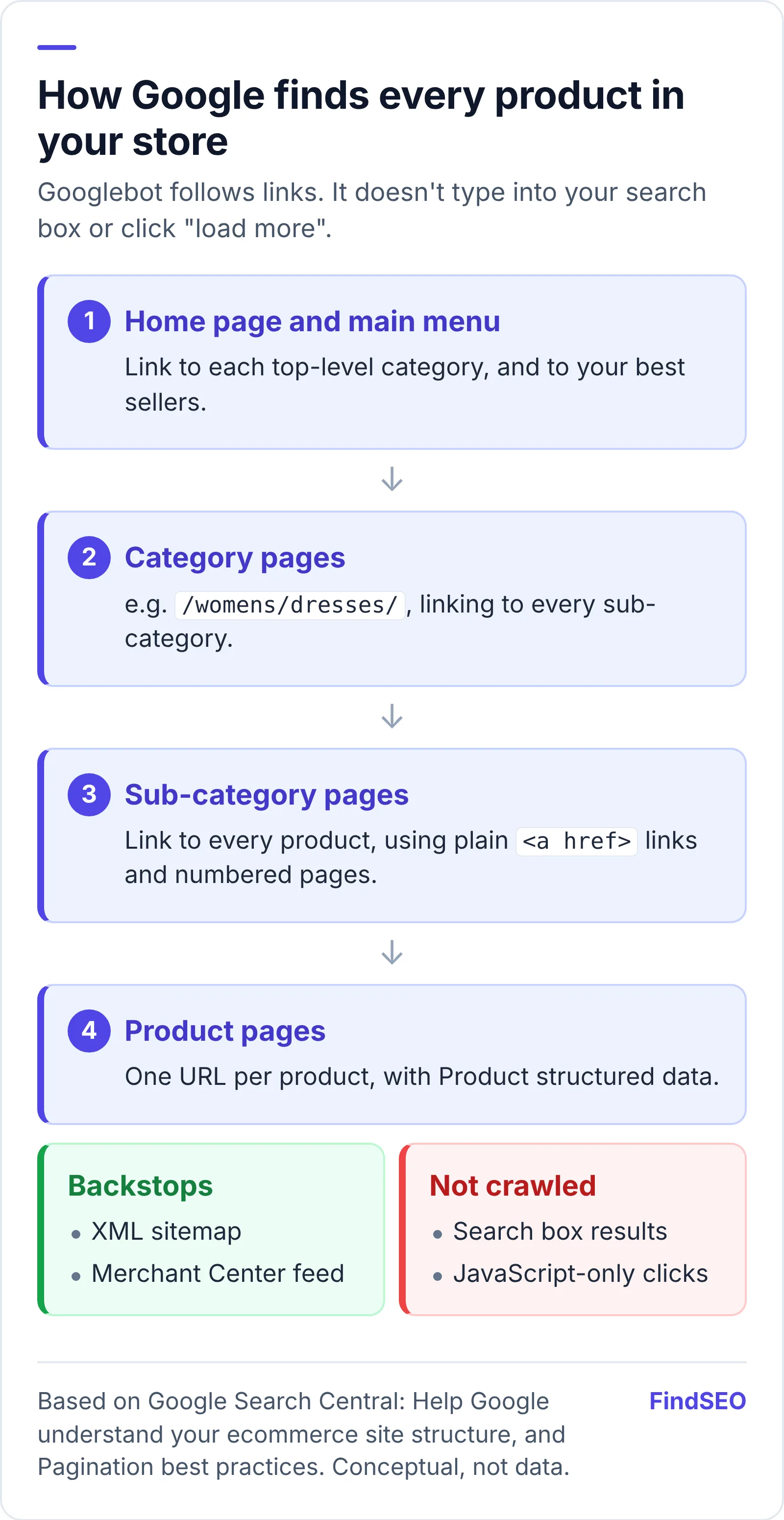
By following links. Google's guide to helping it understand your ecommerce site structure says it looks at how pages link to each other, including how many links it has to follow to reach a page and how many links point to it, to judge which pages matter most. It recommends links from menus to category pages, from categories to sub-categories, and from sub-categories to every product.
Two details trip stores up:
Products that are only reachable through your search box. Google says Googlebot "generally doesn't try to submit searches into a search box". If a product isn't linked from a category page, it may never be found by crawling.
Navigation built from JavaScript events. Google asks for real <a> links rather than click handlers on other elements. Our guide to whether JavaScript is bad for SEO explains why that matters for crawling and rendering.
Where you can't link to everything, Google suggests an XML sitemap or a Merchant Center feed as a backstop. Our article on whether you need an XML sitemap covers when a sitemap earns its keep.
Googlebot follows links from menu to category to product. Based on Google Search Central: Help Google understand your ecommerce site structure, and Pagination best practices.
How should you organise categories and internal links?
Google is clear that the shape of your URLs isn't how it works out your site's structure. The same guide says it "generally doesn't look at the structure of URLs" and instead reads the links between pages: as a general rule, the more internal links a page has, the more important it looks relative to your other pages.
That makes your menus, category pages and cross-links an SEO decision, not just a design one:
Group products the way shoppers search. Category and sub-category names should match the words people use, which is a search intent question as much as a merchandising one.
Link to your best sellers from strong pages. Google's own example is linking a best-selling product from the home page, blog posts or newsletters.
Give each category a job. Two categories targeting the same phrase compete with each other, a problem known as keyword cannibalisation.
Use descriptive anchor text. Google's URL guide asks for meaningful link text, such as the product's name, rather than "click here".
If you're on an established ecommerce platform, Google's URL structure guide for ecommerce sites says you can most likely skip this part, because the platform has probably handled it. If you're building your own, or customising heavily, its main points are:
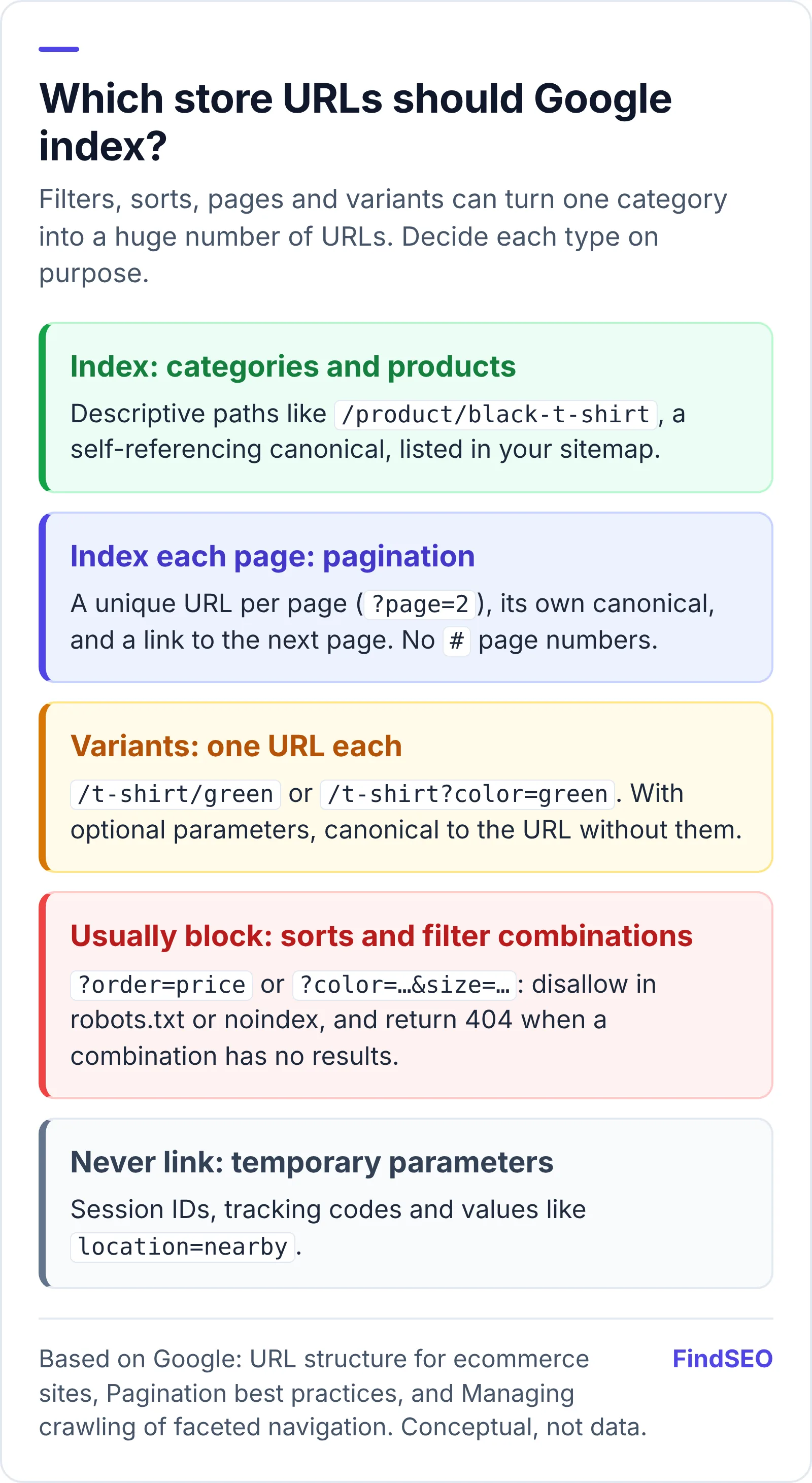
Use descriptive words./product/black-t-shirt-with-a-white-collar rather than /product/3243.
Don't use fragments to show different content. Google doesn't use the part after # in indexing, so /product/t-shirt#black and /product/t-shirt#white count as one page.
Use key=value parameters./t-shirt?color=green, not /t-shirt?green.
Keep temporary values out of internal links. Session IDs, tracking codes and relative values like location=nearby create short-lived or duplicate URLs.
Give every product variant its own URL. A path such as /t-shirt/green or a parameter such as /t-shirt?color=green both work. If the variant parameters are optional, Google recommends the URL without them as the canonical.
Be consistent everywhere. Google asks that the same URL appear in internal links, sitemaps and canonical tags, and that every indexable page carries a self-referencing canonical. Our guide to what canonical tags are explains how Google treats them as a strong hint, and our article on whether duplicate content hurts SEO explains why near-identical variant pages are rarely a penalty risk.
URL type
Google's recommendation
Product
One descriptive URL, self-referencing canonical, in your sitemap
Variant
Its own path or parameter; canonical to the base URL if the parameter is optional
Paginated category
A unique URL per page, each with its own canonical
Sort order or filter combination
Keep out of the index with noindex or robots.txt
Empty category
noindex, or a 404 if the category has been removed
How should you handle filters, sorting and pagination?
Filters are where online stores most often create crawling problems. Google's page on managing faceted navigation warns that parameter-based filters can generate "infinite URL spaces", which leads to overcrawling and slower discovery of the new pages you actually care about. That's a crawl budget problem, and it grows with every filter you add.
Google offers two paths:
If you don't need filtered URLs in search, stop them being crawled. Its preferred method is a robots.txt disallow rule for the filter parameters, keeping the individual product pages and an unfiltered listing crawlable. Our guide to creating a robots.txt file shows the syntax. Google says canonical tags and nofollow links are generally less effective for this in the long term.
If some filtered pages deserve to rank, make them clean. Use the standard & separator, keep filters in the same order every time, and return a real 404 status when a combination has no results, rather than redirecting to a generic error page.
Decide each URL type on purpose. Based on Google Search Central: URL structure for ecommerce sites and Pagination best practices, plus Google's guide to managing crawling of faceted navigation.
For long categories, Google's pagination and incremental loading guide says its crawlers don't click buttons and generally don't trigger JavaScript that needs a user action. So "load more" and infinite scroll need crawlable links behind them. Its pagination rules:
Link each page to the next one with ordinary <a href> links, and consider linking every page back to page one.
Give each page a unique URL, such as ?page=2.
Don't point every page's canonical at page one. Each page gets its own.
Don't rely on rel="next" and rel="prev". Google says it no longer uses them, though other search engines may.
Keep sort orders such as ?order=price out of the index with noindex or robots.txt.
Not sure whether a key category or product is in Google's index? Our free Google index checker runs the common indexability checks in one go.
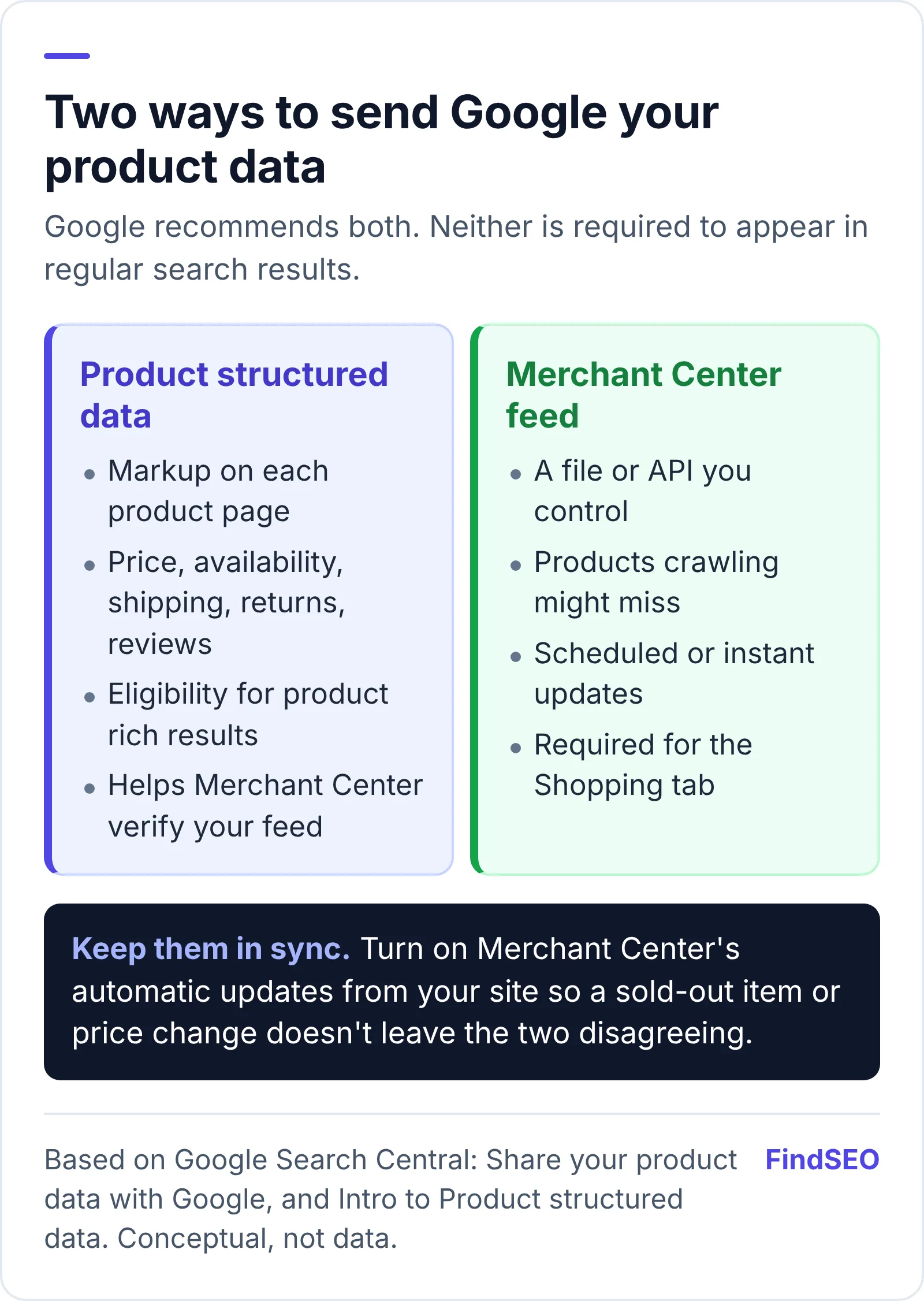
Product structured data on each page. Google says it isn't required to appear in results, but it increases eligibility for product rich results and helps Google read details like price, discounts and shipping costs accurately. The introduction to Product structured data separates two types: merchant listings, for pages where people can buy from you, and product snippets, for pages such as editorial reviews where they can't. It also recommends return policy and loyalty program markup nested under your Organization. Our Academy lesson on structured data basics explains how schema markup works.
A Merchant Center feed. Google says uploading product data isn't mandatory for search results, but it's required for the Shopping tab, and feeds let you push updates on your own schedule, include products crawling might miss, and share details that aren't on your site, such as store-level stock.
Structured data and a Merchant Center feed do different jobs. Based on Google Search Central: Share your product data with Google, and Intro to Product structured data.
The two can drift apart. Google notes that a sold-out product may update on your site straight away but lag in a feed, and suggests letting Merchant Center automatically update its copy from your website when it spots a mismatch.
How do you make product and category pages worth ranking?
Google's structure guide ends with the point that matters most: "The ultimate ecommerce SEO best practice is to create useful and interesting content that is valuable to users." For a store, that usually means:
Product pages that answer buying questions. Sizes, materials, compatibility, delivery and returns, written for your customer rather than pasted from a supplier sheet.
Category pages with a short, useful introduction that helps shoppers choose, above a fully linked product grid.
Original photos with descriptive alt text. Our guide to image SEO covers file names, alt text and image sitemaps.
Empty categories handled properly. Google's URL guide says to noindex a category with no items, or return a 404 if it's been removed.
Seasonal demand matters too. If you sell into peak periods, our Australian sale calendar shows when to have category pages ready. To work out whether the effort pays, try our SEO ROI calculator.
Ecommerce SEO checklist
Every product is linked from at least one category page with a plain <a href> link.
Best sellers are linked from the home page or other strong pages.
Product and category URLs are descriptive, lowercase and consistent everywhere.
Each variant has its own URL, with a canonical to the base URL if parameters are optional.
Filter and sort URLs you don't want indexed are blocked in robots.txt or noindexed.
Filter combinations with no results return a 404.
Each paginated page has a unique URL, its own canonical and a link to the next page.
Product pages carry merchant listing structured data, and your return policy is marked up.
A sitemap or Merchant Center feed lists the products you want found.
Empty categories are noindexed or return a 404.
The bottom line
Google's ecommerce advice isn't exotic. Link to everything you sell, keep the number of URLs under control, describe your products clearly in the page and the markup, and make pages genuinely useful to someone choosing what to buy.
Do I need structured data for my products to appear in Google?
No. Google says structured data isn't required to appear in search results. It increases eligibility for product rich results and helps Google understand details like price, availability and shipping more accurately.
Do I need Google Merchant Center for SEO?
Not for regular search results. Google says uploading product data to Merchant Center isn't mandatory to appear in Search, but it is required for listings in the Shopping tab, and a feed can help Google find products that crawling misses.
Should filtered category pages be indexed?
Usually not. Google recommends blocking crawling of faceted navigation URLs you don't need in search, for example with robots.txt. If some filtered pages deserve to rank, keep their URLs clean and consistent and return a 404 when a combination has no results.
Should paginated pages canonicalise to page one?
No. Google says each page in a paginated sequence should have its own URL and its own canonical, rather than pointing to the first page. It no longer uses rel next and prev to understand the sequence.
Does my ecommerce platform already handle URL structure?
Probably. Google's URL structure guide says that if you use an ecommerce platform you can most likely skip it, because the platform has already considered these issues. Custom builds and heavy customisation are where problems usually start.
Branded searches come from people who already know you. Non-branded searches show new customers finding you. How to split the two in Search Console and read them.
Connect your website in Google Ads Goals, create URL or code conversion actions, set Primary and Secondary, and test the tag so bidding can use real results.
How to find the cause of a Google traffic drop: rule out reporting glitches, technical faults, penalties, ranking updates and seasonality before you change anything.