SEO strategy

Branded vs Non-Branded Search Traffic: Which One Shows SEO Is Working?

Branded searches come from people who already know you. Non-branded searches show new customers finding you. How to split the two in Search Console and read them.

FindSEO7 min read

A yellow road sign with a double-headed arrow pointing left and right stands in flat desert scrub, with mountains on the horizon under a clear sky.

Photo: Pablo Garcia Saldaña / Wikimedia Commons (CC0)

In this article
  1. What counts as a branded search?
  2. Why does the split matter when you judge SEO?
  3. How do you separate branded and non-branded traffic in Search Console?
  4. What if you can't use the branded filter?
  5. What changed in November 2026?
  6. How should you read the numbers?
  7. What should you ask your SEO agency?
  8. Branded vs non-branded checklist
  9. The bottom line

Branded searches include your business name. Non-branded searches don't. If you want to know whether SEO is bringing in new customers, watch the non-branded numbers. Google puts it plainly in its announcement of the branded queries filter: branded queries typically lead to higher-ranking pages and higher click-through rates, while non-branded queries "offer organic growth," because they show how new users find your content. Search Console now separates the two for you, and since 16 November 2026 its API does too, so there's little excuse for a report that lumps them together.

This guide explains what counts as branded, how to split your traffic, how to read the results, and what to ask your agency.

Google's definition is broader than "searches with your name in them." A branded query includes your brand name, variations and misspellings of it, and searches for products or services unique to you. Google's own example is that "Gmail" counts as a branded query for google.com. Everything else is non-branded.

Here's how that looks for an imaginary Geelong business called Brightwater Plumbing:

Search Branded or non-branded? Why
brightwater plumbing Branded The business name
brightwatter plumbing geelong Branded A misspelling of the name, plus a location
brightwater hot water service Branded The name with a service, from someone who already knows them
blocked drain geelong Non-branded No name: the searcher hasn't chosen a plumber yet
how to fix a leaking tap Non-branded A question anyone could answer

The Search Console Help guide to common tasks sums up the difference: branded traffic "often comes from users already familiar with your site, while non-branded traffic can indicate new audience growth."

Why does the split matter when you judge SEO?

Because the two kinds of search respond to different things. People search your name after they've seen a billboard, heard about you from a friend, clicked an ad or bought from you before. Good SEO helps you show up properly for those searches, but it rarely creates them. Non-branded searches are where a site competes with every other business for people who haven't decided yet, and that's where SEO work shows up.

Mixing them hides what's happening. A TV campaign or a busy sale season can lift total organic traffic while non-branded clicks quietly fall. The reverse happens too: a quiet month for brand demand can make solid SEO progress look flat. Branded clicks also tend to have a much higher click-through rate, so a blended figure can make CTR look healthy when your non-branded listings aren't earning clicks.
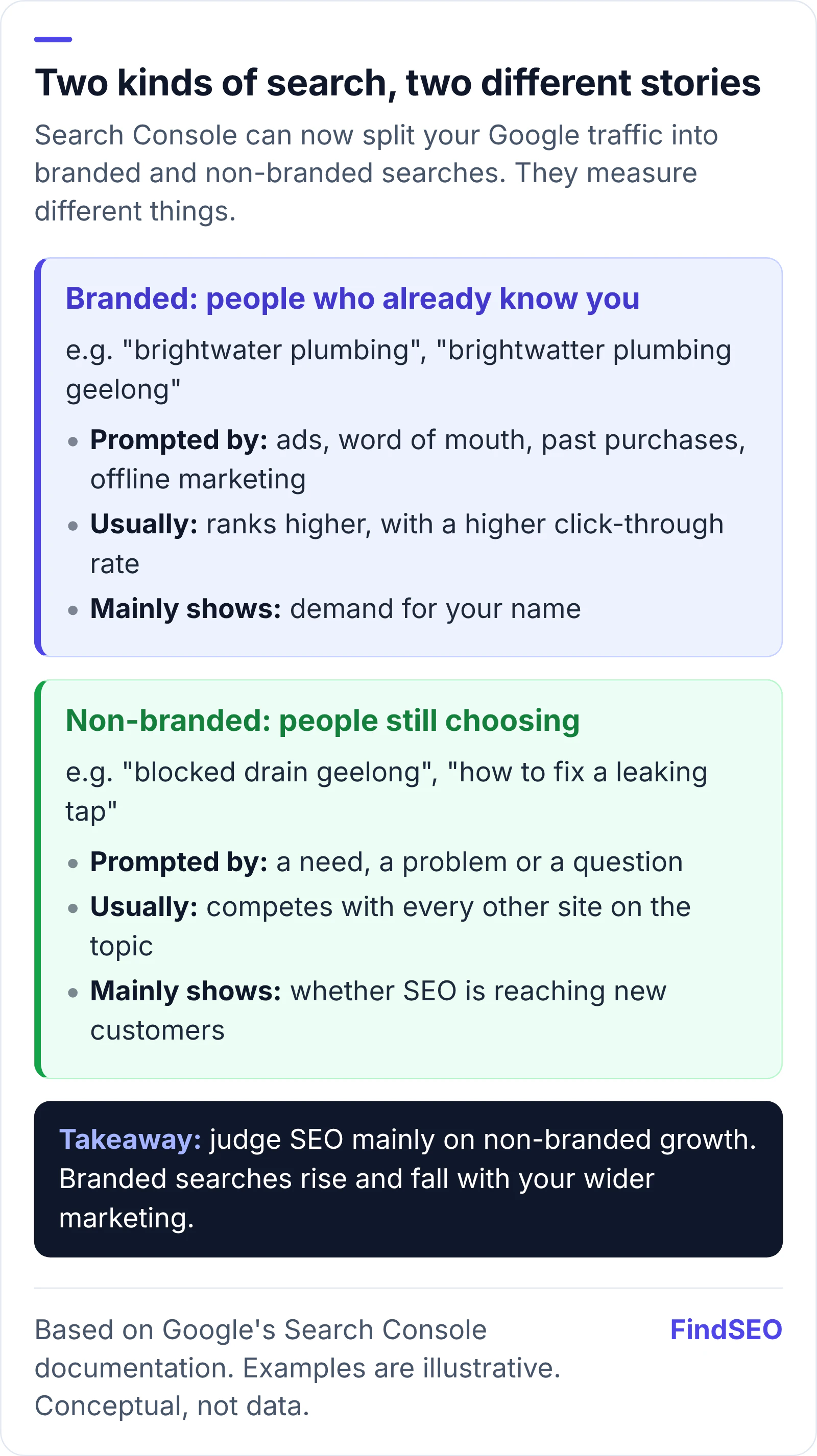
Explainer comparing branded and non-branded searches. Branded searches come from people who already know you, prompted by ads, word of mouth, past purchases and offline marketing; they usually rank higher with a higher click-through rate, and mainly show demand for your name. Non-branded searches come from people who haven't chosen a business yet; they compete with every other site for the topic, and show whether SEO is reaching new customers. The takeaway: judge SEO mainly on non-branded growth.
Branded searches mostly measure demand for your name. Non-branded searches show whether SEO is reaching new people. Based on Google's Search Console documentation. Conceptual, not data.

That's why our guide to measuring SEO ROI suggests separating the two before you credit SEO with any growth, and why our Academy lesson on setting SEO goals and KPIs favours targets built on non-branded performance.

How do you separate branded and non-branded traffic in Search Console?

Use the built-in filter in the Performance report. If you haven't set up Google Search Console yet, start with our guide to setting up Google Search Console.

  1. Open the Search results Performance report. Pick a date range of at least three months, and compare it with the same period last year so seasonal swings don't mislead you.
  2. Add the Query filter and choose Branded or Non-branded. The metrics (clicks, impressions, CTR and average position) then cover only that group. Google says it works for web, image, video and news search.
  3. Check the Insights card. Search Console Insights shows how your total clicks break down between branded and non-branded searches.
  4. Look at the queries tab for each group. Scan the non-branded list for the services and topics you want to win, and the branded list for anything misclassified.

Know the limits. The dimensions guide says the filter isn't available for sites with low impressions, and its data starts in March 2025. It only works on top-level properties, not URL-path or subdomain properties. Google also says the classification comes from an internal automated system rather than a keyword list, so some queries may be misidentified, and that the labels have no effect on rankings.

A laptop on a white desk showing pie charts, line graphs and icons on a dark screen, beside a metal mug, sticky notes and loose papers.
The branded filter turns one blended traffic line into two that tell different stories. Photo: rawpixel, CC0, via Wikimedia Commons.

What if you can't use the branded filter?

Build your own split with a regular expression. Google suggested exactly this in its post on regex filters, using the example of a company called Willow Tree:

willow tree|wilow tree|willowtree|willowtee

In the Performance report, add a Query filter, choose Custom (regex), paste your pattern and pick Matches regex for branded or Doesn't match regex for non-branded. Google's guide to advanced filtering says matching uses RE2 syntax, isn't case-sensitive, and matches anywhere in the query unless you anchor it.

Two cautions. First, keep your list of name variants up to date, including product names and common typos you find in the queries table. Second, totals won't add up neatly. Search Console leaves out anonymized queries (rare searches hidden for privacy) once any query filter is applied, so your branded and non-branded figures together will usually come to less than the unfiltered total. Larger sites can get a fuller picture from the bulk data export to BigQuery, where Google's sample queries include one that splits impressions and clicks by whether the query contains your brand.

What changed in November 2026?

On 16 November 2026 Google brought the branded split to the Search Analytics API. Tools and dashboards can now group or filter by a brandedClassification dimension instead of maintaining keyword lists. As in Search Console, it only works for eligible properties: for others, Google says the response won't include any rows. The same update added filters for several countries or devices in one request, and a new search type covering Google Lens, Circle to Search and image uploads. The API reference lists the supported values.

For anyone buying SEO, the practical change is simple: an agency's automated reports can now show branded and non-branded clicks side by side using Google's own classification. If yours doesn't, ask why.

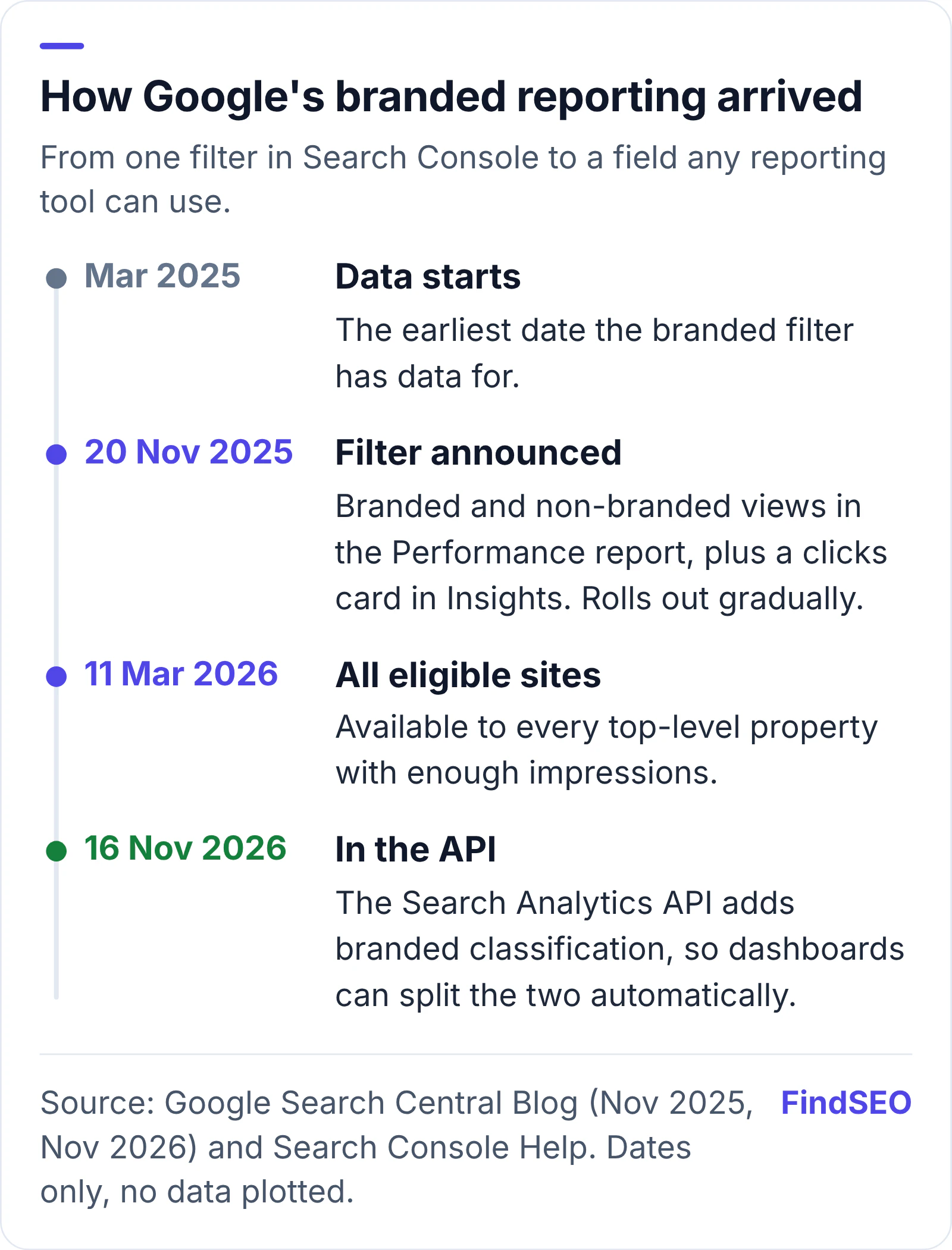
Timeline of Google's branded queries reporting. March 2025: the earliest date the branded filter has data for. 20 November 2025: Google announces the branded queries filter in the Search Console Performance report, plus a branded versus non-branded clicks card in Insights, rolling out gradually. 11 March 2026: the filter is available to all eligible sites. 16 November 2026: the Search Analytics API adds branded classification, so reports and dashboards can split the two automatically.
From a filter in one report to an API field any reporting tool can use. Source: Google Search Central Blog (November 2025 and November 2026) and Search Console Help. Dates only, no data plotted.

How should you read the numbers?

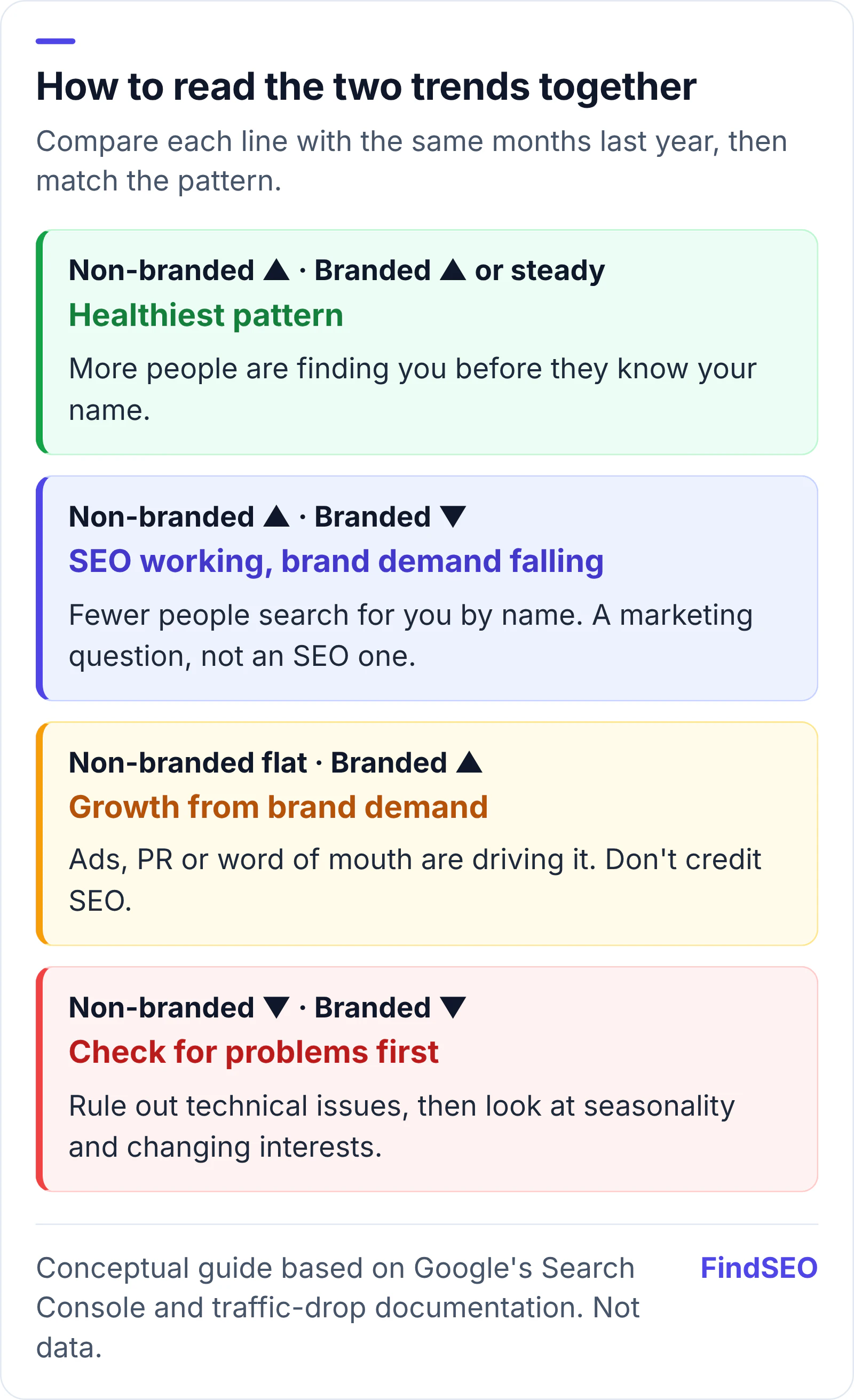
Look at both lines together, over months rather than weeks. The combinations usually mean different things:

  1. Non-branded up, branded steady or up. The healthiest pattern: more people are finding you before they know your name.
  2. Non-branded up, branded down. SEO is working, but fewer people are looking for you by name. That's usually a marketing or demand question, not an SEO one.
  3. Non-branded flat, branded up. Growth is coming from brand demand, such as advertising, PR or word of mouth. Don't credit SEO for it.
  4. Both down. Check for technical problems first. Google's guide to debugging traffic drops also points to changing interests and seasonality, which Google Trends can help you spot. Our guide to diagnosing a Google traffic drop walks through the order of checks.
Two-by-two guide to reading branded and non-branded search trends. Non-branded up with branded steady or up: the healthiest pattern, as new people find you. Non-branded up with branded down: SEO is working, but demand for your name is falling, which is a marketing question. Non-branded flat with branded up: growth is coming from brand demand such as ads, PR or word of mouth, so don't credit SEO. Both down: check for technical problems, then seasonality and changing interests.
Read the two trends together, compared with the same months last year. Conceptual guide based on Google's Search Console documentation. Not data.

Then connect the clicks to results. If you link Search Console to Google Analytics, you get Google Organic Search Queries and Google Organic Search Traffic reports, which show how landing pages from search lead to enquiries and sales. Our guide to what an SEO report should include covers how to tie it together, and our SEO ROI calculator helps you put a value on non-branded growth.

One more trap: paid search. If you run Google Ads on your own name, those clicks come from people who were already looking for you. Google Ads lets you keep generic campaigns off searches for chosen brands with brand exclusions, which keeps the two channels easier to compare. Our guide to SEO or Google Ads first explains how the two fit together.

What should you ask your SEO agency?

At an outdoor cafe table, a bearded man in a suit and red tie works on a laptop while the woman beside him checks notes in a folder.
Ask for branded and non-branded results side by side at every review, not just a single traffic total. Photo: rawpixel.com, CC0, via Wikimedia Commons.

A good agency will welcome these questions. Add them to the ones in our guide to questions to ask an SEO agency:

  1. Do your reports split branded and non-branded traffic? And do they use Google's filter or their own list of name variants?
  2. Are our targets based on non-branded growth? Promises about total traffic are easy to meet when brand demand rises for other reasons.
  3. Which non-branded searches are you trying to win, and why? The answer should match the services you sell and the places you serve.
  4. How will you separate SEO results from our other marketing? Ads, PR and seasonal sales all move branded numbers.
  5. What will you compare against? The same months last year is fairer than last month for most businesses. Our guide to how long SEO takes sets realistic timeframes.

Our Academy lesson on working with your agency covers how to run those reviews. To size up competitors for the non-branded searches you want, the free page authority checker gives a quick read on how strong their pages are.

Branded vs non-branded checklist

  • Search Console is verified as a top-level property, not a URL-path or subdomain property.
  • You've checked whether the branded queries filter is available.
  • If not, you have a regex covering your name, misspellings and unique products.
  • Reports show branded and non-branded clicks and impressions separately.
  • Comparisons use the same months last year, not just last month.
  • SEO targets are based mainly on non-branded growth.
  • Search Console is linked to Google Analytics so clicks connect to enquiries.
  • Brand campaigns, PR and sales are noted so they aren't mistaken for SEO results.
  • You review the branded query list now and then for misclassified searches.

The bottom line

Branded search tells you how many people already know your name. Non-branded search tells you whether new customers are finding you, and that's the clearest measure of SEO. Use Search Console's branded filter, or a regex if it isn't available, read the two trends together against last year, and expect your agency to report them separately. If you're looking for an agency that reports this way, compare SEO audit specialists in Australia, browse SEO agencies in Melbourne, or get matched with an SEO agency.

FAQs

What is the difference between branded and non-branded search traffic?

Branded traffic comes from searches that include your business name, misspellings of it, or products unique to you. Non-branded traffic comes from every other search, such as a service or a question. Google says branded traffic often comes from people already familiar with your site, while non-branded traffic can show new audience growth.

How do I see branded and non-branded queries in Search Console?

In the Search results Performance report, add the Query filter and choose Branded or Non-branded. The Insights report also shows a branded versus non-branded clicks card. The filter is only available for top-level properties with enough impressions.

Why can't I see the branded queries filter?

Google says it isn't available for URL-path or subdomain properties, or for sites with a low number of impressions. In that case, use a Custom (regex) query filter listing your brand name, its common misspellings and your unique product names.

Should SEO targets be based on branded or non-branded traffic?

Mainly non-branded. Branded searches rise and fall with advertising, word of mouth and seasonal demand, so they say more about awareness of your name than about SEO. Non-branded growth shows whether you're reaching people who haven't chosen a business yet.

Does the branded queries filter affect rankings?

No. Google says the branded and non-branded classifications are for information only and don't affect how your site ranks. Some queries may be misclassified, so check the branded list from time to time.

Sources

Ready for help with SEO?

Compare SEO-only agencies near you, with client reviews checked by a person, or tell us what you need and get matched.

SEO strategy

How to Set Up Conversion Tracking in Google Ads

Connect your website in Google Ads Goals, create URL or code conversion actions, set Primary and Secondary, and test the tag so bidding can use real results.

FindSEO5 min read

Branded vs Non-Branded Traffic: Is Your SEO Working? | FindSEO