To measure SEO ROI, put a value on the enquiries and sales that arrive from organic search, subtract everything the SEO cost you, and divide by that cost: ROI = (return − cost) ÷ cost. The maths is the easy part. The hard part is counting the return honestly, which means tracking the right actions, valuing them with your own sales figures, and judging the result over months rather than weeks.
What does SEO ROI actually mean?
Return on investment compares what a piece of work earned with what it cost. For SEO, the "earned" side is the value of the leads, bookings and sales that came from organic traffic, meaning visits from the unpaid search results. The "cost" side is everything you spent to earn them: agency or freelancer fees, content, tools and the hours your own team put in.
Two things make SEO ROI different from ad ROI:
- There's no per-click bill. Google states that it never accepts money to rank sites in its organic results, so your costs are the work, not the clicks.
- The return arrives slowly. Google's own SEO Starter Guide says some changes take effect in a few hours and others could take several months, and suggests waiting a few weeks before judging whether a change helped.
That second point is why a single month's ROI figure tells you very little. If you're weighing SEO against paid search, our comparison of SEO and Google Ads explains how the two channels differ on timing and cost.
What's the formula for SEO ROI?
The formula has three parts, and each one needs a number you can defend.
- Return is the value of the actions organic visitors completed. For an online store, that's revenue from organic orders, ideally after the cost of goods so you're measuring profit, not turnover. For a service business, it's the number of organic leads, multiplied by the share that become customers, multiplied by what an average customer is worth to you.
- Cost is the full cost of the SEO work over the same period, including internal time.
- ROI is the return minus the cost, divided by the cost. A result above zero means the work paid for itself; below zero means it hasn't yet.
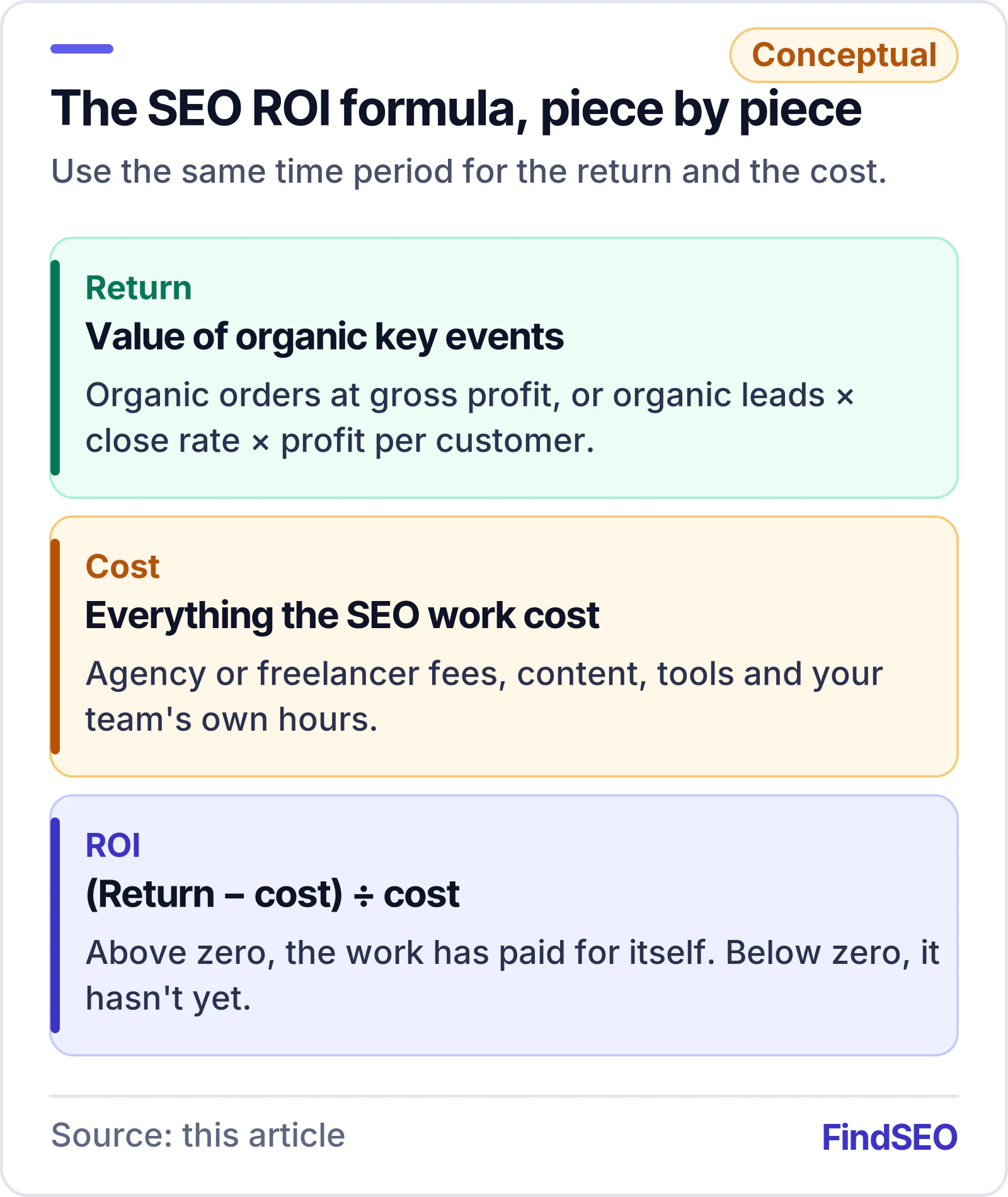
Use the same time window for both sides. If you count twelve months of agency fees, count twelve months of organic sales too.
How do you track the return from organic search?
You can't value what you don't record. Most of the work in measuring SEO ROI is setting up tracking before you need it.
Mark your important actions as key events
In Google Analytics 4, the actions that matter to your business are called key events. Google's help centre explains how to mark events as key events, and notes that a standard property can have up to 30 of them. Online purchases are marked as key events by default. Lead-based businesses need to choose their own, such as a submitted enquiry form, a booking or a click to call.
Google publishes a set of recommended lead generation events for this: generate_lead for form submissions and similar first contacts, qualify_lead when a lead is judged a good fit, and close_convert_lead when a lead becomes a paying customer. Sending a value with these events lets GA4 report revenue for leads, not just a count.
Marking an event as a key event only affects reports from that point on. It doesn't change historical data, so set this up on day one of any SEO engagement, not when the first report is due.

Isolate organic search
GA4's default channel groups sort visits into channels using rules. The Organic Search channel is visitors arriving through non-ad links in search engine results, which keeps paid search separate. Filter your key events and revenue by that channel to see what search earned.
Pick an attribution model you'll stick with
Buyers rarely convert on their first visit. Someone might find you through an organic result, come back through an ad, and enquire after typing your address directly. Attribution decides which of those visits gets the credit. GA4 offers data-driven attribution, which shares credit across the touchpoints, and paid and organic last click, which gives all the credit to the last channel clicked. Every model excludes direct visits from credit unless the whole path was direct.
Neither model is "right", but switching models halfway through a year makes your before-and-after comparison meaningless. Agree one with your agency and note it in the report.
How much data do Google's tools keep?
ROI is a before-and-after comparison, so you need a baseline from before the work started. Google's tools don't keep everything forever, and the limits are shorter than many people assume.
According to Google, Search Console keeps data for the last 16 months, and Search Console reports inside GA4 are limited to the same window. In GA4, the data retention setting for user-level and key events data can be 2 months or 14 months on a standard property. That setting affects explorations and funnel reports, not standard aggregated reports, but explorations are where most detailed ROI analysis happens.
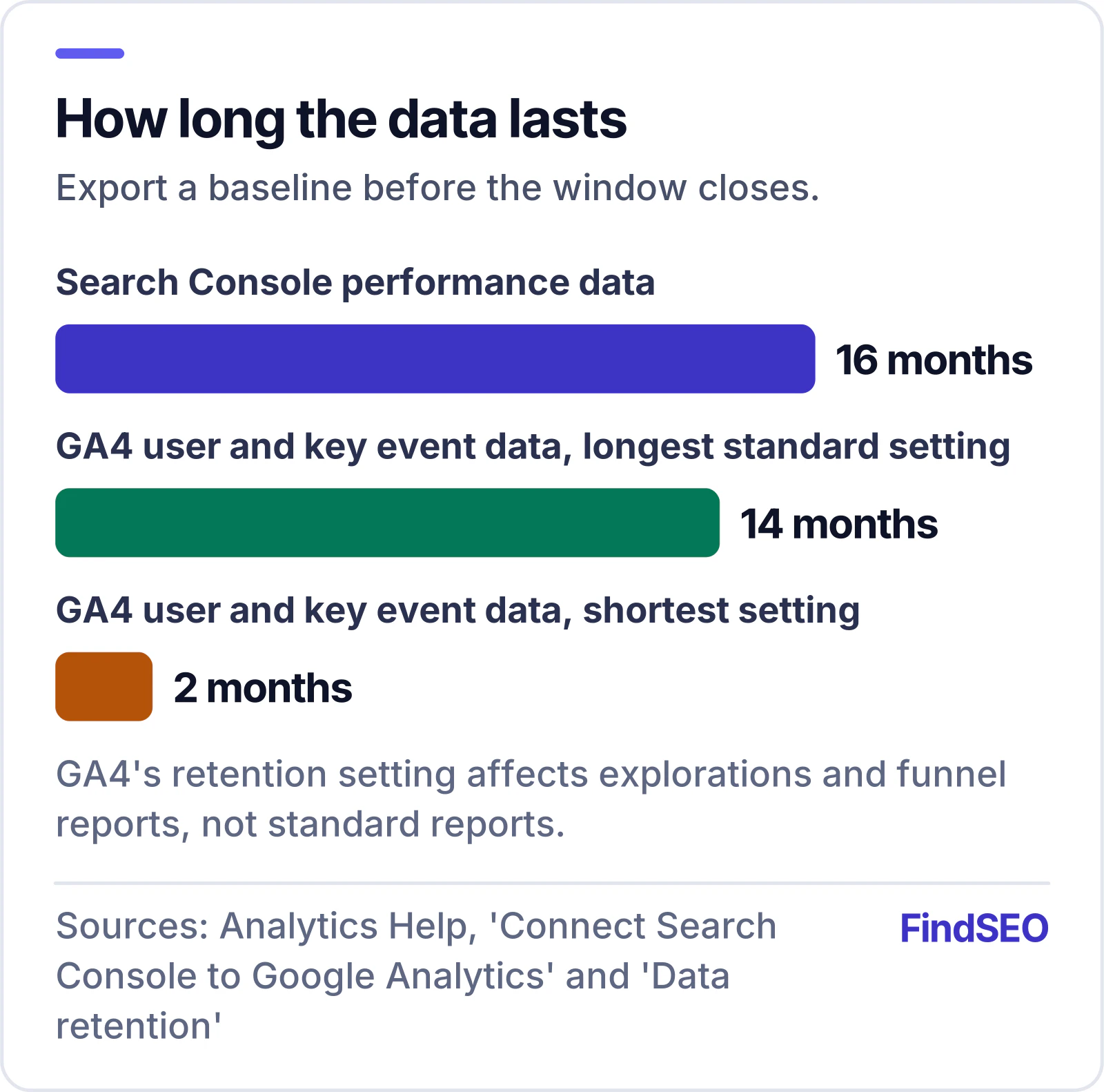
The practical lesson: export a baseline before you start. Save twelve months of organic clicks and impressions from the Search Console Performance report, plus organic key events and revenue from GA4, and check that GA4's retention is set to the longest option.
How far back GA4 looks when it credits a conversion is a separate setting. Under attribution settings, the key event lookback window defaults to 90 days for most key events, with 30 or 60 days available. If your sales cycle is long, a shorter window will undercount what organic search contributed.
A worked example
Here's how the formula plays out for a made-up service business. The numbers are hypothetical, chosen to show the method; use your own figures from GA4 and your sales records.
| Step | Hypothetical figure |
|---|---|
| Organic enquiries over 12 months (GA4 key event) | 120 |
| Share that became customers (from your CRM) | 25% |
| New customers from organic search | 30 |
| Average gross profit per customer | $2,000 |
| Return (30 × $2,000) | $60,000 |
| Cost: agency fees, content and internal time | $36,000 |
| ROI: ($60,000 − $36,000) ÷ $36,000 | 0.67, or 67% |
Notice that the example uses gross profit per customer, not revenue. Using revenue makes every channel look better than it is. The SEO ROI calculator runs the same sums from your traffic, conversion rate and customer value, and estimates a payback month.
"The number we care about is profit from enquiries the business can trace back to search, not traffic," says Tristan Brunsdon of Design Box Digital in Melbourne. "If a client can't tell us what a customer is worth, that's the first thing we work out together."
Measuring SEO ROI in six steps
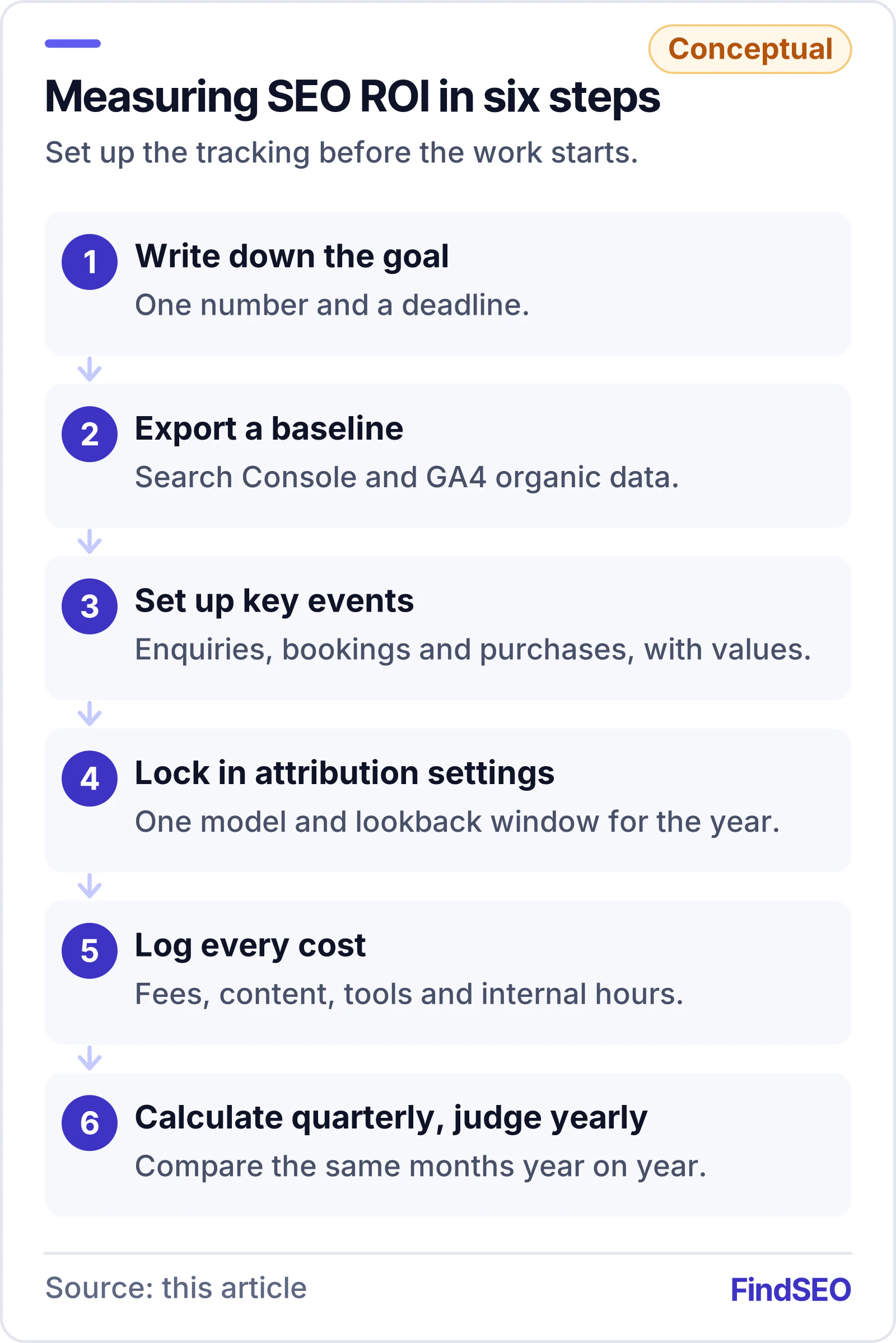
- Write down the goal. One sentence with a number and a timeframe, as covered in the Academy lesson on SEO goals and KPIs.
- Export a baseline. Save Search Console and GA4 organic data before any work starts.
- Set up key events. Track enquiries, bookings and purchases, with values where you can.
- Choose an attribution model and lookback window. Then leave them alone for the year.
- Log every cost. Fees, content, tools and internal hours, by month.
- Calculate quarterly, judge yearly. Compare like-for-like periods to allow for seasonality.
What makes SEO ROI look wrong?
A few common errors can swing the result either way:
- Counting rankings or traffic as return. A click-through rate or ranking is a leading signal, not money. Report them, but don't put them in the formula.
- Using revenue instead of profit. This inflates the return, especially for low-margin products.
- Ignoring internal time. Hours spent writing, approving and fixing pages are a real cost.
- Judging too early. Google's own guidance is that changes can take months to show. Our guide to how long SEO takes explains what speeds that up.
- Missing seasonality and updates. Compare the same months year on year, and check whether a Google core update landed in the period. Google's guide to debugging drops in Search traffic covers the usual causes.
- Branded searches. People searching your business name may have found you anyway. Use the Performance report's query data to see how much organic traffic is branded.

Questions to ask your agency about ROI
An agency should be able to show its working. Before you sign, and at each review, ask:
- Which key events are you tracking, and have you tested that each one fires once?
- Which attribution model and lookback window do the reports use?
- Do your reports separate branded and non-branded organic traffic?
- What costs are included in the ROI figure you show us?
- What results would tell us the strategy isn't working, and when would we know?
Be wary of anyone who promises a fixed ROI or a guaranteed ranking. Google's advice on hiring help is that if someone guarantees first place in search results, you should find someone else. Our guide to fake SEO guarantees lists the warning signs, and the article on what an SEO report should include shows how results should be presented. It also helps to write the reporting terms into your SEO contract.
A checklist for measuring SEO ROI
- Write one goal with a number and a deadline
- Set up Google Search Console and link it to GA4
- Export at least twelve months of organic baseline data
- Set GA4 data retention to the longest option available
- Mark enquiries, bookings and purchases as key events, with values
- Test every form and call button so each key event fires once
- Agree an attribution model and lookback window, and keep them fixed
- Record every cost, including internal hours
- Value leads with your real close rate and gross profit per customer
- Compare the same periods year on year
- Use the SEO cost calculator to sense-check your budget
The bottom line
SEO ROI is the value of what organic search brought in, minus what it cost, divided by that cost. Getting a number you can trust depends on tracking key events from day one, keeping a baseline before Google's data windows close, valuing leads with real profit figures, and giving the work months, not weeks. If you're ready to find help, browse SEO agencies in Australia or use Get matched to compare agencies that can show their working.