Local SEO

Why Isn't My Business Showing on Google Maps? Causes and Fixes

Why a business doesn't appear on Google Maps, how to tell a missing profile from a ranking problem, and the fixes Google's own Business Profile help recommends.

FindSEO7 min read

Inside a small, bright boutique: a white spiral staircase on the left, a potted palm by the front window, hats and tote bags on wall hooks, a rail of checked shirts and a hand-written Closed sign hanging on the glass door.

Photo: Eduard Militaru / Wikimedia Commons (CC0)

In this article
  1. Is your business missing from Maps, or just not ranking?
  2. Is your Business Profile verified?
  3. Has your profile been suspended or disabled?
  4. Is your profile new or recently edited?
  5. Is there a duplicate profile?
  6. Is your business eligible at that address?
  7. Why does my business show for its name but not for "near me" searches?
  8. Can you pay Google to show up higher on Maps?
  9. When should you get help?
  10. Google Maps visibility checklist
  11. The bottom line

If your business doesn't appear on Google Maps at all, the cause is almost always the Business Profile itself: it isn't verified, it's been suspended, it's still new or under review, it's been treated as a duplicate, or the business isn't eligible at that address. If it appears when you search its exact name but not for searches like "electrician near me", that's a different problem: local ranking, which Google says is based mainly on relevance, distance and prominence. Work out which one you have before you change anything, because the fixes are different.

This guide walks through how to tell the two apart, each common cause and Google's recommended fix, and when it's worth getting help.

Is your business missing from Maps, or just not ranking?

Start with one test. Search your exact business name and suburb in Google Maps, ideally on a device or browser that isn't signed in to the Google Account that manages your profile. Google's guide to finding your business on Google suggests the same name-and-city search.

  • Nothing comes up: your profile isn't visible to the public. Work through the causes below in order.
  • Your profile comes up: you're on Maps. You're just not showing for broader searches, which is a ranking question. Skip ahead to the section on ranking.

Our Google Business Profile glossary entry explains what the profile is and where it appears, including the local pack of map results in Google Search.
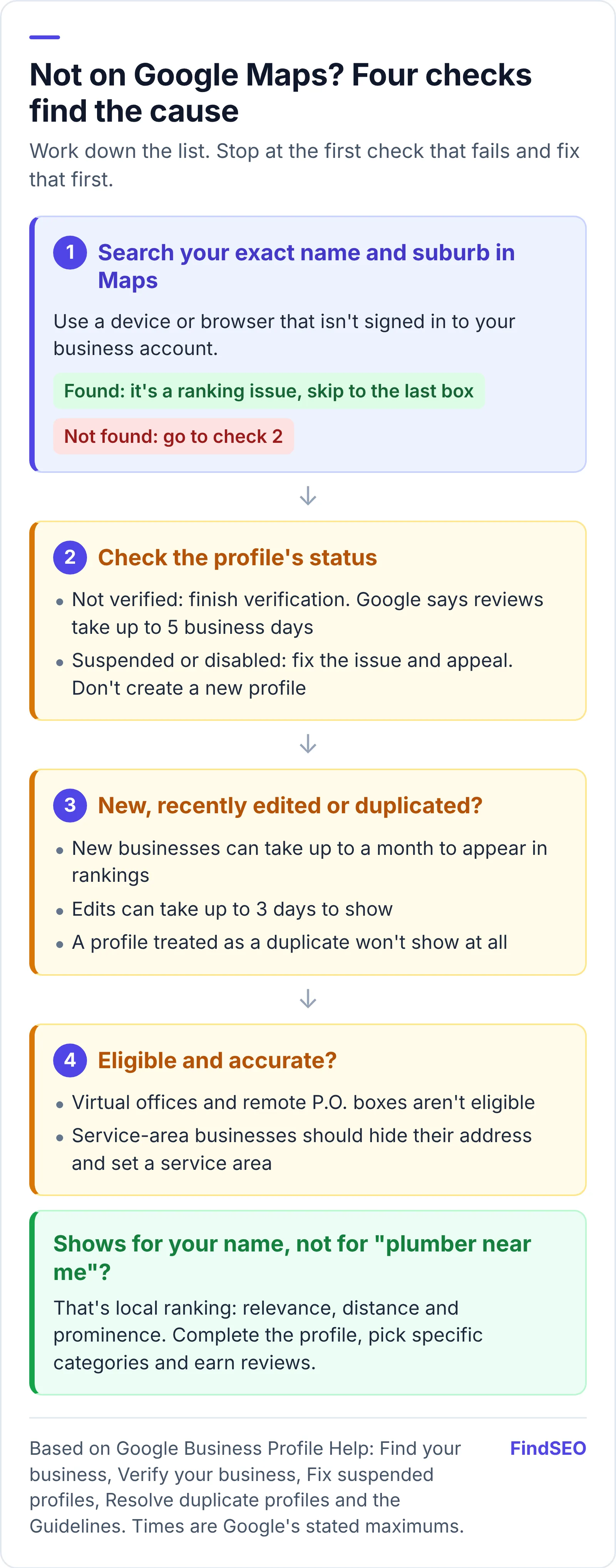
Four-step flowchart for diagnosing a business missing from Google Maps. Step one: search your exact name and suburb in Maps while signed out; if found, it is a ranking issue, if not, keep going. Step two: check the profile status; if not verified, finish verification, which Google says takes up to 5 business days to review; if suspended or disabled, fix the issue and appeal without creating a new profile. Step three: is it new, recently edited or a duplicate? New businesses can take up to a month to appear in rankings, edits up to 3 days, and a duplicate won't show at all. Step four: is it eligible and accurate? Virtual offices and remote P.O. boxes aren't eligible, and service-area businesses should hide their address. A final box says that showing for your name but not for searches like plumber near me is a local ranking problem based on relevance, distance and prominence.
Four checks, in order, find most reasons a business is missing from Google Maps. Based on Google Business Profile Help: Find your business on Google, Verify your business, Fix suspended or disabled profiles, Resolve duplicate profiles and the Guidelines for representing your business. Times shown are Google's stated maximums.

Is your Business Profile verified?

Verification is the first gate. Google's help page on finding your business says "only verified businesses can show their business info on Maps and Search."

If you haven't finished it, follow Google's steps to verify your business. A few details catch people out:

  1. Google chooses the method. Options such as phone, email, video or postcard depend on your business type, region and other details, and you can't change them.
  2. Reviews take time. After you complete the steps, Google says verification reviews take up to 5 business days, and occasionally longer.
  3. Don't edit while you wait. If you're verifying by postcard, Google says not to edit your business name, address or category, or the code won't work. Codes expire after 30 days.

If you haven't set a profile up yet, our step-by-step guide to setting up a Google Business Profile covers the whole process.

Has your profile been suspended or disabled?

Google suspends or disables profiles that break its rules, and a suspended profile won't show to other users until you resolve the issue. You'll get a notification in the Google Account that manages the profile.

Google's page on how to fix suspended or disabled profiles sets out the appeal process:

  1. Fix the problem first. Check the profile against the guidelines for representing your business on Google.
  2. Gather evidence. Google lists official business registration, a business licence, tax certificates and utility bills, with names and addresses that match the profile.
  3. Appeal once, carefully. Google says appeals can only be submitted once, so attach everything before you submit.
  4. Don't create a new profile for the same business. Google says so directly.

In Australia, a registered business name is the kind of document that helps. The government's page on how to register your business name explains when you need one. Our guide to a suspended Google Business Profile covers the most common triggers in more detail.

A young woman in a red and black checked hoodie looks down at a smartphone while standing on a train station platform.
Customers only see a profile that's visible to the public, not the version you see while signed in to manage it. Photo: Daria Nepriakhina, CC0, via Wikimedia Commons.

Is your profile new or recently edited?

Sometimes nothing is wrong except timing. Google gives these maximums in its Business Profile help:

Situation What Google says What to do
Brand-new business Rankings can take up to a month to appear Complete the profile and wait
Verification submitted Reviews take up to 5 business days Don't change name, address or category
Profile info edited Changes can take up to 3 days to appear Avoid stacking more edits
Ownership requested from someone else The current owner has 3 days to respond Check your email, then claim if offered

Making several edits in a row can make it harder to tell which change caused what, so change one thing at a time.

Is there a duplicate profile?

Google allows one profile per business. Its page on how to resolve duplicate profiles and ownership issues is blunt: "If a profile is considered a duplicate, it won't show on Google Search or Maps."

Duplicates usually happen when someone creates a fresh profile instead of claiming an existing one, a previous agency or staff member set one up, or two profiles share the same address. The fixes:

  1. If a verified profile exists and someone else owns it, request ownership. The current owner has 3 days to respond, and if they don't, you may get the option to claim it.
  2. If you created a duplicate yourself, ask Google support to merge or remove it rather than running both.
  3. If two genuinely separate businesses share an address, Google says each can have its own profile if they have different names and clearly visible differences in signage.

If you manage several branches, our guide to Google Business Profiles for multiple locations explains how to keep one profile per location.

Is your business eligible at that address?

Google's guidelines open with the basic rule: a business can have a profile if it has a physical location customers can visit, or travels to customers where they are. Several address set-ups aren't eligible:

  • Virtual offices. A rented mailing address you don't operate from isn't eligible.
  • P.O. boxes or mailboxes at remote locations aren't acceptable.
  • Co-working spaces only qualify if your office has clear signage, receives customers during business hours and is staffed by your team.

Service-area businesses, such as plumbers, cleaners and mobile mechanics, are eligible, but the guidelines say they should hide their address and set a service area. Our guide to service-area businesses on Google shows how to set that up without breaking the rules.

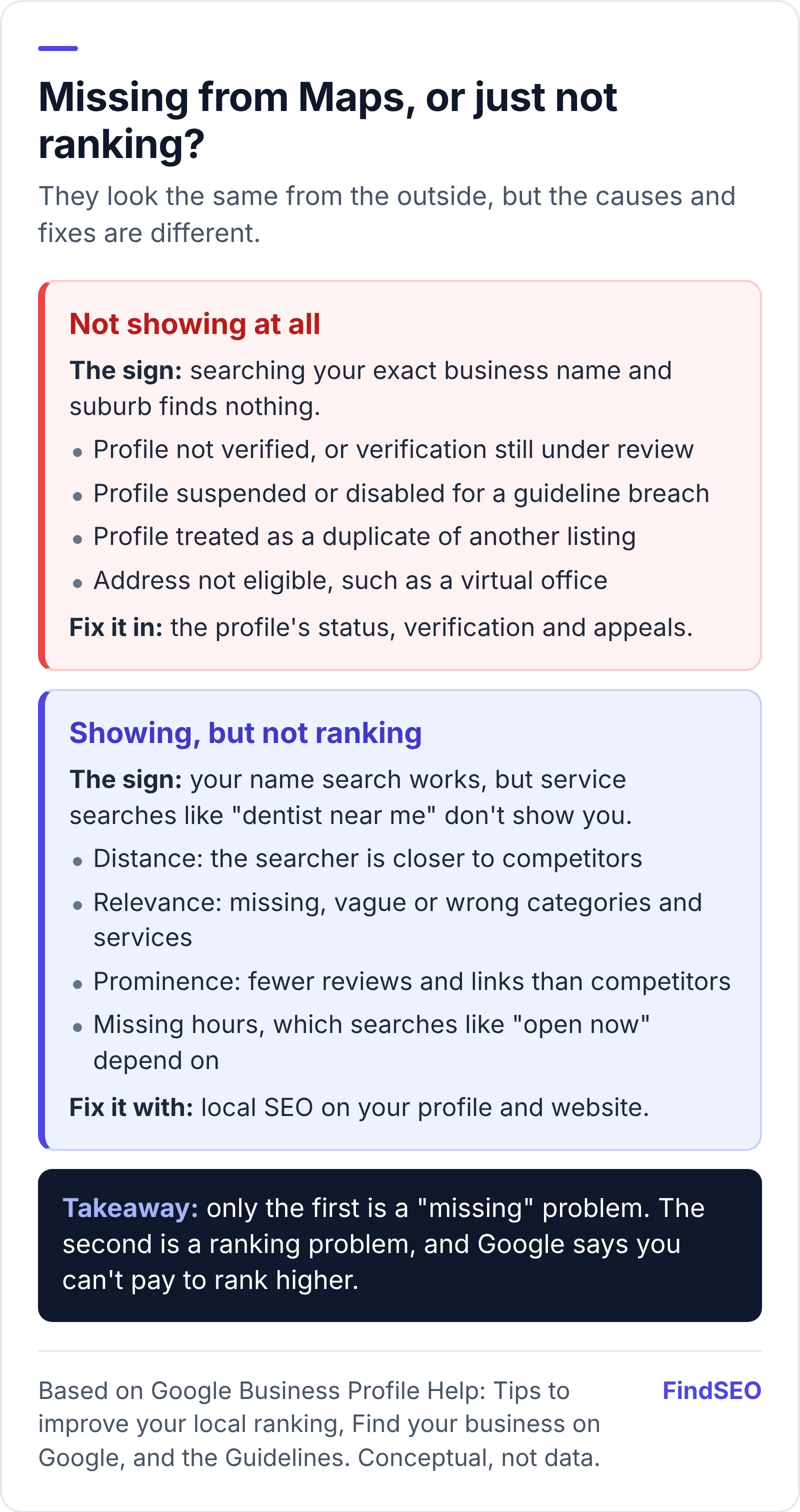
Comparison graphic: missing from Maps versus not ranking. Not showing at all: the sign is that searching your exact business name and suburb finds nothing; causes are an unverified profile or verification still under review, a suspended or disabled profile, a profile treated as a duplicate, or an ineligible address such as a virtual office; fix it in the profile status, verification and appeals. Showing but not ranking: the sign is that your name search works but service searches such as dentist near me don't show you; causes are distance from the searcher, missing or vague categories and services, fewer reviews and links than competitors, and missing hours that searches like open now depend on; fix it with local SEO on your profile and website. Takeaway: only the first is a missing problem; the second is a ranking problem, and Google says you can't pay to rank higher.
A missing profile and a low-ranking profile need different fixes. Based on Google Business Profile Help: Tips to improve your local ranking, Find your business on Google, and the Guidelines for representing your business. Conceptual, not data.

Why does my business show for its name but not for "near me" searches?

Because that's ranking, not visibility. Google's tips to improve your local ranking say local results are based mainly on relevance, distance and prominence. Our guide to how Google ranks local results explains each factor in depth. In short:

  1. Distance is how far you are from the person searching. You can't change it, which is why the same search shows different businesses in different suburbs.
  2. Relevance is how well your profile matches the search. Google's guidelines say to choose "the fewest number of categories" that describe your core business, and to pick categories that complete the statement "This business IS a" rather than "this business HAS a." Add your services, hours and a clear description too.
  3. Prominence is how well known you are. Google says this draws on information such as how many websites link to your business and how many reviews you have. Our guides to getting more Google reviews and local citations cover the legitimate ways to build it.
A glowing red neon sign spelling OPEN inside a blue neon border, against a black background.
Accurate opening hours help your profile show for searches like "open now". Photo: Alex Holyoake, CC0, via Wikimedia Commons.

Opening hours matter too. Google's explanation of how it sources business information uses the example of a salon that may appear for "salons open now" because it has provided its address and hours. Google also uses information from your website, so make sure your site lists the same name, address, phone number and hours. Adding LocalBusiness structured data helps search engines read those details, and our guide to adding LocalBusiness schema markup shows how.

Can you pay Google to show up higher on Maps?

No. Google's local ranking page says: "There's no way to request or pay for a better local ranking on Google." Google Ads is a separate product, and our comparison of SEO and Google Ads explains when paying for visibility makes sense.

Be wary of anyone who promises guaranteed map rankings, or suggests stuffing keywords into your business name. Google's guidelines say your name should reflect your real-world name, as used on your signage, website and stationery, and Google says it can suspend profiles that break its guidelines.

When should you get help?

Many visibility problems can be fixed by the business owner directly. Ranking problems take longer, especially in competitive suburbs. Consider professional help if:

  1. Your profile has been suspended and your appeal was rejected.
  2. You've fixed visibility, but you still don't appear for your main services after a few months.
  3. You run several locations and need consistent profiles and location pages.

Before you talk to agencies, the free SEO ROI calculator helps you estimate what extra local leads are worth, and the page authority checker shows how your website compares. You can then compare local SEO agencies, browse local SEO agencies in Australia, or look at SEO agencies in Melbourne.

Google Maps visibility checklist

  • Your profile appears when you search your exact name and suburb while signed out.
  • The profile is verified, with no "Get verified" or review notices.
  • There's no suspension notice in the Google Account that manages it.
  • Only one profile exists for each location.
  • The address is a real, staffed location, or hidden with a service area set.
  • Your business name matches your signage and website, with no added keywords.
  • You've chosen the fewest, most specific categories that describe what the business is.
  • Hours, services, phone and website are complete and current.
  • Your website shows the same name, address, phone and hours.
  • You're asking happy customers for reviews and replying to them.

The bottom line

If your business isn't on Google Maps at all, look at the profile first: verification, suspension, timing, duplicates and eligibility explain almost every case. If it's there but not showing for service searches, that's local SEO, and the work is completing your profile, choosing the right categories, earning reviews and strengthening your website. If you'd rather hand it over, get matched with an SEO agency that specialises in local search.

FAQs

Why can I see my business on Google Maps but customers can't?

You may be seeing it because you're signed in to the account that manages the profile. Search your exact business name and suburb on a signed-out device. If it doesn't appear, check whether the profile is verified, suspended, still under review or treated as a duplicate.

How long does it take for a new business to show up on Google Maps?

Google says rankings for new businesses can take up to a month to appear in search results, verification reviews take up to 5 business days, and edits to your business information can take up to 3 days to show.

Can I list my business on Google Maps without a shopfront?

Yes, if you travel to customers. Google's guidelines allow service-area businesses, but say they should hide their address and set a service area. A virtual office or P.O. box isn't an eligible address.

Will creating a new Business Profile fix a suspended one?

No. Google says not to create a new Business Profile for the same business. Fix the issue, gather evidence such as business registration documents, and submit an appeal through Google's appeals tool. Appeals can only be submitted once.

Can I pay Google to rank higher on Google Maps?

No. Google says there's no way to request or pay for a better local ranking. Local results are based mainly on relevance, distance and prominence. Google Ads is a separate, paid product.

Sources

Ready for help with SEO?

Compare SEO-only agencies near you, with client reviews checked by a person, or tell us what you need and get matched.

Local SEO

How to Set Up a Google Business Profile

Add or claim your listing, complete the verification method Google offers, and fill in accurate hours, photos and contact details for Search and Maps.

FindSEO6 min read